quinta-feira, 28 de janeiro de 2021

2021 Marketing Trends: Here’s What Nobody is Talking About

marketing trends I know you are ready for 2021 marketing trends because you read this blog and tons of other marketing blogs, right? Here is the thing: I also read the most popular marketing blogs, follow all of the marketing YouTube channels, and listen to the same podcasts you do. And I’ve noticed very few people are talking about what’s really going to happen in 2021 and beyond. Sure, they talk about the importance of voice search and Google going mobile-first. They might mention marketing automation. There are actually more interesting trends that will affect your marketing that no one is really talking about. So, what marketing trends should you actually be focusing on?

Marketing Trend #1: Companies that Rely on Google Analytics Will Lose 

We all love Google Analytics. Heck, I love it so much I log in at least three or four times a day. And here is the kicker: I get so much traffic that my Google Analytics only updates once a day. You are probably wondering, what’s wrong with Google Analytics? There actually isn’t much wrong with it. It’s a great tool, especially considering that it’s free. But marketing is changing. New channels are being constantly introduced, such as voice search. Transactions no longer are as simple as someone coming to your site from an ad and buying. These days there are things like upsells, down sells, repeat purchases, retargeting, and even checkout bumps. On top of that, there are so many different ways you can generate revenue for your online business, such as partnerships, affiliate marketing, and even webinars. This has caused companies to start using analytics solutions that tie into their database better, such as Amplitude.  Or better yet, you will see a big push into business intelligence. A central place where you can tie in all of your data and make better-informed decisions so you can optimize for your lifetime value instead of your short-term income. In 2021, you’ll see more companies adopting business intelligence solutions from paid ones to free ones like Google Data Studio.
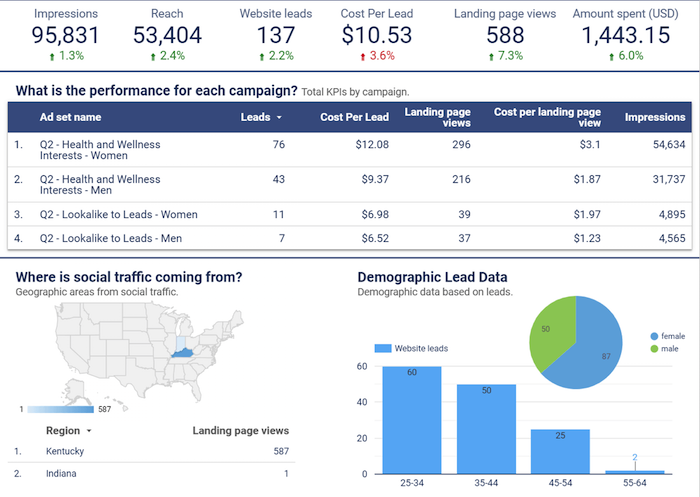
marketing trends 2021 google data stuideo
If you haven’t checked out Data Studio, you’ll want to start now because it is easy to pass in all of your business and marketing data into one place. For example, you can pass in more granular data from your Facebook ad campaigns into Data Studio, which would be a bit difficult to do with Google Analytics. Another tool that will give you an edge is Ubersuggest (and its free Chrome extension), as it helps you outperform your competitors in the search engines. For example, Google Analytics no longer provides comprehensive data regarding the keywords sending traffic to your website. So, while you can make assumptions based on top keywords, you’ll never really know for sure. That leaves the door open for your competitors. With Ubersuggest, it only takes a few minutes to dig up keyword data so you can adjust your content and marketing strategies accordingly.

Step #1: Enter Your URL and Click “Search”
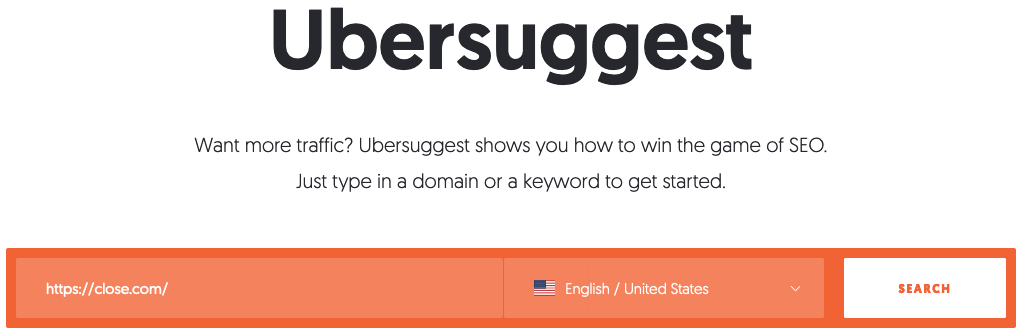
marketing trends use ubersuggest For this example, we’re using Close, a leading inside sales CRM with a strong search engine presence.

Step #2: Review the Domain Overview

marketing trends 2021 domain overview screen shotMost importantly, you’ll find the number of organic keywords your domain ranks for. Other data includes:
  • Organic monthly traffic: The total estimated traffic the domain gets for the keywords.
  • Domain score: The overall strength of the website, with 1 the lowest and 100 the highest
  • Backlinks: The number of backlinks to the website from other websites

Step #3: Scroll Down to SEO Keywords
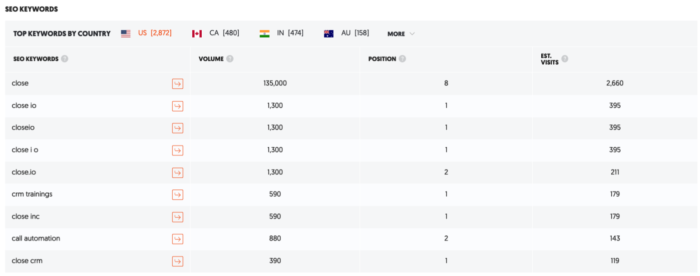
marketing trends SEO audit ubersuggest This is the data you won’t find on Google Analytics. The lefthand column is a list of all the keywords your site ranks for. In this case, there are 6,135 of them. This is followed by:
  • Volume: The number of searches the keyword gets each month
  • Position: The position the URL is ranked for in Google search
  • Estimated visits: The estimated traffic the web page gets from Google for the keyword.
Not only does Analytics withhold information on keywords, but there’s nothing about volume, position, and estimated visits. You have to use other tools, such as Keyword Planner, to find this. Ubersuggest brings it all under one roof.

Step #4: Review All Your Keywords

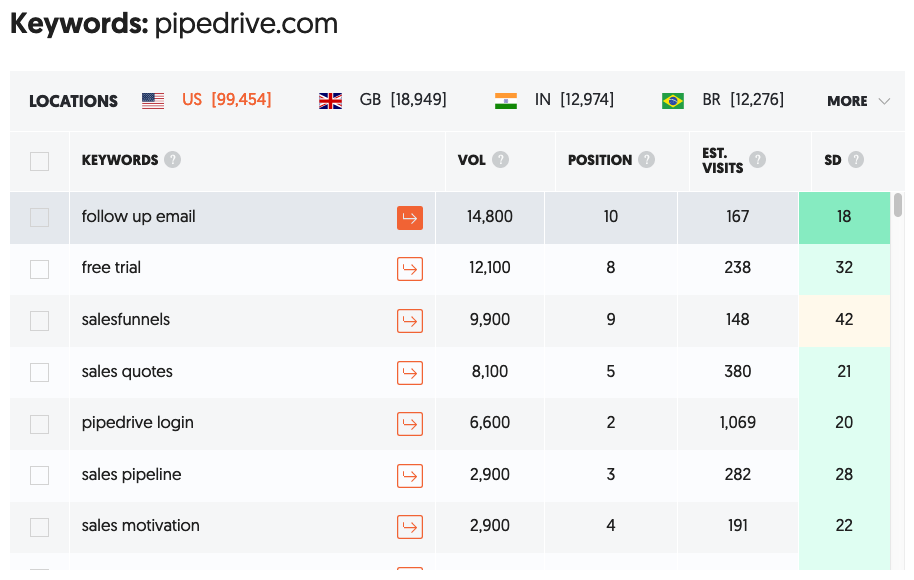
In addition to reviewing all your keywords, complete with volume, position, estimated visits, and SEO difficulty, you can also type in a competitor name and see their keywords. This gives you new ideas of terms to go after. Sticking with the above example, you could run a search for Pipedrive. Here’s what you get: marketing trends 2021 ubersuggest keywords example Now, in addition to the keywords you’re already ranking for, you can uncover those that your competitors are ranking for, thus giving you additional ideas on what to target next. I’ve used Google Analytics since day one, and that’ll never change. However, it’s not capable of doing everything you need to beat your competition. If you want to win big, combine Analytics with other tools, such as Ubersuggest, to access advanced data for making more informed decisions.
Marketing Trend #2: Companies Will Optimize for Voice Search, But Not for Revenue

According to ComScore, over 50% of searches are from voice search. But that’s not really a new trend — everyone has been talking about voice search for years. So, what’s the big deal? Optimizing for voice search is a great way to get your brand out more, but how will it convert into sales? I haven’t seen too many solutions so far when it comes to capitalizing on your voice search traffic, but so far, there is Jetson.ai. If you aren’t familiar with Jetson.ai, it makes it so people can buy from your site using voice search. It doesn’t matter if it is Alexa or Google Home; they work with the most popular devices. What’s cool about Jetson.ai is that it can learn from each customer and customize the interactions. For example, if I keep ordering the same toothpaste from a specific store using voice search, Jetson.ai keeps track of that so you can easily keep ordering the same product over and over again with little to no friction. Heck, it’s easier than logging into your computer or pulling out your phone to make a purchase.

Marketing Trend #3: Your Email List Won’t Convert As Well; Look for Alternative Communication Channels

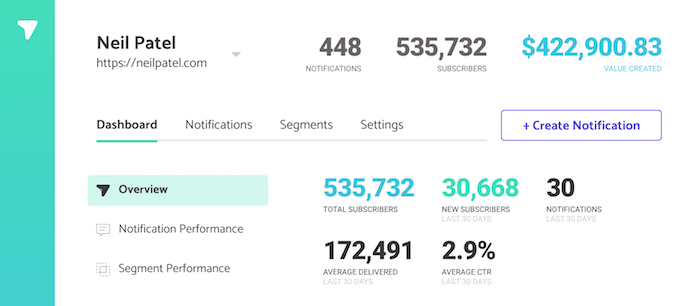
Email; it’s something we all use in the marketing world. But here’s the interesting thing — I’m in a group with a bit over 109 email marketers across different industries in different parts of the world. Can you guess what we are all noticing? Our open rates are staying roughly the same and that’s largely because we all know how to clean and optimizing for deliverability. But our click rates are going down. So far, we have seen our click rates drop by 9.4 percent. That’s crazy, considering as a group, we have over 146 million email addresses. Does this mean email is dead? Of course not! Email is here to stay and will be here for a very long time. However, companies will have to leverage more communication channels. Chatbots are taking off. Not necessarily the Intercom’s or Drift’s of the world but more so the solutions like ManyChat and MobileMonkey. In addition to chatbots, more people are leveraging tools that allow push notifications like Subscribers. It’s so powerful, here is the impact I’ve been able to generate from push notifications so far using Subscribers.
marketing trends chat bot example
You can wait till next year to leverage chatbots for lead generation and customer service, but I’d recommend you start sooner rather than later.

Marketing Trend #4: Moats Will Be Non-Existent, Other than Brands

You’ve probably heard the word “moat” before. If you haven’t, just think about water around a castle.
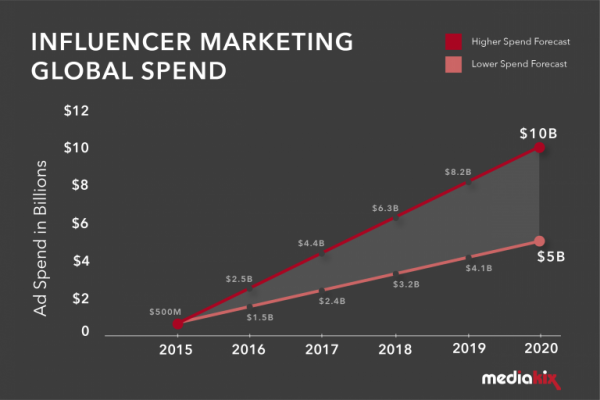
There’s water all around the castle, and a drawbridge is used to get in and out of the castle,  protecting them from invaders. With your business, you may have a moat. It could be a feature, your cost structure, a technological advantage, or even a marketing advantage. Over the years, moats in the online world have slowly disappeared. It’s easy for anyone to copy marketing strategies these days. So, what’s separating you from your competition? Something that works right now might not work next year. But do you know what will still be a strong moat in 2021 and even a stronger one in the future? It’s branding. People buy Jordan shoes because they love Michael Jordan. His brand is stronger than ever, even though he hasn’t played in the NBA for over a decade. His shoes are so popular, it’s helped him boost his net worth to over a billion dollars. Plus owning a basketball team doesn’t hurt either. 😉 But what’s interesting is he made more money after retirement than he did as a basketball player. It’s not just Jordan who built a strong brand — so have the Kardashians. Kylie launched a billion-dollar company, according to Forbes, and it was all because of her personal brand. Her cosmetic company isn’t doing anything revolutionary. She just has a strong brand. The same goes for companies like Ferrari, Tesla, American Express — and the list goes on and on. It’s why companies are spending over 10 billion dollars a year on influencer marketing.
marketing trends influncer marketing
Just look at my agency NP Digital. It’s literally one of the fastest-growing ad agencies out there. When I look at all of my competitors’ numbers, we are growing at a much faster pace because of my brand. Yes, we have a great team, but again, that really isn’t a moat as a lot of agencies have great teams. It’s my brand that gave us a really fast kick start and continues to hopefully push us up. You’ll want to focus on brand building in 2021. Whether it is personal or corporate, it’s the best moat you can build in marketing. Plus, it will help you with Google’s EAT.

Marketing Trend #5: You Have No Choice But to Use Automation

When I first started off as an entrepreneur, I turned to SEO because I couldn’t afford the big ad budgets like my competitors. Heck, I couldn’t even afford to run any paid ads. Over the years, the playing field has become more level. Credit card companies like Brex make it easier for startups to get approved for larger limits and you may not have to pay them back right away. There are financing companies that will give you cash to spend on marketing, so non-venture funded companies can more easily compete. Companies like Lighter Capital offer loans based on your existing revenue. And to top it off, software solutions are now starting to integrate AI to give better recommendations. From Clickflow and RankScience to Distilled ODN, everyone using AI to make SEO and other forms of marketing easier. Heck, BrightEdge can even automate your SEO (or at least a large portion of it). Their automated SEO solution increases page views per visit by 60% and provides 21% more keywords on page one​. Keep in mind their clients are really big (their software starts in the thousands of dollars per month) so they would probably see better results than most companies, but still, you will see many more software companies leveraging AI in SEO. This is being driven by the rise of AI, Rank Brain, and natural language processing. Even with Ubersuggest, I’m working on AI that does the SEO for you, so you no longer have to spend endless hours on SEO while saving you thousands of dollars. In other words, the marketing playing field is getting more even. If you want to do well, you will have to leverage AI and marketing automation to survive. If everyone is leveraging the same AI marketing technology, how can you beat your competitors? Well, it will come down to everything else — price, customer service, upselling, operations, sales. All of that small stuff is what’s going to help you win. This brings me to my next point.

Marketing Trend #6: There Are No More Silver Bullets, We All Have to Optimize for Marginal Gains

A lot of businesses were built using just one marketing channel. Dropbox grew through referral marketing. Invite more friends, get more free space.
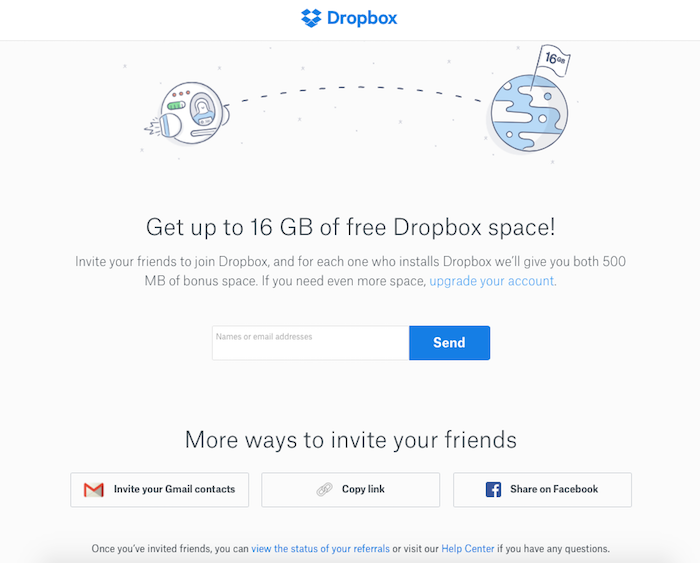
dropbox marketing trends
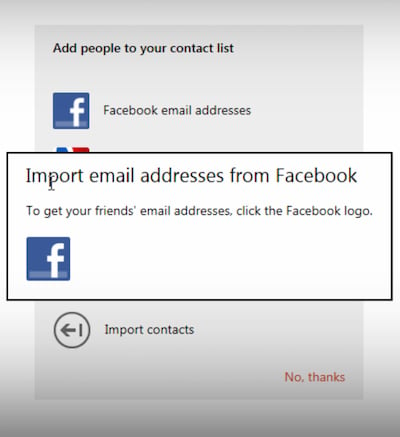
Facebook was built off your email address book. Facebook used to tap into it and invite all of your contacts to use Facebook on your behalf.
marketing trends use facebook
Companies like Quora and Yelp were built off of SEO. All of those rankings really help drive their businesses. But you no longer can build a business through just one marketing channel. Good channels get saturated extremely fast. (Take a look at Facebook organic reach if you need a reminder…) Even if they work and cause explosive growth, it will only last for a short while before your competitors jump on board and make it harder. Marketing will soon be all about “marginal gains.” There’s a British cycling coach named Dave Brailsford. His belief was that if you improved every area related to cycling by just one percent, then those small gains would add up to remarkable improvement. He’s right, that’s how you win a race. The same will be true with your marketing. There will be a big shift from people focusing on one channel and trying to find the “Holy Grail of marketing” to working on slightly improving each area of your marketing. From split testing your title tags to get a few ranking improvements to adding checkout bumps to your order page so you can spend a little bit more on your paid ads to using Google Data Studio to better optimize for your lifetime value—it’s all about the little things. That’s what is going to add up to winning. That’s what you’ll have to shift your mindset to in order to win in 2021 and beyond.

Marketing Trend #7: Depersonalization is the New Marketing

The problem with marketing as it exists today is that 95 percent of your visitors will never convert into a customer. That’s if you are lucky. Chances are you are more likely looking at 97 percent or more of site visitors leaving without converting. The big reason isn’t that your marketing sucks or that all of those visitors are junk and unqualified. It’s that your message doesn’t fit every single one of your visitors. Personalization allows you to convert more of your visitors into customers. A basic example of this is Amazon. When you go to Amazon, they know what you typically buy, so they show you what they think you’ll want to boost their conversions. It works! When I log into Amazon, I see tons of household supplies because that’s what I buy the most often. I never buy dog food (which is smart because I don’t have a dog,) so I’ll never see ads for dog food.
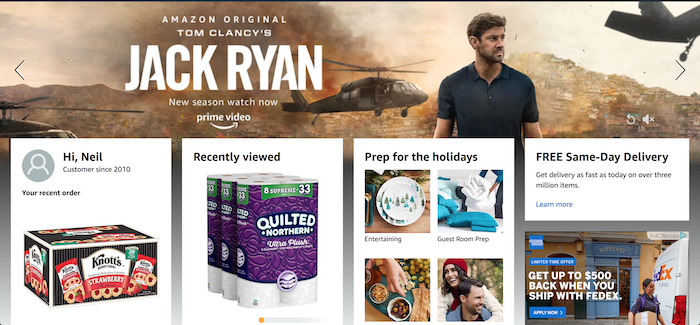
marketing trends depersonalization
Businesses are also trying to personalize each and every single experience, both online and offline. Companies like Amperity are trying to create a customer relationship engine so you can better serve each of your customers, whether it is online or offline. Marketing has become a game of personalization. With ad costs and general marketing costs rising, you have no choice but to figure out how to convert the 97% of your traffic that just never comes back. The problem is, everyone else is using the same exact personalization strategies, and consumers are getting wise.  This is why depersonalization is going to be big. Rather than using names in an email, brands need to dial back the fake personalization efforts and focus on transparency and writing like a real, live person.

Conclusion

These are the marketing trends that will come true, and you need to be prepared for them. Here’s the beautiful part, though. Now you have a chance to act on the information before your competition. Make sure you get in ahead of the crowd. I want to see you not only succeed, but I want you to beat your competition. I believe you can, whether you are a big company or just starting off with very little to no money. What do you think of the trends above? Do you see any marketing trends that few people are talking about? 

The post 2021 Marketing Trends: Here’s What Nobody is Talking About appeared first on Neil Patel.


2021 Marketing Trends: Here’s What Nobody is Talking About
Publicado Primeiro em Neil Patel

How to Promote Brands Through Gifs

Gif Search: How to Promote Brands Through Gifs

In a Tenor survey, two-thirds of millennials said gifs did a better job conveying emotions than text. It’s true. With gifs, brands can entertain and engage their target audiences in a way plain text or static images just can’t.

Just look at this gif:

Broad City Gif

In a few frames, it describes the gif/jif debate perfectly—this could take paragraphs in text.

How ow does this relate to marketing? How can you harness the power of gifs to boost your marketing strategy?

In this article, I’ll show you how you can find and use gifs throughout your marketing plan to increase engagement, make your brand relatable, and entertain your audience.

Find Gifs Through a Gif Search Engine

A gif search engine is a repository of gifs you can search by category, popularity, name, gif artist, and several other search parameters, much like an image site.

Typically, you type in a word, short phrase, or quote, and results appear from most to least popular.

This is where gif search engines may most greatly diverge from traditional ones: long-tail keywords may significantly limit your results.

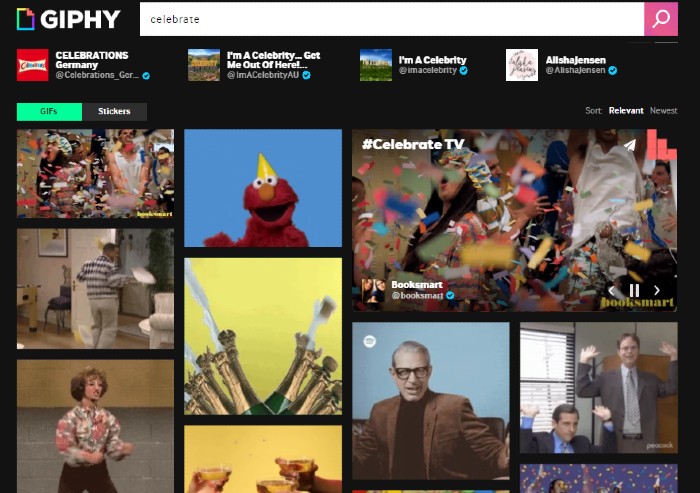
Let’s say I want a celebratory gif, so I search for “celebrate.” This is what comes up:

Celebration gifs

Giphy—the example site above—is arguably the most popular gif search engine. In fact, Giphy is the second-largest search engine online.

(However, it’s not the only option. Other places to find gifs include Tenor, Tumblr, Reddit, and Imgur).

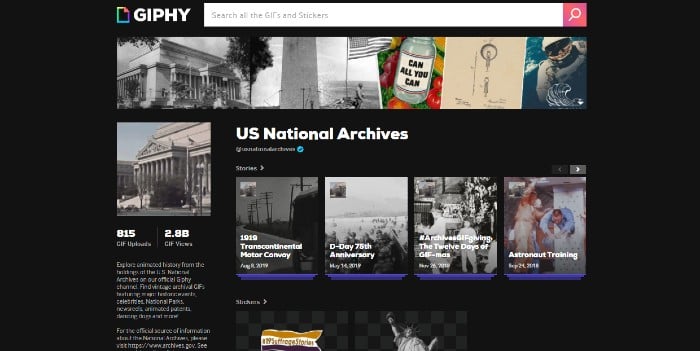
On Giphy, brands can create channels for their gifs, much like YouTube. Even the National Archives has a Giphy channel:

National Archives Gif Channel on Giphy

What Do People Use Gifs For?

Gifs are now used in place of emojis and text in everyday online conversations. Marketers can jump on this train to get our audience’s attention in their endless Twitter, Facebook, and Tumblr feeds and engage with users across all of our marketing platforms.

Gifs have been around since 1987, long before internet use was widespread. It was a simple image of a commercial jet flying through a cloudy sky.

In the early days of the commercial internet, gifs were all over websites — spinning icons, under construction signs, flashing CTA buttons—and it was busy.

Then, gifs evolved into dancing everything—the peanut-butter-jelly banana, and, of course, the dancing baby; probably the first gif to attain pop-culture status.

Dancing Baby Gif

Gifs can be so much more than a tool for humor, though. Marketers can harness their popularity to promote their brands in new ways. Gifs can be used in email marketing, social posts, and blogs—some blogs even create entire articles out of gifs!

Tips for Gif Engine Search Optimization (GEO)

Like other search engines, to use gifs most effectively, you need to learn about gif engine search optimization (GEO).

If you don’t have one already, consider creating an account on a site like Giphy, especially if you’re thinking of creating your own gifs. It’s another way to give your brand visibility using gifs users can share through their social channels.

Remember, it’s not enough to upload your content—you have to optimize it. Here are some tips for optimizing your gifs.

Be Mindful of the Purpose of Your Message and Your Audience When You Use Gifs

Before you share or create a gif, ask yourself what you’re trying to accomplish. What do you want your audience to do with your gif? Some common goals for gifs include:

  • Gaining likes and shares
  • Sparking conversation to increase engagement
  • Raising awareness about a product or service
  • Increasing click-through rates

Now think about the kinds of gifs that are appropriate for your platform and your audience. What will they respond to? If you’re using a pop-culture reference, will they recognize it?

Additionally, make sure your gif truly speaks to your audience and not at them. It’s very easy to choose a gif for its humor or popularity, but it’s also very easy to come off as tone-deaf.

During the 2020 elections, for example, Gap created a gif of blue and red sweatshirts melding together with the message, “The one thing we know is that, together, we can move forward.”

controversial gap gif that's been deleted

The gif was posted while votes were still being counted, which struck many as poorly-timed and, given how contentious things were, out-of-touch. It was subsequently deleted, but, as we know, anything posted online is out there forever.

You should consider more than not just the statements your gifs make—it’s the things people or characters in your chosen gifs have done.

If you’re using celebrities or politicians in your gifs, make sure you do your due diligence on their recent escapades. Have they done anything controversial? If you’re using a fictional character, is there anything about that character that could turn viewers away?

Keep Up With Gif Trends

Staying on trend with gifs can keep your brand relevant and help you show up in searches through trending keywords.

Some gifs create trends—think the dancing baby or the “guy in the crowd” birthday.

Happy Birthday Beard GIF by swerk - Find & Share on GIPHY

Many gifs riff off popular movies, TV shows, events, or celebrities.

One way to keep your gifs and, by extension, your content relevant is by creating an original gif that speaks directly to an event.

Another way to stay on trend is to create a gif using a popular show, movie, or person of interest. That could be a celebrity, politician, or just someone in the news enjoying (or not) their 15 minutes of fame.

For instance, remember Justine Masters from RuPaul’s Drag Race?

Jasmin Masters Gif

This gif had more than 419 million views in 2019, and using something like this could show consumers you’re hip to the latest fads.

Keep an Eye on Gif File Size

When it comes to gifs, smaller is generally better. Giphy lists the following recommendations for uploading gifs to their site:

  • Files 8MB or below are best.
  • Resolution at or below 480 is most effective.

Gifs are not like still images, where high resolution is essential. It’s more about the message than the appearance, especially since most gifs will be viewed on mobile.

Add Tags to Your Gifs

Once you’ve uploaded your gif, don’t forget to add tags, as users search by them. Make sure you include all relevant tags. For instance, if you’re using the Jasmine Masters gif above, you may want to include “Jasmine Masters,” “RuPaul’s Drag Race,” and “And I oop.”

Keep Gifs Short and Sweet

Gifs are not videos, and Giphy recommends keeping gifs below six seconds and 100 frames if possible, though longer is allowed.

Six Ways to Use Gifs to Promote Your Brand

Gifs have become their own language. You can use them to react, show emotion, give support, say the things that are hard to say in writing—just about anything can be told through gifs.

That includes telling your audience why they should choose your brand.

Here are some tips about how to use gifs to promote your brand to your target audience.

Use Gifs to Entertain Your Audience

This is probably the most common use of gifs. Brands use gifs purely to entertain their audience by sharing popular gifs related to their brand or by creating their own.

Here’s one from fast food restaurant Chick-fil-a, created with their signature cow mascot.

Whether you’re using pop culture icons or creating something of your own, keeping things entertaining can draw your audience in.

Use Gifs in Blog Posts

The undeniable king of the gif-laden listicle is Buzzfeed. They’ve created an entire genre of articles based solely on gifs.

Giphy has also gotten into the game, creating blog posts about current events and trending topics that feature gifs in their search engine.

GIF Search Engine - Use Gifs in Blog Posts

Keep in mind that you don’t have to create entire stories out of gifs. Simply using a few well-placed gifs in a blog post could illustrate or emphasize a point better than a still image.

Pro Tip: If your blog post covers a serious topic, consider leaving gifs out.

Use Gifs in Email Marketing

Using gifs in email marketing can be a little tricky, but it could be beneficial if done well.

Ask yourself how your target audience would respond to gifs in your emails. For some, opening an email to a barrage of moving images is a turnoff.

This is where some research could come in handy—for instance, look at how your community is interacting with your brand on social media to see if they appreciate a good gif.

No matter who your audience is, you should use gifs sparingly in your emails. This is for two reasons:

  1. Too many gifs make your emails look busy and confusing. Your audience may lose your message among all the flashing colors and moving pictures.
  2. Gifs can be big files, and they could create lag time when your audience tries to open them.

Finally, if your emails take on a more serious or professional tone, don’t use gifs at all. Gifs give a content piece a lighter tone that may not jive with your message.

Use Gifs to Show Off Your Products

Gifs don’t have to be solely for entertainment. You can use them to highlight product features in a few frames.

This is particularly helpful for social media ads. For example, Subway regularly creates fun, colorful gifs to show off their sandwiches and salads.

Subway sandwich gif

Use Gifs to Boost Engagement

Engagement with gifs can go way beyond likes and shares. Here are two ways you can use gifs to boost engagement.

Reaction Gifs

Reaction gifs are a great way to respond to followers’ comments on your social feeds. Since most social media platforms have integrated gifs, it’s easy to upload one.

Let’s say someone paid your brand a nice compliment. Instead of merely writing “thank you,” which can come across as a bit impersonal or robotic, you could includ a gif like this to show how much you appreciate their feedback:

OMG Thanks gif

If you wanted to inject a little more humor into your response, you could try something like this:

Oh, stop it Gif

Basically, gifs allow you to customize your responses to your brand’s voice and the message you want to convey.

Live Giffing

In 2012, Tumblr introduced the world to live giffing during the presidential debates. Think live tweeting but with gifs.

You can use live giffing during a major TV event, like the season premiere of a popular show, an awards show, or a sports event.

Anything you can relate to your brand may benefit from live giffing. This can be done on any social media site.

Conclusion

Gifs may have started as spinning icons and funny animations, but they’ve evolved into a powerful tool for marketers.

When everyone is using gifs to communicate, it’s a no-brainer that brands should get in on the conversation to increase engagement and promote their products and services.

Look at your marketing strategy and decide when and how you can use gifs to best convey ideas to your audience. Find gifs on search engines or create your own—whatever works best for your brand.

If you need help implementing this and other content marketing techniques, we’re here to help!

How could you use gifs in your marketing strategy?

The post How to Promote Brands Through Gifs appeared first on Neil Patel.


How to Promote Brands Through Gifs
Publicado Primeiro em Neil Patel

Best CPanel Web Hosting

Disclosure: This content is reader-supported, which means if you click on some of our links that we may earn a commission.

What do you want from your web hosting provider?

Strong uptime rates? Excellent performance? High speeds? 

Pretty sure we want it all. But not at the cost of simplicity because managing the web host is equally important.

Your current hosting provider may offer you strong performance, but it won’t be any good if you can’t manage your account—or if it becomes overly complicated.

What you need is a cPanel web host.

The cPanel is the very helm of your website’s designs, domains, extensions, and every other thing you need for having an online site. In addition to being the most popular management system for web hosting, it’s incredibly user-friendly and acts as the control center for every website. 

But there are quite a few cPanel web host providers in the market. Perhaps even thousands.

So, how are you supposed to find the right match?

In this guide, we’ll walk you through our top picks for the best cPanel web hosting, along with our methodology to help you make the right choice.

Top 5 Options for Best cPanel Web Hosting

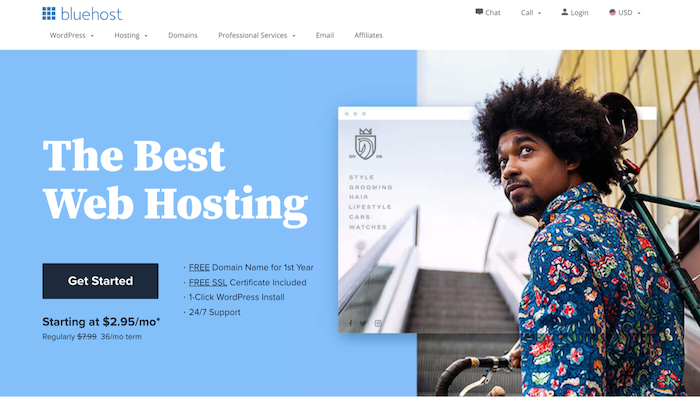
  • BlueHost – The Best for WordPress Sites
  • HostGator – The Best for On-Demand Scaling
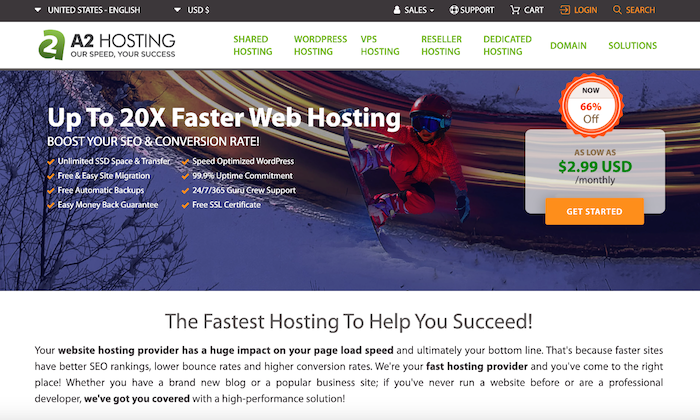
  • A2 Hosting – The Best for Cloud Hosting
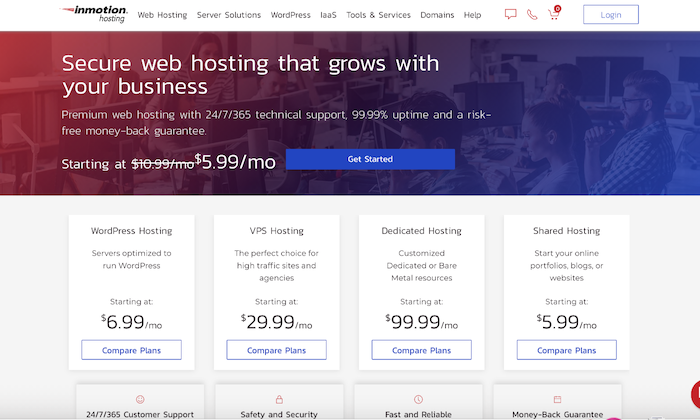
  • InMotion – The Best for Shared and VPS Hosting
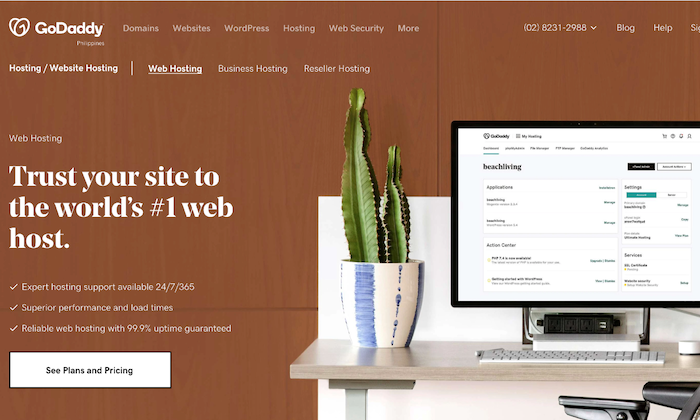
  • GoDaddy – The Best for Extra Features

How to Choose the Best cPanel Web Hosting for You

Every cPanel web hosting provider is unique. Some of them will be better suited for your website requirements than others with their feature offering, hosting type, and pricing.

Making a decision can definitely be tricky if you don’t know what you want. Therefore, you should figure out what you need other than the obvious high uptime rates and better speed.

Below, we’ve discussed a few questions you should consider before choosing a cPanel web hosting provider.

Does the Web Hosting Provider of a Free cPanel License?

You need a provider that offers a free cPanel license if you plan on using cPanel. The good news: Plenty of web hosts do offer cPanel licenses for free. 

You’ll also find hosts that offer a cPanel license for an upcharge. But why pay for something that you can get for free?

Does the Web Hosting Provider Support One-Click App Installations?

People prefer cPanel because of its simple, user-friendly dashboard and its compatibility with third-party applications. Look for a provider that offers you all the above benefits and makes it easier to manage everything within the dashboard.

Choose a web host that advertises one-click app installs. This will completely eliminate the need to do complicated downloads and installations. Plus, the whole process will be much faster. 

Irrespective of whether you own an ecommerce site or run a basic WordPress blog, third-party app installation will make things much more convenient for you.

Web host providers that advertise one-click app installs also allow for one-click or auto-updates. It’s a win-win for you either way.

How Well Does the Web Hosting Provider Meet Your Website Needs?

Your prospective cPanel hosting plan should accommodate every single requirement of your website. Otherwise, it won’t make sense to invest all that money only to buy a plan that falls short.

Check out the resources included in the plan to determine how well it meets your website needs. This includes RAM, bandwidth, storage, and CPUs. I would also recommend choosing a provider that offers you the flexibility to scale by allowing you to upgrade in the case of seasonal upsurge or organic traffic growth.

What Kind of Freebies Do You Get With the Prospective Web Hosting Plan?

When looking for web hosting options, you must remember to always operate within your budget. Unfortunately, though, many companies resort to shady practices to boost their sales.

For instance, you may choose a plan that appears to be cheap at first. But after subscribing, you realize there are several other hidden costs, even upcharges for basic features. 

What happens in the end? You’re left with a hole in your pocket and frustration. 

Prepare a list of all the features you need, and then look for a host that offers them for free. You’ll be surprised at the number of freebies you get when choosing a web host, including domain name, developer tools, SSL certificate, advertising credits, site migrations, and WordPress installation.

While all these freebies are great, your provider should also offer a money-back guarantee. While a 30-day assurance is the industry standard, you can also find guarantees as high as 90 days.

The Different Types of cPanel Web Hosting

Let’s take a quick look at the different types of cPanel web hosting.

Small Business vs. Medium-Sized Business vs. Large Business 

Every business has its own unique needs, along with different employee capabilities.

For instance, small and medium-sized businesses don’t usually hire dedicated experts, nor do they have a large IT department. It’s also possible for them to not have professionals with technical knowledge concerning websites.

These businesses, in particular, would benefit from the user-friendly and simple dashboard of the panels. The fact that it’s cheaper than other web hosting options (several shared hosting plans include cPanel!) can be better suited to their budgets.

Enterprises and other large businesses often have the necessary resources and workforce to handle the technicalities involved in developing and maintaining sites.

These businesses generally prefer cPanel for its highly customizable interface, allowing them to align it with their respective brands. They can add custom URL branding, brand logo, and HTML to complete a more on-brand look.

cPanel & WHM

cPanel is the control panel used by end-users under a reseller of a web host provider and used by customers to manage their own hosting accounts. 

On the other hand, WHM stands for Web Host Manager and is a reseller control program panel that allows the hosting provider to manage all its customers’ accounts.

You’ll find solo cPanel plans as well as ones that include cPanel and WHM features. The solo plan is ideal for small businesses or freelancers and professionals—basically, individuals who require just one hosting account.

cPanel and WHM combined plans are more suited for small agencies and larger web hosts. It’s perfect for use in a supported virtualized environment and managing multiple sites with high-volume traffic or a single high-volume traffic site.

Sub-Domains vs. Parked Domains vs. Add-on Domains

CPanel users can create multiple domains on the same account, with only the hosting provider setting limits on the number of domains for any single account. In other words, managing complex domains is made much easier. 

That said, there are different types of domains in cPanel that can influence your experience.

Let’s say you have a domain website xyz.com.

Sub-domains: Imagine you install a message board and put it in a directory called xyz.com/board/. You can then turn the directory board into a sub-domain by adding it to the control panel.

In other words, you can access your message board as either xyz.com/board or board.xyz.com. This will be completely free and cost you nothing.

Parked domains: Think that you have another domain site called x-y-z.com in addition to your website domain xyz.com. You want both the websites to go to the same place so that when anyone types ww.xyz.com or x-y-z.com, they land on the same page—your website. 

You’ll have the option to purchase an additional domain site that can be bought from a registry like WestHost.

Add-on domains: In cPanel, imagine you have two domain sites xyz.com and x-y-z.com. However, you want these two domains to be completely independent. Again, you can buy the additional domain from a registry. 

You can select the kind of domain you want in the cPanel based on your website requirements.

#1 – BlueHost – The Best for WordPress Sites

Bluehost is the undisputed leader in the web hosting niche. But if you narrow your search down to the best cPanel web hosts, you’ll still find it topping lists.

And it’s not without reason.

This web host offers a unique take on cPanel after having redesigned the system to enhance efficiency and straightforward navigation. So you still get the icon-based design, along with several other advantages that work especially well for WordPress sites.

Its cPanel interface is hands down one of the most intuitive and developed when compared to its competitors. Not only can you get your website up and running easily, but you can also customize several parameters without having to invest in third-party plugins or additional software.

You can manage access control from your dashboard, enabling you to restrict access to certain areas of your hosting account. This works particularly well for sites that have multiple users logging in.

For instance, if you own a product review website, you can change the settings to prevent your bloggers from accessing your server resources or billing account.

Plus, you’ll get a free domain name (for the first year) and a free SSL certificate when you sign up. What’s not to love?

Some features include: 

  • Fully customizable websites
  • User-friendly dashboard
  • Built-in security
  • SimpleScripts one-click installs
  • 24/7 expert support

Pricing

  • Shared Hosting — Starting at $2.95 per month
  • VPS Hosting — Starting at $18.99 per month
  • Dedicated Hosting — Starting at $79.99 per month

#2 – HostGator – The Best for On-Demand Scaling

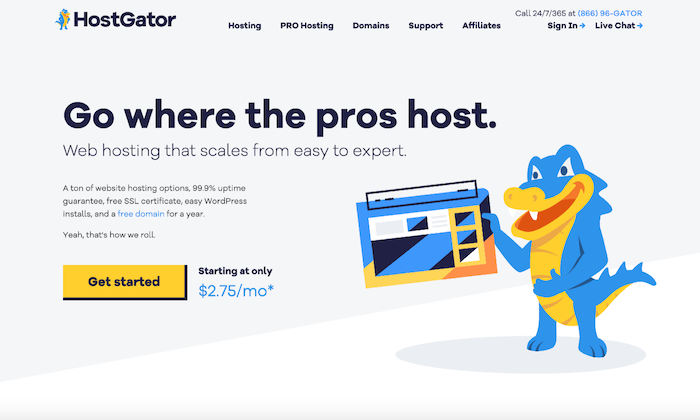
HostGator has many things going for it—it guarantees a 99.9% uptime, offers excellent 24/7 support throughout the year, and has inexpensive plans. Precisely why so many people recommend this web hosting service.

It can be the perfect choice for scaling companies as its shared hosting, dedicated hosting, and reseller hosting plans include a cPanel-based interface, along with other advanced tools like hotlink protection and IP deny manager.

It comes with a full range of support options, all kinds of hosting types, and several quality features. It’s the perfect choice for those who want top performance but don’t want to spend a lot of money.

The cPanel control gives you access to all components to design your website from scratch and customize further if needed. What’s more, you also get a website builder with HostGator, so you won’t have to pay for another service.

People with limited technical knowledge will find the platform easy-to-use. At the same time, it still has enough features to make it suitable for technical users.

Features of HostGator include:

  • Google ads credits
  • Bing ads credits
  • Free site transport
  • Free domain transfer
  • Free SSL

Pricing

HostGator offers three hosting plans: 

  • Hatchling Plan — Starting at $2.75 per month
  • Baby Plan — Starting at $3.95 per month 
  • Business Plan — Starting at $5.95 per month

#3 – A2 Hosting – The Best for Cloud Hosting

A2 Hosting already enjoys a stellar reputation because of its high speeds and efficient customer service. This, in combination with reliability and green hosting, makes the web host an excellent choice for those looking for a cloud hosting solution.

It uses cPanel to power its shared, dedicated, VPS, and reseller services and has an intuitive and easy to use interface. The web host also combines cPanel with SwiftServers to further enhance your website and boost loading speed.

Moreover, the cPanel integration is seamless. You get swift access to all the necessary tools needed to manage all sites and emails efficiently. You also get additional security and SEO features that come fitted in a straightforward layout.

A website backup done on the cloud is also available, making it appealing for all those who want a backup in case of hacks or compatibility problems.

Features include: 

  • Configure SSH keys
  • Create a Node.js app
  • Install an SSL certificate from a third party
  • Manage your files
  • Manage databases
  • Manage email usage
  • Manage domains

Pricing

  • Shared Hosting — Starting at $2.96 per month
  • VPS Hosting — Starting at $5.00 per month
  • Reseller Hosting — Starting at $9.80 per month
  • Dedicated Hosting — Starting at $99.59 per month

#4 – InMotion – The Best for Shared and VPS Hosting

It’s hard to beat InMotion when it comes to VPS and shared hosting solutions, thanks to its impressive features, disk space, and customer support.

Regardless of the plan you choose, managing your Linux-based server will always come with a cPanel. As a result, setting up domains, handling site automation, and managing resources will be easier than ever.

It’s a great choice for those looking to build their site from scratch or who don’t know how to design or code a website. The cPanel is easy to view and properly streamlined, giving it a modern and functional look as everything is laid out on a single page.

You can manage various sections of your site with ease and keep track of crucial statistics like bandwidth usage. If needed, you can use it at the top to jump to any section you want or use the search bar to filter results.

Another thing that I like about InMotion is its incredibly tailored service. You can optimize cPanel for VPS hosting, which, in turn, ensures all your resources are used minimally while also boosting speed and performance.

The software tool offers one-click app installations with 400+ applications, which can be managed directly in cPanel. It also allows auto upgrades, version rollbacks, and easy maintenance.

Some features are:

  • SSD Storage
  • Unlimited Bandwidth
  • Domain Registration or Transfer
  • No-Downtime Website Transfers
  • Daily Backups
  • Free SSL
  • Free Advertising Credits

Pricing

InMotion offers the following plans:

  • Shared Business Hosting — Starting at $6.39 per month
  • WordPress Hosting — Starting at $6.99 per month
  • VPS Hosting — Starting at $21.04 per month
  • Dedicated Servers — Starting at $105.69 per month

#5 – GoDaddy – The Best for Extra Features

GoDaddy is definitely one of the better web hosts with cPanel in the market. Once a simple domain registrar, the web host provider has expanded quickly and is currently offering a long list of services, including WordPress and shared hosting, with cPanel tying all the plans together.

The look is slightly different from the regular cPanel, but there’s no compromise on the functionality.

While the icons have a more unified color scheme and are slightly larger on the page, the typical left-side menu is absent. Therefore, you don’t have WordPress control or access to the MOJO Marketplace. 

That said, this isn’t a feature that’ll be missed terribly by non-WordPress users, so it isn’t a major deal-breaker.

In its place, you’ll see an overview of your resources, along with quick stats on your CPU usage, memory limits, number of email addresses, and so on.

Its standout is the surprising amount of features.

The list of features include:

  • Centralized management
  • Dozens of beautifully crafted templates from renowned designers
  • Cross-platform access
  • Customizable themes
  • One-click application install

Pricing

  • Web Hosting — Starting at $5.99 per month
  • WordPress Hosting — Starting at $6.99 per month
  • Business Hosting — Starting at $19.99 per month
  • Reseller Hosting — Starting at $39.99 per month
  • VPS Hosting — Starting at $4.99 per month
  • Dedicated Servers — Starting at $94.99 per month

Final Thoughts

Whether you’re looking for a shared hosting plan, VPS hosting, or a dedicated server, your website is sure to benefit from cPanel hosting. Keep in mind that a cPanel hosting service involves a surprisingly long-term commitment, so be careful with what you choose.

You can use our methodology to find one that meets your website requirements and aligns with your brand.

Our top picks, especially Bluehost and HostGator, have all the necessary features arranged in a user-friendly dashboard to help you take complete charge of your website. Regardless of your decision, you can be assured of a much easier life with cPanel.

The post Best CPanel Web Hosting appeared first on Neil Patel.


Best CPanel Web Hosting
Publicado Primeiro em Neil Patel

4 Link Building Campaign Tips That Work

link building campaign tips that work

It’s no secret that link building campaigns are critical to ranking organically.
If you want better search engine rankings, you need more backlinks.

Links give context and power to pages that Google considers authoritative.

Google will almost certainly see a page with 100,000 links as more authoritative than one with 1,000 links. (Unless all those links suck.)

But that is exactly the problem– everybody needs links, and everyone campaigns for them.

So how on Earth do you get links when half your inbox messages are other people asking you for a link?

Many marketers have stopped campaigning because they think link building is“annoying” or “disrespectful.”

But you need those links if you want to increase organic traffic.

So link building still needs to be a priority.

Thankfully, there are a few ways you can campaign for backlinks that are guaranteed to produce results — and avoid annoying people.

Here’s why you need to be building links, plus four link-building campaign tips that still work today.

Why Link Building Matters

We often hear that link building should be a cornerstone of our SEO efforts.

Which is true, but many marketers don’t know why.

Why do you need links? What is it about links that make your content rank better?

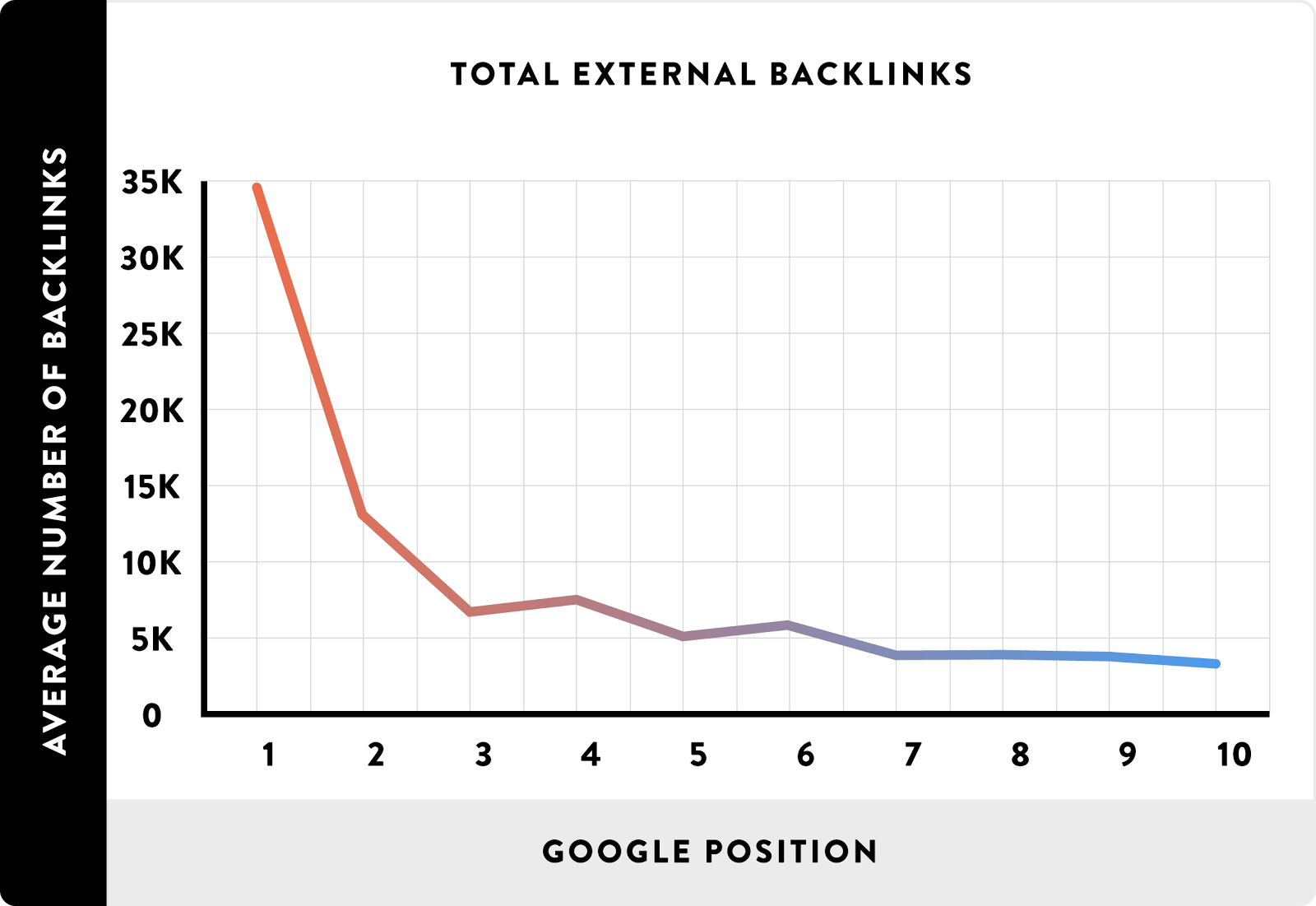
Backlinko analyzed over 1.8 million Google search results pages.

Their goal was to figure out what factors correlate to higher rankings.

Guess what they noticed for backlinks?

They found that building links was critical for ranking position.

pasted image 0 1936

The top-ranking 3.8x more backlinks than posts in positions #2 through #10.

But that’s not all.

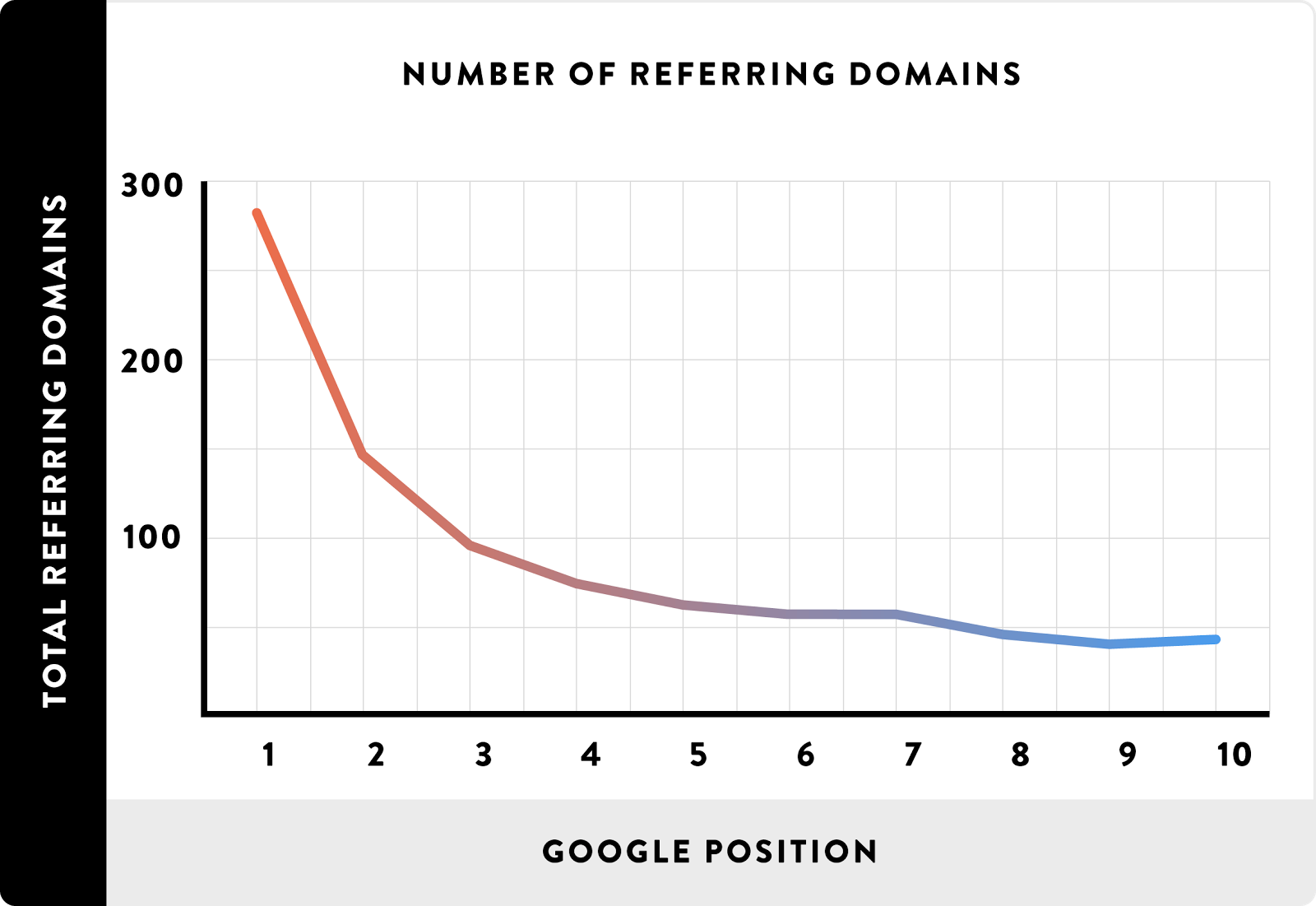
Simply having 100,000 backlinks isn’t going to get you rankings.

Spamming your links on a forum or directory or the comments section of a blog won’t get you good links.

Because they found the number of referring domains mattered as well.

pasted image 0 1930

This means that having backlinks from a diverse source of sites is critical for ranking.

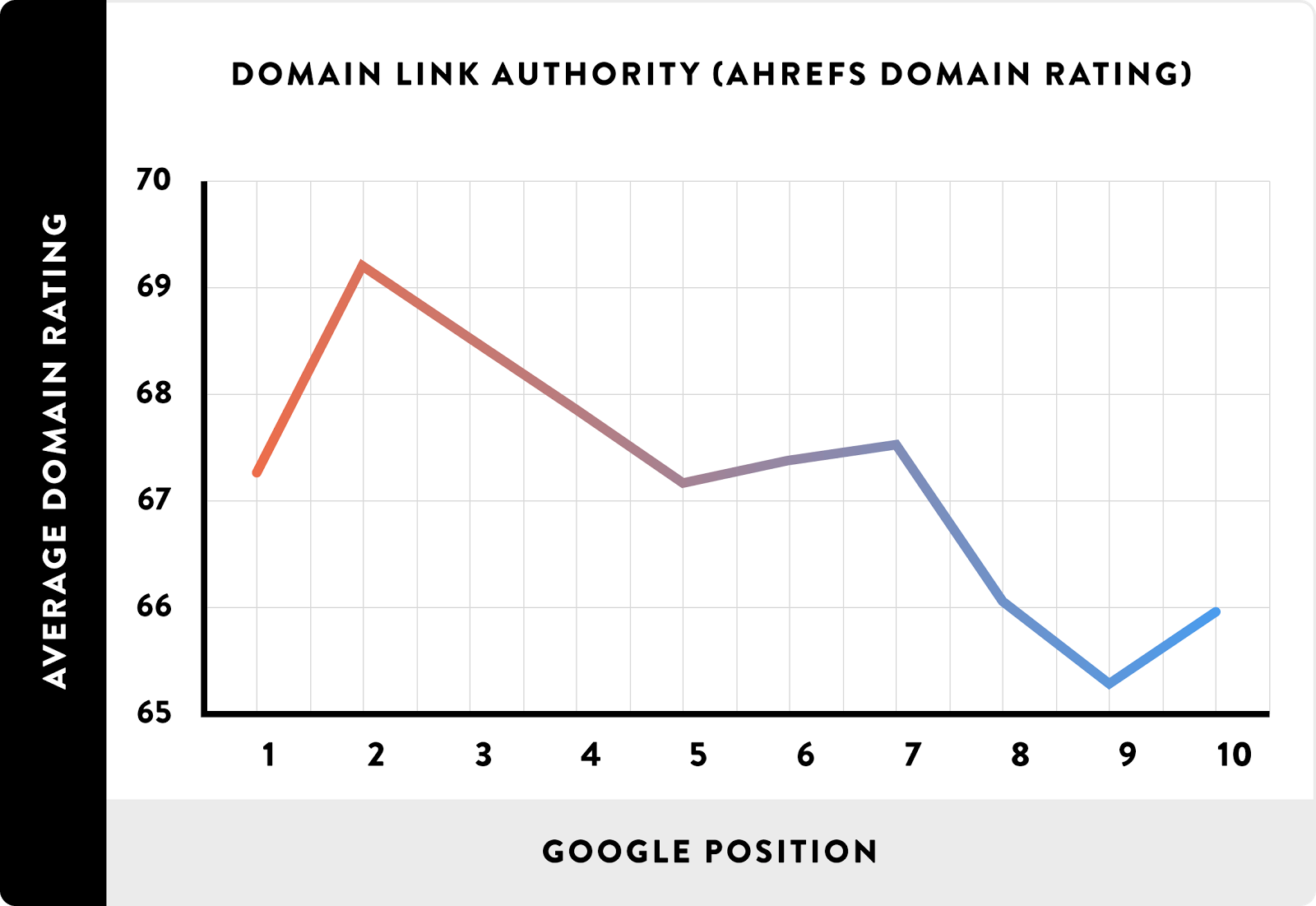
Backlinko also found that sites with higher domain link authority ranked higher on Google.

pasted image 0 1946

So what exactly does that mean for link building?

It means you need to focus on getting high-quality links from high-quality sites.

The higher the domain authority, the more powerful the site and the better the link.

Let’s conduct this simple experiment on our own.

Fire up Google and search for a random industry keyword like “content marketing guide.”

link building campaign guide example

Click on one of the top results on the first page.

link building campaign example

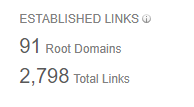
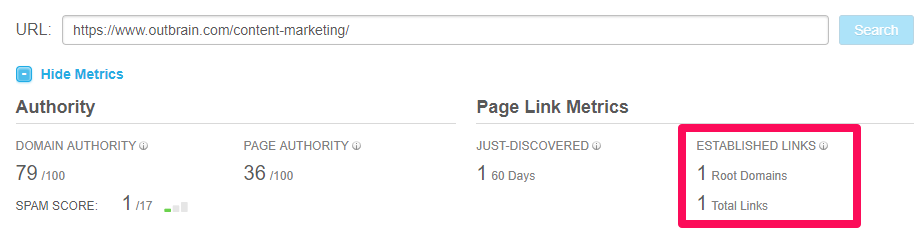
Now, copy and paste that link into Moz’s Link Explorer to see how many links that individual page has.

Look under the “Established Links” section.

link building campaign example

Did you notice how many links it has? A lot. Nearly 3,000 of them.

That means almost 3,000 pages have linked to that specific post, giving it tons of authority.

Now let’s go to the second page of Google for that same search result and click on the first result (on the second page).

link building strategy example

Take that link and plug it back into Open Site Explorer and inspect the number of links.

link building strategy example research

You can instantly see why some content ranks higher than others.

This second piece of content is excellent. I’ve read it multiple times myself.

The domain authority of the site is significant. But without links, you can’t expect to compete.

Links are a factor that Google uses to measure relevancy, authority, and popularity of content.

Link building is a necessary evil when building your SEO strategy and getting more organic traffic.

Here are four link-building campaign tips that still work.

Link Building Strategy #1:Guest Blogging

Guest blogging is one of the avenues for driving new traffic to your site.

It’s relevant, industry-specific, and allows you to brand yourself as an industry expert and thought leader.

Despite what you might have heard, it isn’t dead. But you have to do it right.

Blogging on your own site is great. But posting on guest sites that already have millions of fans is an easy way to draw traffic you otherwise couldn’t access.

I do this all the time on other sites.

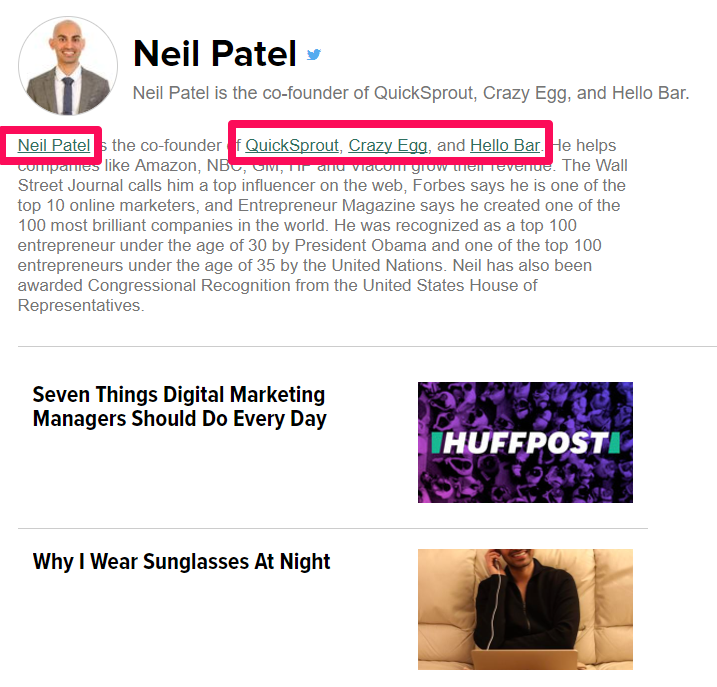
For example, I guest blog frequently on sites like Inc., Entrepreneur, and Huffington Post:

link building strategy guest blogging

Look at those boxes I highlighted. Those are links back to my sites.

In fact, on every single post, I get a custom author byline that links back to my sites.

link building strategy guest blogging example

Think of guest blogging like this: It’s nearly free promotion.

You write a great article for a publication. In exchange for that work you’ve delivered, you get valuable links.

So the key here is to only guest post on high-quality, high-profile sites.

Don’t waste your time guest blogging on sites with no authority.

You’re better off posting on your own blog.

However, focus on posting with high-quality sites like Huffington Post or marketing niche blogs like HubSpot.

Guest blogging is a give-and-take endeavor.

You provide a great article that takes time and effort, and you get the reward of links and traffic back to your site.

So how do you do it?

It’s actually pretty easy.

To get started, you simply need to prospect for sites that allow guest posting.

That’s easy, too. Do you have a favorite marketing blog? For example, maybe your favorite blog is SEMrush.

Start by heading to Google, then do a custom search like this:

link building strategy guest blogging search

You can also use searches like:

((target site)) + guest post

((target site)) + guest blog

((target site)) + blogging guidelines

And look what shows up first:

link building strategy guest blogging look for places to blog

Click on that post and check out their guidelines. You can get started submitting a guest post almost instantly.

The beauty of this technique is that it’s fast and simple.

You don’t need to find a fancy email-outreach tool or conduct hours of email prospecting.

You don’t have to cold email people and wait weeks for a “no.”

You simply fill out a form and get judged for submission.

There’s no easier way than using the guest-blogging technique to get links.

Link Building Strategy #2: Mention Influencers in Your Post

Have you ever read a blog post like, “What the top industry experts say about X?”

I know I have.

I see them all the time, in fact.

Or perhaps round-up-style posts like this:

link building campaign round up post example

Those who write these articles do so for a very specific reason. They’re interesting, and they get links like no other.

When you mention a popular influencer in your post, you get more links.

Why? Because the influencer that you mentioned will most likely share it (if it’s good). And that will result in more links.

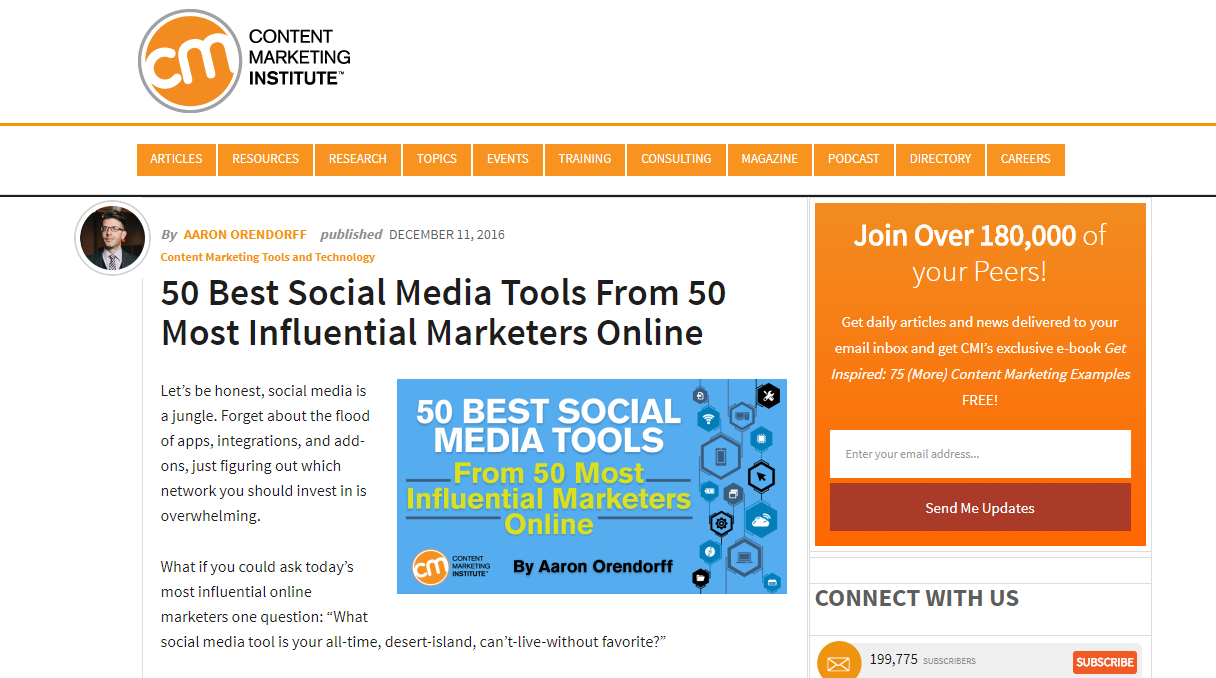
For example, check out this post on the Content Marketing Institute:

link building campaign best social media tools

It’s entitled: “50 Best Social Media Tools From 50 Most Influential Marketers Online.”

If that isn’t a link-generating post, I don’t know what is.

Scroll down, and you’ll quickly see mentions of the top industry experts.

I got an easy link myself by submitting my answer for this post.

link building campaign round up post

So there’s some give and take.

I provide information for this expert article in exchange for a link. Then I give another link back to this post to drive more traffic.

It’s a cycle of link building that works almost every time.

When you mention someone in your article, you let them know they’re a popular, insightful influencer.

That’s powerful.

That makes me want to give a link back to that specific post because it mentions me and contains relevant, helpful content.

So how do you start doing it?

Start by searching for posts just like that one.

For example, you can search for something like this:

link building campaign search

This type of search will turn up listicle-style round-up posts with tons of the top influencers.

Click on any of these posts and find the best influencers to mention in your next article.

But remember: the article must be high-quality to get links. When you mention an influencer, make sure the overall quality of your article is top-notch.

Gaining links isn’t a fast process.

Techniques like this will help speed up that process.

Mentioning influencers is a wonderful way to get their attention and give them praise, while gaining links for yourself.

Link Building Strategy #3. Prospect for Broken Links

Prospecting for broken links is an old technique that still works.

The method has been around for many years, and for a good reason: It still works even today.

The idea is pretty simple.

You browse a popular industry blog or influencer blog and scan the page for broken links.

If you come across one, send an email to that blogger to let them know their post has a broken link.

That’s where you slip in your blog post for the pitch.

You say something like, “I noticed X link is broken. I have an article on this subject you can replace it with.”

Obviously, you want to be a little less aggressive in pitching, but that’s the basic premise.

So how do you do it?

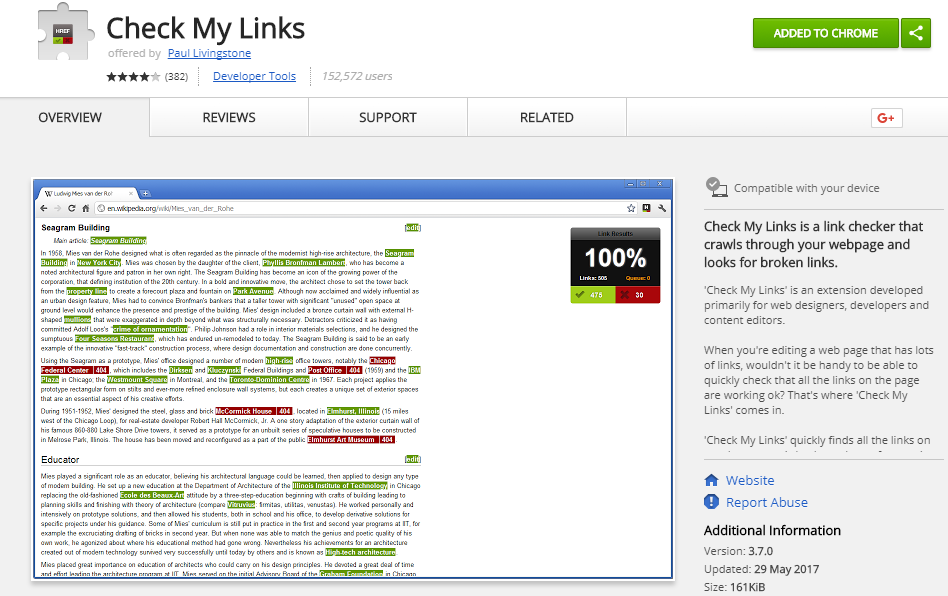
Use a tool like Check My Links.

link building campaign look for broken links

Simply add the extension to your Chrome browser and head to your favorite industry blog.

For example, we can conduct this test on my own blog.

Here’s what using the tool looks like on my site:

link building campaign look for broken links

Find that invalid link and use it to pitch the writer your own blog post to replace it.

Try using a simple email template. I’ve used this short-and-sweet one before with great success:

Hi, __,

I was reading your post on X and noticed that X link wasn’t working.

I loved the post and just wanted to let you know so you can fix it.

I actually have an article (insert link) that I wrote about this subject. If you want, you could replace the broken link with it.

Best,

Neil.

Try being real, honest, and simple in your correspondence.

Don’t try to game the system or use people. Simply offer your link as an easy fix for their problems.

Link Building Strategy #4. Use Infographics as Link Bait

Infographics are some of the most-shared types of content.

In fact, there are entire sites dedicated solely to publishing infographic content.

Why do people love infographics?

It’s because visual content performs best.

People don’t want to read a 6,000-word blog post; they want to scan your infographic and get that information in just a few seconds or minutes.

I use them all the time because they work. They get shares, and they get links.

People will often clip images from your infographic for their own blog, meaning you’ll get tons of links.

It’s a known fact that humans perceive visual content more efficiently than they do text.

For example, if you looked at an entire block of text, you would need to read it to understand it.

But with an infographic image, you can almost instantly understand the information you see.

Thankfully, you don’t need to be a design expert to make infographics.

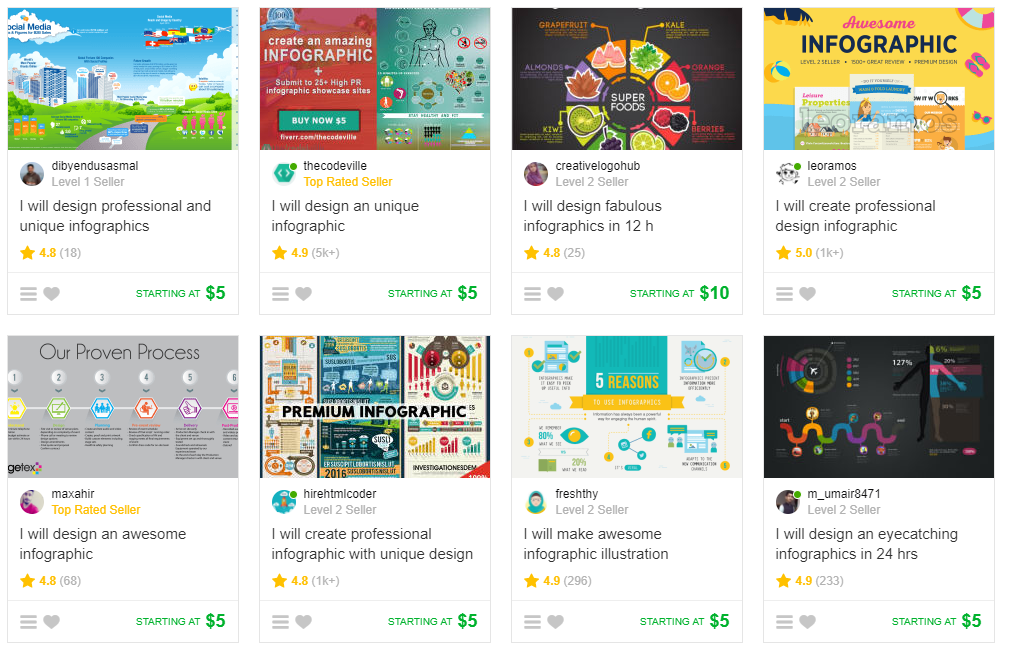
You can use a site like Fiverr to find people who can create cheap infographics.

use infographics for link building campaigns

For only five bucks, you can get a pretty high-quality infographic.

So if you don’t want to spend an hour or two making one, just pay someone a few dollars.

If you prefer to customize everything on your own, you can use a tool like Venngage.

You can create a free account and instantly build infographics based on existing templates.

venngage for link building with infographics

Choose between multiple categories based on your infographic topic.

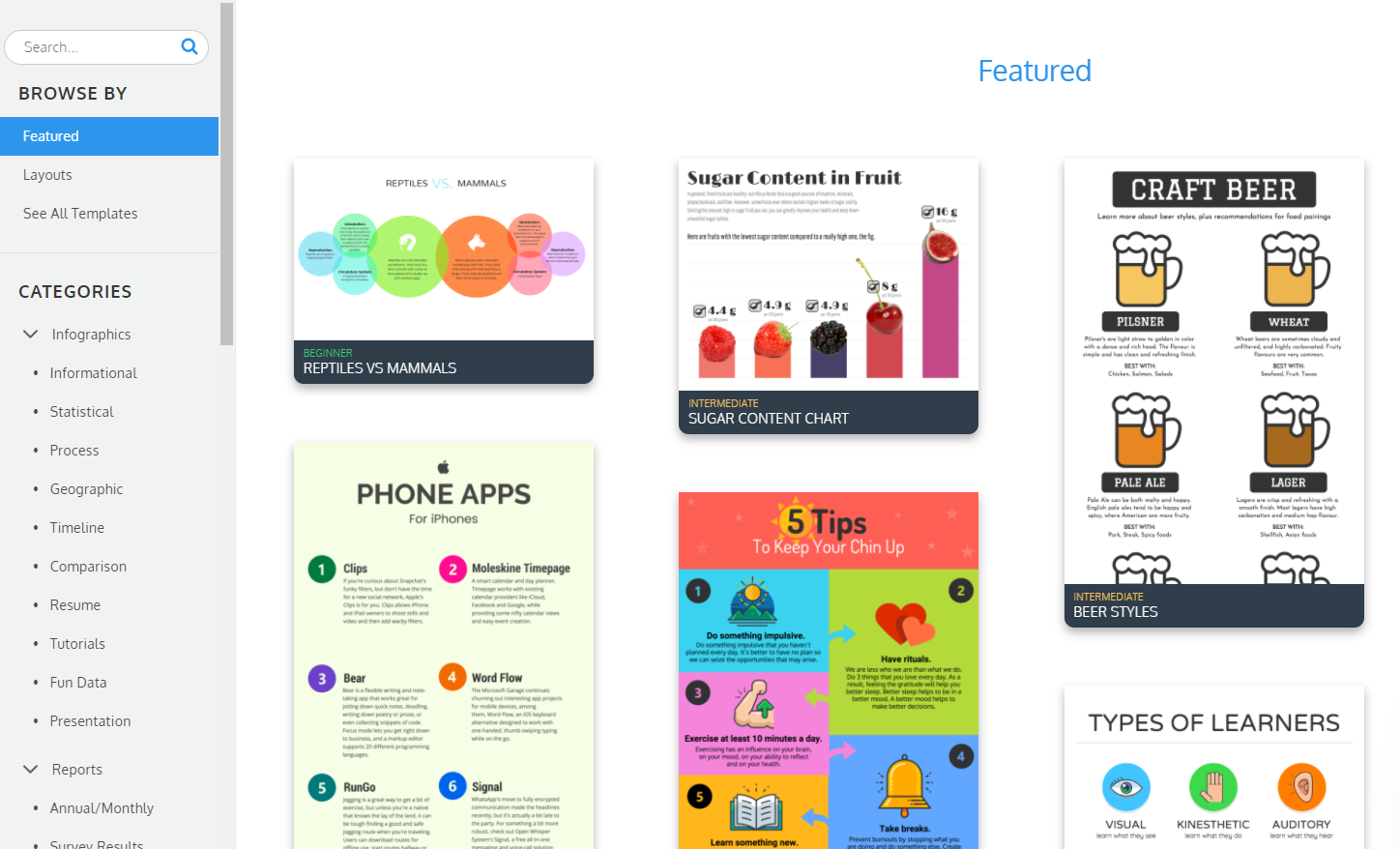
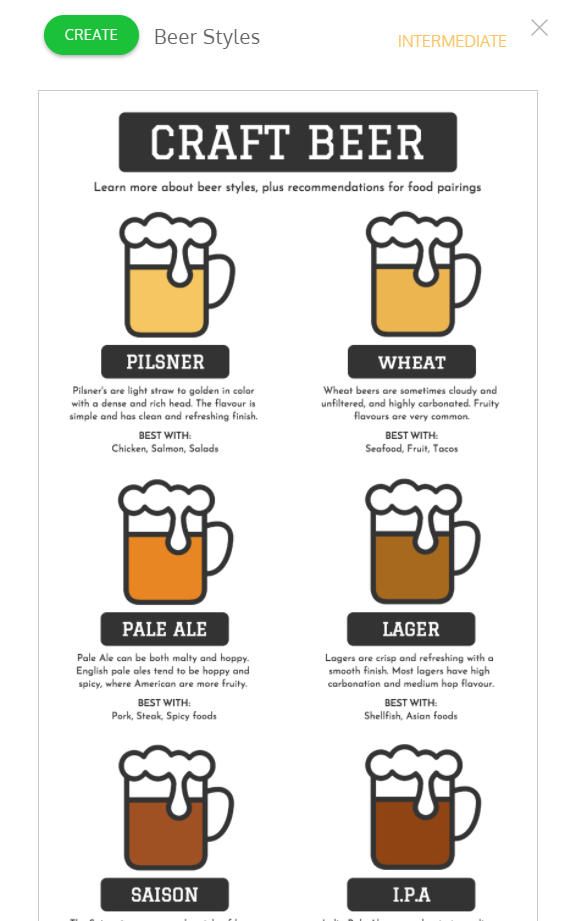
Once you’ve selected one, you can view the preview of the template or hit “Create” to start editing it.

create an infographic for link building

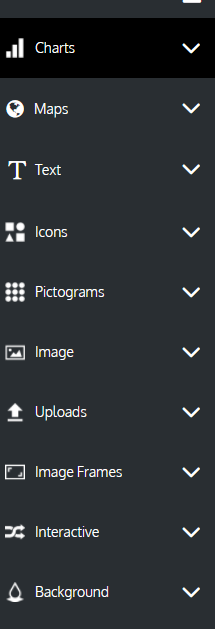
You can edit the images and text directly on the infographic page or add even more page elements.

create an infographic for link building

Venngage is a great tool for quickly creating great-looking infographics.

Once you’ve created one, simply publish it and start spreading the news.

People naturally love infographics, so you’re almost guaranteed to get some links.

Consider creating infographics for existing posts.

For example, do you have a blog post that’s already driving lots of traffic but not many links?

Take some of that information and repurpose the content into an infographic.

This tactic will give you a better chance at getting more links, as people readily share infographics online.

When in doubt, add an infographic to help your content get more shares and links.

Conclusion

If you want to rank better for organic search keywords, you need to focus on building links.

It’s no secret that more backlinks give you more power in the rankings.

Your content marketing efforts depend on links to gain traction.

Mentions and backlinks can drive huge amounts of relevant traffic back to your site.

Focusing your time and efforts on link building is critical.

Thankfully, there are still a few link-building campaign tips that work today.

Start by implementing an updated guest-blogging strategy. Next, mention top influencers in your post for a good chance at acquiring a link. If you strike out, try prospecting for broken links and pitching your content.

If all else fails, create high-quality infographics to bring in links.

What link-building campaign tips have you found that still work?

The post 4 Link Building Campaign Tips That Work appeared first on Neil Patel.


4 Link Building Campaign Tips That Work
Publicado Primeiro em Neil Patel