segunda-feira, 1 de fevereiro de 2021

Best SEO Plugins for WordPress

Disclosure: This content is reader-supported, which means if you click on some of our links that we may earn a commission.

Search Engine Optimization (SEO) can be complicated or overwhelming for the average business owner, but it doesn’t have to be.

With a decent SEO plugin for your WordPress website, the process of improving the quality and quantity of website traffic will be a breeze. 

An SEO plugin offers you tools and powerful features like audit checklists, sitemaps, and content insights to optimize your website. 

We’ve compiled a list of the seven best SEO plugins for WordPress options, making it easier for you to find the best plugin to suit your company’s needs. 

All seven SEO plugins in this guide are suited for any WordPress website and help you improve engagement and increase traffic. 

#1 – All-In-One SEO (AIOSEO) – The Most Comprehensive SEO Plugin for WordPress 
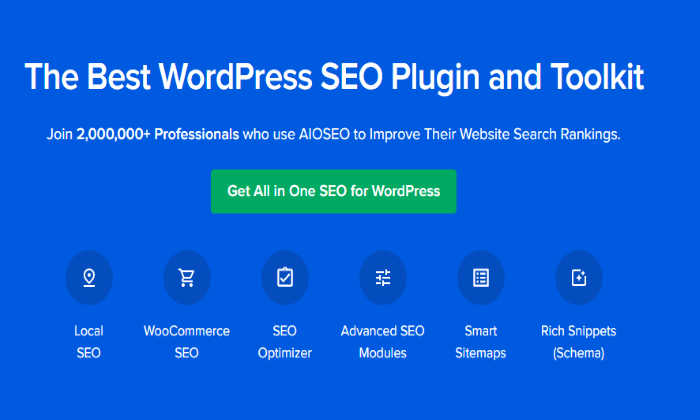
If you’re an experienced SEO expert but are looking for a comprehensive toolkit to help improve your company, AIOSEO is an excellent option. 

AIOSEO is a well-known toolkit with over two million active users to date and offers powerful features that anyone can use. 

Even if you aren’t quite familiar with SEO plugins, AIOSEO makes it incredibly easy to use as you can set up your data and integrate your social media platforms without hiring an expert. 

Some prominent features include: 

  • SEO custom user roles
  • SEO audit checklist
  • Smart XML sitemaps 
  • Exceptional 24/7 customer support 

Another outstanding feature of this plugin is the option to easily optimize your page with a TruSEO score, where you can get a more in-depth analysis of your data with a click of a button. 

AIOSEO offers four pricing plans:

  • Basic: $99 per year (for one site)
  • Plus: $199 per year (for three sites)
  • Pro: $399 per year (for 10 sites)
  • Elite: $599 per year (for 100 sites)

While there is no free trial listed on the website, AIOSEO does offer a 14-day money-back guarantee on all pricing tiers.

#2 – Yoast SEO – The Best WordPress SEO Plugin for Page Analysis 
Extra help with page analysis can be scarce in the form of an easy-to-use plugin, however, Yoast SEO offers exactly that. 

The plugin can help you increase engagement and traffic with its unique high-performing keyword feature and automatic keyword optimization, which enables you to save time as there’s no need to manually search for keywords anymore. 

You can become your own SEO expert with Yoast’s academy courses—where you can receive professional SEO training. Each element of the plugin is easy-to-use, and with personalized SEO training, you can’t go wrong. 

Some other helpful features include: 

  • Content insights 
  • 24/7 support for premium users 
  • Free support forums
  • Available in multiple languages for inclusivity 
  • Social media integration

Yoast SEO offers two pricing plans, including:

  • Free: Includes free courses, 10 keyphrase queries a day, keyword optimization, and more.
  • Premium: $89 per year (one site) for no ads, keyword export, integration with Zapier and Elementor, content insights, and more.

Larger companies can save up to 50% by purchasing 150 sites. 

#3 – SEMRush – The Best WordPress SEO Plugin for Keyword Research
Most businesses will find SEMRush to be very helpful for everyday SEO tasks and projects, but it especially shines when it comes to keyword analysis. 

As an all-in-one, award-winning tool with multiple data and strategy features, SEMRush is the perfect plugin for your WordPress website. Not only can you run SEO, but SEMRush also offers content marketing, PPC, and social media marketing. 

With this plugin, you’re able to uncover millions of national and local keywords, with no cap on in-depth analysis. SEMRush also allows you to analyze domain backlink profiles with ease so that you can stay on track. 

The six keyword research tools SEMRush has are: 

  • Keyword overview: Find out the value and competition of any keyword or phrase
  • Organic research: Get analysis on your competitors’ rankings and pages for organic keywords
  • Keyword magic tool: A database with over 20 billion keywords
  • Keyword gap: Compare a keyword to your competitors
  • Keyword manager: Look at changes for up to 1,000 keywords in real-time
  • Organic traffic insights: See Google Analytics “not discovered” keywords and cross-reference that and other data

SEMRush offers three pricing plans, including: 

  • Pro: $199.95 per month
  • Guru: $229.95 per month 
  • Business: $449.95 per month 

You can also try the Pro and Guru plans before you buy with a free trial.

#4 – SEOPress – The Best WordPress SEO Plugin for Beginners 

If you’re new to plugins and are unsure where to begin, SEOPress is the perfect option for beginners. 

This simple, fast, and powerful plugin will catapult you into the world of SEO with ease, especially considering they offer an installation wizard that helps you install and set up your data. 

What’s great about SEOPress is that not only does it cater to beginners, but it offers content analysis with unlimited keywords, even for users on the free plan—making it affordable and inclusive. 

With SEOPress, you’ll benefit from core features, like: 

  • Google knowledge graph
  • Twitter card to improve social sharing
  • Meta title/description to save time on content
  • Video and image sitemap to improve your ranking 
  • Customizable URL rewrite 

SEOPress offers two pricing plans, including: 

  • Free: Unlimited sites and basic tools 
  • Pro: $39 per year with unlimited sites, all features, and one year of upgrades and support

Like AIOSEO, SEOPress offers a 14-day money-back guarantee with no questions asked.

#5 – Google Search Console – The Best Free WordPress SEO Plugin 
If you’re looking for an affordable tool for basic SEO maintenance, Google Search Console is an excellent option because it’s free! 

When it comes to free plugins, it doesn’t get any better than Google Search Console to help you monitor your website’s presence in search results. 

Google Search Console is another great plugin for beginners, as it’s more on the basic side and wouldn’t suit a user looking for more comprehensive support. 

Some features include: 

  • Measure your site’s search traffic and performance 
  • Optimize content with search analytics 
  • Alerts for any issues via email 
  • Submit sitemaps for crawling 
  • UL inspection
  • Data and analytics to understand how Google views your pages

The plugin will also help you fix any issues that may arise within your WordPress website, providing full support, so you don’t have to waste time. 

Google Search Console is a completely free plugin for all users. All you need to do is sign up with a domain or URL prefix. 

#6 – Ahrefs – The Best WordPress SEO Plugin for Competitor Analysis 
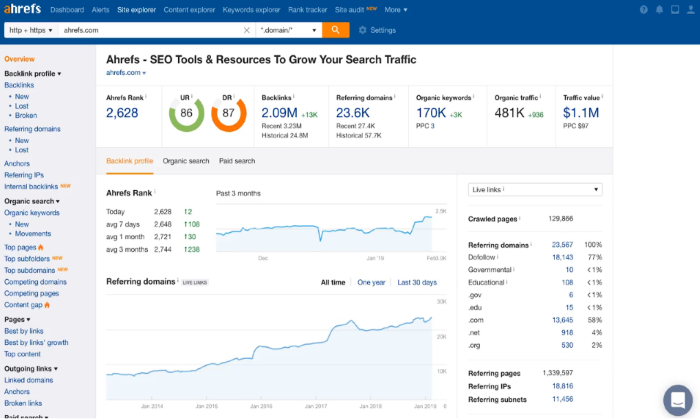
Ahrefs is another all-in-one toolset for SEO that offers many benefits, not the least of which is their in-depth off-page functionality to analyze your competitor’s marketing and content strategies. 

With Site Explorer, Ahrefs lets you see organic search traffic and backlink profiles for any and every website. You’ll be able to see what keywords they rank for, what pages get the most traffic, what websites are backlinking to the competitor, and where they direct paid traffic.

In addition to your direct competitors, Ahrefs also has a Content Explorer tool to analyze high-performing content in your industry with multiple metrics and advanced filters. Every piece of content has analytics to show you how a page performs and even clicks over time.

These features allow you to study your audience and what they are consuming—and better tailor your content to them. 

Some other features of Ahrefs include:

  • Site audit
  • Rank tracker
  • Alerts on new and lost backlinks, keywords, and mentions
  • Batch analysis
  • Domain comparison

There are four pricing plans, including: 

  • Lite: $99 per month for one user and unlimited projects
  • Standard: $179 per month for one user 
  • Advanced: $399 per month for three users 
  • Agency: $999 per month for five users

The price tag of Ahrefs is its only drawback, but the company does offer a seven-day trial of the Lite and Standard plans for $7, so you can test before you invest.

#7 – Schema Pro – The Best WordPress SEO Plugin for Website Markup
If you aren’t great with plugins and need that little bit of extra help, Schema Pro is an excellent and functional option. 

With a simple click and select interface, Schema Pro allows you to install and navigate the plugin easily. 

Schema Pro specializes in website markup, where the software lets you know how your pages should look and work. It’s the easiest way for Google to understand the data that is present on your WordPress site. 

The Setup Wizard enables you to automatically map schema to individual pages and posts instead of manually doing it one by one.

With this plugin, you can use its features to optimize your website, some of these features include: 

  • Markup configurations which are automatically applied
  • Potential increase in CTR ratings and votes
  • Includes all post types for functionality 
  • JSON-LD implementation
  • Highly optimized Google code 
  • Intuitive interface that’s easily extendable with custom field support 

Schema Pro has two pricing plans, including: 

  • Schema pro: $79 per year
  • Agency bundle: $249 per year 

You can also save between 20-30% with Schema Pro’s lifetime option and only pay once.

What I Looked At To Find the Best SEO Plugin for WordPress 

Now that you know our top seven best SEO plugins for WordPress, it’s time for you to make a decision that aligns with your company’s needs. Identifying these criteria is the most critical part of your decision-making process because it will dictate whether it will improve your website traffic and engagement and inform your strategies. 

Consider the following factors and whether prospective tools align with your personal preferences to make the right decision for your business. 

Keyword Explorer 

An SEO plugin allows you to find keywords to optimize your WordPress site. With that said, a keyword explorer is crucial to the ultimate success of your plugin and website. This is because it makes the act of finding and including keywords much easier. 

When comparing plugins, it’s important to do some research on keyword explorer functions and make sure you invest in a plugin that offers one. This function’s primary focus is to improve the ROI of your content strategy and receive actionable recommendations. Also, check if the plugin has a limit on keyword searches and analytics.

Without one, you will waste a lot of time manually finding keywords. 

Social Media Integration 

Social media integration is another integral part of your SEO success. Social media integration lets you share to social media more conveniently by storing all your data under one platform—helping you save time and money.

SEOPress offers a customizable Twitter card that helps to improve social sharing. This is a great example of what kind of plugin you should look for to optimize your content to its full potential. 

Customer Support 

Unfortunately, not all free versions of the above plugins offer 24/7 customer support or even particularly efficient support. A simple way to combat this issue is to pay for the premium versions or simply find a plugin that offers customer support for all plans. 

A great example of what you should look for is offered in the Yoast SEO plugin. Yoast has 24/7 support for premium users and a free support forum for unpaid users. This allows everyone to receive customer support if they’re feeling stuck. 

Customer support is imperative, as it’s common for some issues to arise for people who have little experience with WordPress software. 

Conclusion

Our top recommendations for the best SEO plugin for WordPress are AIOSEO and Yoast SEO. To recap the full list:

  1. All-In-One SEO (AIOSEO) – Most comprehensive SEO plugin 
  2. Yoast SEO – Best for page analysis 
  3. SEMRush – Best for keyword analysis 
  4. SEO Press – Best for beginners 
  5. Google Search Console – Best free SEO plugin
  6. Ahrefs – Best for competitor analysis
  7. Schema Pro – Best for website markup 

AIOSEO is the perfect toolkit for an expert looking for extra help, while Yoast has a unique page analysis functionality and is great for any size business.

SEMRush offers content strategy features and is affordable. SEOPress is an excellent choice for novices and is very straightforward with some customization options.

Google Search Console is the only free tool on this list and is great for monitoring and maintaining your website’s presence. Ahrefs offers great customer service, and Schema Pro has diverse functionality. 

No matter what you decide, any tool in this guide will be on the right path to optimize your website and increase traffic.

The post Best SEO Plugins for WordPress appeared first on Neil Patel.


Best SEO Plugins for WordPress
Publicado Primeiro em Neil Patel

The Best Blogging Platforms (In-Depth Review)

Disclosure: This content is reader-supported, which means if you click on some of our links that we may earn a commission.

Do you want to skip the read and get right to my top pick? The best blogging platform for most people is Wix.

Whether you want to become a blogger for a big-time news publication, share your independent thoughts online, make millions as a blogger, or something in between, it all starts with a blogging platform. 

And choosing the right one sets precedence for everything else you do. 

But with so many options to choose from, picking the best blogging platform can feel overwhelming. 

So to help you out, I created a list of considerations to think about as you go through the process and reviewed the top five blogging platforms on the market today. 

By the end of this article, you’ll be well on your way to starting your own blog. 

The Top 6 Options for Blogging Platforms:

  1. Wix – Best drag-and-drop blogging platform
  2. WordPress.org – Best open-source blogging platform
  3. Squarespace – Best blogging platform for visual appeal
  4. Medium – Best traditional blogging platform
  5. Blogger – Best for personal blogs

How to Choose the Best Blogging Platform for You 

Choosing a blogging platform is an important decision. And the one you choose depends on what you hope to do with your new blog and how much control you want to have. 

So, let’s walk through what to consider as you make your final decision. 

Do You Want to Make Money?

This is probably the most crucial question to ask yourself. 

If you want to start a personal blog to share your thoughts and experiences, you’re completely fine going with a free blogging platform, like Medium or Blogger. 

However, if you want to make money blogging, you have to be careful. Most free platforms don’t let you monetize your blog.

So, you need to choose a premium blogging platform that gives you more control, like Wix, WordPress.org, or Squarespace. 

Do You Already Have a Website?

If you want to add a blog to a website you already have, I highly recommend looking into your website platform’s blogging capabilities. 

This is the easiest way to add a blog to a website that already exists. 

Alternatively, you can look into migrating your website to Wix, WordPress.org, or Squarespace. However, I recommend staying with the platform you’re already using if you can. 

Customization Capabilities

Paid blogging platforms give you more control and design flexibility, allowing you to build a complete website and brand around your blog.

You can customize the look and feel of nearly every aspect of your website instead of having to color inside the lines someone else drew.

If you’re serious about blogging as a business, you a deeper level of control. 

For complete flexibility and customization options, go with WordPress.org. And if you want something easier than WordPress, yet still flexible, Wix and Squarespace are great drag-and-drop options. 

Free blogging platforms don’t give you the ability to customize to that extent. You may be able to change the colors and pick between a few different layouts. 

But, you can’t do much aside from that. 

That said, if you’re interested in personal or hobby blogging, you don’t need anything fancy. Free blogging platforms offer everything you need to quickly write content and share it online in just a few clicks. 

The Different Types of Blogging Platforms

There are several different types of blogging platforms. 

And the right one for you depends on what you want to do with your blog. 

So, before we dive into my top recommendations, let’s walk through the different types and what they’re used for. 

Free Blogging Platforms

Free blogging platforms are perfect for anyone interested in personal or hobby blogging. It’s by far the easiest way to write and publish content online quickly. 

However, free blogging platforms usually don’t let you make money with your content. You can’t make money with ads, use affiliate marketing, or sell your own products. 

Furthermore, they’re very limited in design flexibility and customization capabilities. 

You may even be stuck with random ads placed on your blog. And migrating your content from a free platform to another isn’t an easy process.

In the end, they’re not suitable for business bloggers or anyone interested in making money blogging at any point in the future. 

Website Builders

Website builders are all-inclusive, drag-and-drop design tools that let you quickly build an entire website without touching any code. They’re easy to set up, simple to use, and include a full suite of blogging tools. 

However, they’re not free. Web hosting is included with your subscription, which is nice, and some even offer a free custom domain name for the first year. 

You also get a significant level of flexibility and customization compared to free blogging platforms. That said, some areas may be limited depending on the which option you select. 

This is a great place to start if you want to make money, but you’ve never built a website before. Just keep in mind that you sacrifice some flexibility in exchange for ease of use. 

Open-Source Blogging Platforms

Open-source blogging platforms are free to download and install. They’re completely customizable from the inside out, making them perfect for serious bloggers and business owners interested in building a full-fledged custom website. 

However, there’s a steeper learning curve.

But once you get the hang of it, you’ll realize how flexible and customizable this type of blogging platform really is. You can create ecommerce stores, business websites, portfolios, service-based websites, interactive blogs, and more. 

With that said, you have to buy web hosting before you can install an open-source software. 

The good news is that most web hosts make this type of software easy to install with one-click installation. 

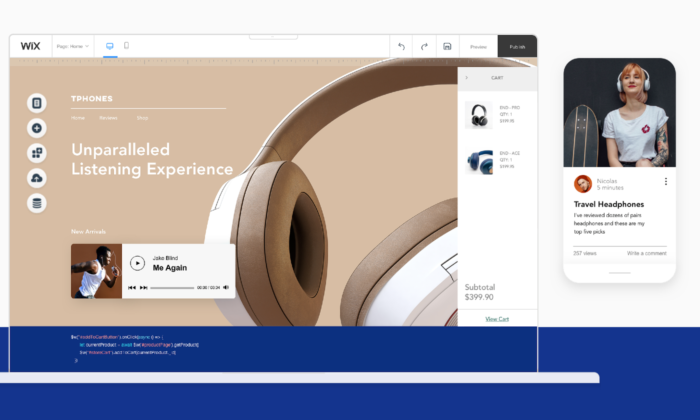
#1 – Wix Review — The Best Drag-and-Drop Blogging Platform

If you’re looking for the easiest premium blogging platform, you should go with Wix. 

It’s an all-in-one website builder with more than 100 million users worldwide, making it one of the most popular options on the market. 

Wix is excellent for beginners interested in creating a full-fledged website with a blog included. And the intuitive drag-and-drop builder makes creating engaging blog content a breeze. 

Plus, it includes everything you need to make money with your new blog. 

With Wix, you get premium blogging features, including:

  • 500 professional design templates
  • Industry-leading SEO tools
  • Rich-text editor
  • Embed HTML codes
  • Categories and hashtags
  • Advanced search capabilities
  • Writer and editor user roles
  • Easy image editing
  • Social media tools
  • Visitor analytics

Wix is arguably the easiest and fastest way to get your professional website and blog running.

You can also take advantage of their ADI (advanced design intelligence) tool, which creates everything you need to get started in a matter of minutes. 

Simply answer a few questions, customize the design, add your website copy, update your images, and you’re ready to start blogging.  

Wix offers a free plan, which is excellent for building your site and getting everything ready to go. However, I highly recommend upgrading to a paid plan so you can remove Wix ads and connect a custom domain name. 

Paid plans start at $13/mo and increase depending on the features you need. Start for free.

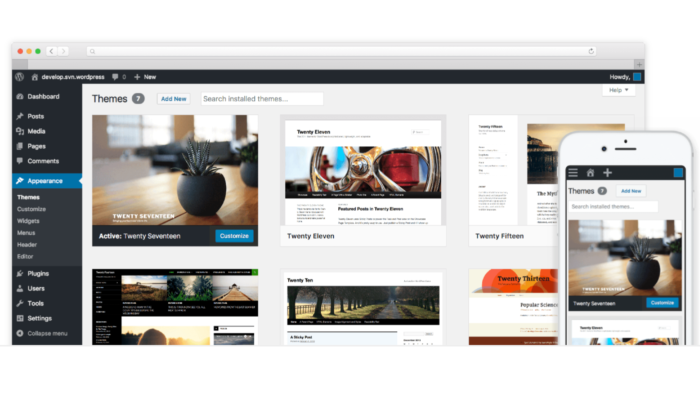
#2 – WordPress.org Review — The Best Open-Source Blogging platform

WordPress.org is an open-source blogging platform with complete design flexibility. 

It also powers 38% of the entire internet, including the blog you’re reading right now, making it the most popular blogging platform on the market. 

And the best part? It’s free to download and install. 

However, you do need web hosting to be able to use it. This usually costs around $3 – $10 per month, so it’s the most affordable option on this list. 

With that said, it’s not as easy as Wix. There are a few more steps to get started, but the extra work is well worth it if you’re looking for complete design control and flexibility. 

With WordPress.org, you also get:

  • 55,000+ plugins to extend the functionality of your site
  • Thousands of free and premium themes
  • The Gutenburg block editor
  • Advanced user roles and permissions
  • Powerful media management
  • A massive community of experts
  • Infinite design control

The best part is that you have 100% control over your website and blog. Plus, you aren’t tied down by rules and regulations. You can decide what to display, what you don’t reveal, and how you make money. 

There are countless ways to get started with WordPress.org. But I highly recommend starting with Bluehost. 

It’s the easiest way to get everything you need. 

They also include a free domain name for the first year. So, all you have to do is pick a hosting plan, snag your free domain, and use their one-click WordPress installation feature. 

#3 – Squarespace Review — The Best Blogging Platform for Visual Appeal

Squarespace is an all-in-one website builder, like Wix. However, it’s famous for aesthetically pleasing templates, making it perfect for visual-based businesses like photographers, designers, and artists. 

For as great as the your published work looks on Squarespace, it’s a relatively effortless platform to use. Plus, it includes web hosting services and a free domain for the first year (if you choose an annual premium plan). 

It’s perfect for bloggers who want an easy, aesthetic way to share images, videos, and portfolio pieces, along with long-form and short-form blog posts. 

And with Squarespace, you create blog posts the same way you create pages. 

Once you learn how the drag-and-drop editor works, you know how to use the entire platform. You also get access to powerful blogging features, including:

  • Free blogging templates to help you get started
  • Five unique post layouts for your home and archive pages
  • Categories, tags, and featured posts
  • Built-in post scheduler
  • Contributor permissions
  • In-depth analytics
  • SEO and social media tools
  • Email marketing (additional fees)
  • Expert customer service
  • Mobile app

Squarespace isn’t as customizable as Wix or WordPress.org, but it’s perfect for creative bloggers and businesses who need to create captivating content quickly. 

Paid plans start at $12 per month and increase depending on the features you need.  Try Squarespace for free.

#4 – Medium Review — The Best Traditional Blogging Platform

Medium is a platform that helps readers and writers find new ideas, knowledge, and perspectives. It’s unique because there are no ads present on the platform. 

To date, they have over 120 million readers, making Medium an excellent way to get your content in front of more people. It’s great for sharing personal stories, perspectives, and getting your ideas out into the world. 

However, it’s not a great platform for making money as a blogger.

Medium does have a partner program that rewards writers for the amount of time paying members spend reading their content. Making a decent amount of money this way is going to be tricky.

Another thing: you can’t include your own call-to-actions in partner posts. So, you have to choose between making money and growing your email list. 

It’s still a great product, just not for revenue. I highly recommend treating Medium as an extension of your Wix, Squarespace, or WordPress.org blog. 

To get started, you can create a profile or a publication. Publications look more aesthetically pleasing, and you get more organization and display features. With publications, you can also send newsletters to your followers. 

Note: if you use Medium as an extension of your blog, make sure you use their import feature to add existing blog posts. This way, you can add content from your blog to Medium without creating duplicate content for SEO purposes. 

#5 – Blogger Review – The Best for Personal Blogs

Blogger is one of the original blogging platforms. It’s been around since 1999.

It’s completely free to use with no paid plans, upsells, or anything like that. And it’s incredibly easy to use. This makes it perfect for personal or hobby bloggers looking to share their thoughts and ideas with the world. 

They have several free templates to choose from that govern how your blog looks. However, they’re not very customizable. 

You can change the colors and the layout of a few things, but that’s about it. 

The platform focuses solely on blogging, so that’s where the majority of their features lie. With Blogger, you get free access to essential features, including:

  • A free SSL certificate and free domain mapping
  • Google integrations
  • Image storage with Google Photos
  • Integrated ad campaigns
  • Simple text editor

And while those features are great, the platform is seriously lacking in other departments, including customization, custom post types, and overall design. 

Essentially, it’s an old-school blogging platform. It works well for simple blogging, but you can’t create a full-fledged website, so I don’t recommend it if you want to build a brand and make money blogging. 

However, since Google’s acquisition in 2003, you can display Google Ads on your blog to make a little extra money on the side. 

But, it’s not a sustainable or long-term way to make a full-time income with your blog. 

Summary

The best blogging platform for you depends on where you want to take your blog. For personal and hobby bloggers, a free platform like Blogger or Medium is the perfect place to start. 

They’re easy to set up, incredibly simple, and the fastest way to start publishing online. Plus, you don’t have to pay anything to share your thoughts and ideas. 

However, if you want to make money and turn your blog into a business, free platforms won’t cut it. The easiest premium blogging platforms are Wix and Squarespace, making them perfect for beginners. 

However, if you want the ultimate level of control, go with WordPress.org hosted by Bluehost. 

The post The Best Blogging Platforms (In-Depth Review) appeared first on Neil Patel.


The Best Blogging Platforms (In-Depth Review)
Publicado Primeiro em Neil Patel
The Best CRM Software (In-Depth Review)

Disclosure: This content is reader-supported, which means if you click on some of our links that we may earn a commission.

It’s critical to understand how your customers behave and what they want from you. 

Gaining that understanding allows you to make decisions that improve customer satisfaction. Over the long-run, this is going to generate more money.

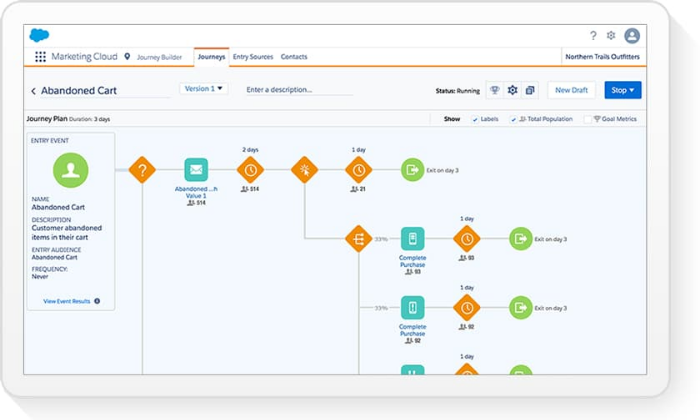
The best customer relationship management (CRM) software helps you build this valuable insight. It streamlines and simplifies business processes for service agents and sales reps, allowing them to create better experiences for your customers. 

With countless CRM software options to choose from, it’s easy to feel paralyzed. Which one is actually going to help your teams?

To help sort things out, I reviewed the top CRM software available and put together a list criteria to help you make an informed final decision.

The Top 5 Options for CRM Software

  1. Hubspot – Best free CRM software
  2. Salesforce – Best CRM software for versatility
  3. Zoho CRM – Best for small to midsize businesses
  4. Freshworks CRM – Best CRM for sales teams
  5. Creatio CRM – Best enterprise-grade CRM solution

How to Choose the Best CRM Software for You

With so many options and types to choose from, finding the best CRM software for your business can feel like looking for a four-leaf clover.

Start with this. All of these products have been built to respond to problems that businesses face every day.

Yes, there are a lot of parts to CRM software, but each has a purpose.

You know the problems you face. And by reaching out to your customer service agents, sales reps, IT team, and anyone who will be using the CRM software, you can get a rich picture of their daily challenges.

There is CRM software that will help everyone at your organization make the most out of every customer relationship.

Finding it is a matter of understanding where your company is, and where it wants to go.

Business Size

The size of your business plays a role in which CRM software is best for you. If you have separate departments for marketing, sales, IT, and customer service, you need more advanced functions than a business with five employees. 

Furthermore, you need to consider who’s going to manage the software. Choosing and paying for software isn’t the same as using it to its full potential. 

You have to set it up and take advantage of its features for the investment to be worth it. 

For small teams, it may be a collaborative effort of everyone pitching in. However, large teams may have dedicated employees to set everything up and maintain the software moving forward. 

The size of your business also plays a role in how much the software is going to cost. The more user seats you need, the more expensive the software. 

Your Challenges

What’s not working? What could be working better?

Consider what systems you want to streamline and improve. It may help to think about current inefficiencies and how a CRM can help. 

Typically, CRM software helps with sales, marketing, IT, and customer service. Which of those do you want to improve, and do you have the capacity to set everything up and maintain it?

There are specific CRM solutions for particular industries.

These tend to be more expensive, but if they are the right fit for your situation, it’s worth it. Teams will have to spend less time configuring such purpose-built CRM software, which is an ongoing savings. 

Basic CRM Features

Most CRMs include a basic set of standard features. The CRM you choose should include them as well.

While the specifics of each feature vary from software to software, there should be a system in place to help you handle things like:

  • Contact and lead management
  • Document sharing and storage
  • Workflow automation
  • Interaction tracking
  • Mobile access

Look for these core CRM features before making any final decisions. It’s probably also a good idea to watch some videos of how these users manage these features.

Something like contact management is handled differently in each platform. Which one fits best with the way your teams work?

Advanced CRM Features

It’s also important to consider advanced CRM features that can have a big impact on your business.

The ability to automate routine workflows, process payments, and send invoices can save countless hours from every employee’s day.

Really rich automation capabilities are only available with high-tier plans. There’s definitely an added cost, but what about the benefit?

In the end, having advanced features for marketing automation and lead scoring can really drive revenue. Is the juice worth the squeeze?

Also, note that these advanced features are not distributed the same way by vendors. One may offer the high-end tools you need as part of a mid-level plan.

Third-Party Integrations

To really streamline and automate your business processes, your CRM tool needs to play well with the tools you’re already using to run your business.

Make a list of the tools you use and double-check to make sure your CRM integrates with them. I’m talking about:

  • Email platforms
  • Social media tools
  • Internal communication software
  • Customer service tools
  • Calling/video chat software
  • Shopping cart (for ecommerce)
  • Contract/proposal software
  • Connectors (i.e., Zapier)
  • Analytics tools
  • Calendar

Once you have your list, you can use it to narrow down your choices to the right CRM software. You can also use it when speaking with a sales team to make sure they offer everything you need. 

The Different Types of CRM Software

There are three different types of CRM software. The most common type is operational. And thankfully, companies are integrating more features from the other types of software into operational CRM systems. 

Doing so helps minimize the need for businesses to have three separate pieces of software. 

Before diving into my top recommendations, let’s talk about these different types and what they mean. 

Operational

Operational CRMs help businesses of all sizes handle business processes and enhance the lead generation systems they have in place. The idea is that streamlining your operational processes helps your business provide better customer experiences. 

There are four types of operational CRMs, including:

  • Marketing
  • Sales
  • Customer Service
  • IT

These are traditionally what people think of when they hear CRM. So, all of the recommendations on this list fall under this category. 

Analytical

Analytical CRMs help businesses gather, analyze, and leverage data collected from their customers. Essentially, this type of CRM software helps turn large data sets into valuable information you can use to improve the customer experience. 

The recommendations on this list include a few basic analytical features.

But there are certainly more robust CRM tools out there for collecting and analyzing customer data, especially for enterprise businesses with a lot of customer information. 

Collaborative

Collaborative CRMs make it easy for businesses to share everything they learn about their customers using operational and analytical CRM software. 

Essentially, this type of software lets team members quickly pass along lead, contact, and customer information from one department to another. 

Doing so helps track interactions between customers and your business as well as identify your customers’ preferred communication channels. 

Both of those things combined help improve customer experiences. 

Most of the recommendations on this list offer multiple operational CRM solutions that seamlessly integrate, making this type of collaboration easy. 

However, there are better systems out there if you’re looking for something more powerful. 

#1 – Hubspot Review — The Best Free CRM Software

If you’re in the sales or marketing industry, you’ve probably read Hubspot’s blog or taken one of their free certification courses. However, they also offer a robust and free CRM software to streamline your customer relationship management process. 

With Hubspot, you can gain unprecedented insight into how your audience behaves. 

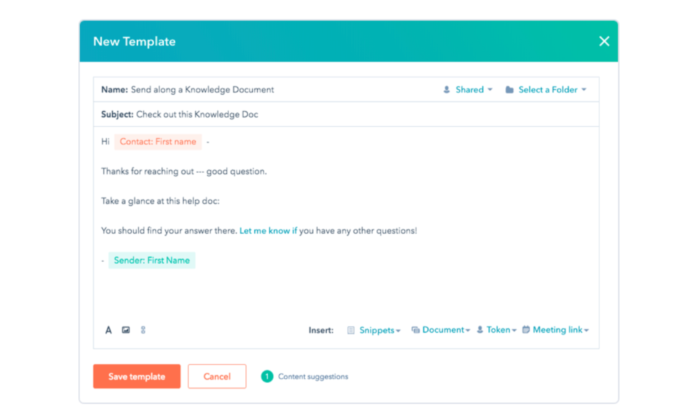
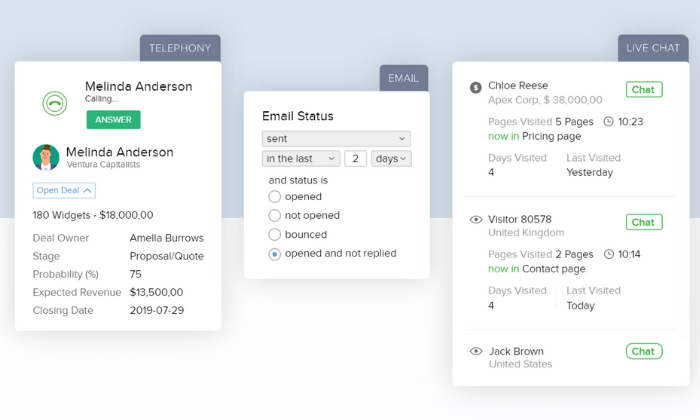
Need to monitor when contacts open your emails so you can optimize your open rates? No problem. Maybe you want to see how a contact behaves on your website. With Hubspot, it’s easy. 

Furthermore, they offer a wide variety of solutions, depending on your role within your company. 

These position-specific solutions include sales, marketing, customer service, operations, and owners. 

The free CRM plan includes a robust set of features, including:

  • Contact management
  • Email scheduling
  • Deal pipelines
  • Meeting scheduler
  • 1-1 live chat
  • Contact website activity
  • Store, track, and manage tasks
  • Document sharing
  • VoIP calling

These features are hard to beat on any other free plans on this list. However, Hubspot’s paid plans are well worth their price as well. 

The Starter Plan starts at $40 per month, paid annually. However, if you want to bundle all of Hubspot’s CRM software, you can get starter access to all four for $50 per month if you commit to a 12-month contract. 

So, for $10 extra dollars a month, you also get software specialized for marketing, sales, and customer service.  

However, keep in mind these prices are based on 1,000 contacts. The price increases for every additional 1,000 contacts you have. 

Sign up for a free plan to get started with Hubspot today.

#2 – Salesforce Review — The Best CRM Software for Versatility

Whether you’re a small business owner or a sales, marketing, IT, or customer support team, Salesforce has the perfect CRM solution. Known for its versatility, they offer specialized software that adapts to meet your needs. 

More than 150,000 businesses, including T Mobile, Adidas, and Yeti, rely on Salesforce to help them build strong relationships with their customers. 

They also offer specialized solutions for 14 different industries, including:

  • Financial services
  • Healthcare
  • Manufacturing
  • Consumer goods
  • Energy
  • Communications
  • Nonprofits

The system is so versatile because you can pick and choose which apps you need to build a complete CRM solution customized to match your business. 

From marketing automation and ecommerce sales to call-center software and self-service portals, Salesforce is dedicated to providing everything you need for unprecedented customer relationships. 

Their business plans include:

  1. Essentials — $25/user per month (basic sales and support)
  2. Sales Professional — $75/user per month (complete sales solution)
  3. Support Professional — $75/user per month (complete service solution)
  4. Pardot Growth — $1,250 per month for up to 10,000 contacts (marketing automation)

However, you can add additional features and applications depending on what you need. They also offer other plans for sales, customer service, commerce, and marketing CRM packages with varying features. 

Start your free trial to take Salesforce for a test drive today.

#3 – Zoho CRM Review — The Best for Small to Midsize Businesses

Unlike the other options on this list, Zoho CRM is an all-in-one solution. There aren’t additional modules to look through for different departments or anything like that. This makes it an excellent option for small to midsize businesses.

They also have an extensive network of 40 other business tools. So, if you’re using Zoho software already, integration with Zoho CRM is seamless. 

Plus, they have a worldwide network of over 150,000+ customers (including Netflix and Bose) in 180 countries, so you know you’re in good hands. 

Furthermore, Zoho offers a free forever plan with up to three users. It includes essential features like lead management, document sharing, task management, workflow rules, and a mobile application. 

However, their paid plans are affordable as well, and they include advanced CRM features like:

  • Real-time sales signals and customer notifications
  • Blueprint business management for both on and offline processes
  • Prospect scoring capabilities
  • Unique sales pipelines
  • Mass emails
  • Inventory management
  • An AI assistant
  • Advanced customizations

The cheapest paid plan starts at $12 per user per month, making it extremely affordable for small businesses. 

Sign up for a free 15-day trial to see if Zoho CRM is right for you. 

Note: Zoho also recently launched a sales-centric CRM specifically for small businesses. It’s called Bigin, and it includes a robust free plan if you’d like to try it out. Bigin’s paid plans are $7 per user per month. 

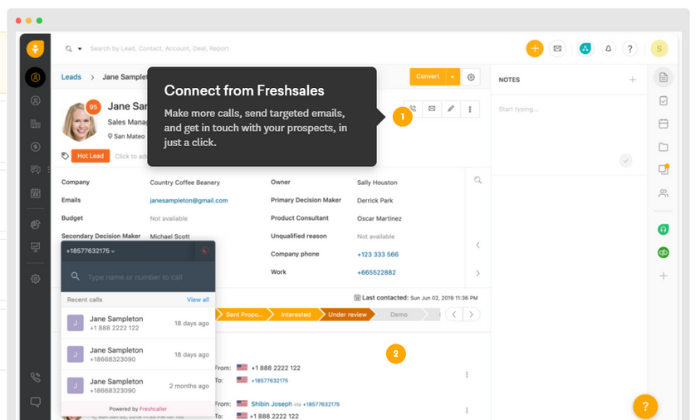
#4 – Freshworks CRM Review — The Best CRM for Sales Teams

Unlike the other options on this list, Freshworks CRM is specifically built for sales teams and lead management. From cold leads to customers, Freshworks helps you make better relationships while saving time with automation. 

Furthermore, this CRM helps you find the best leads, get in touch with them via their preferred method, and close the sale. 

And Freshworks includes a built-in email and phone system to help simplify the process. 

They have a customer base of over 40,000 businesses, including some big names like Dyson and Best Western. So, despite being newer to the industry, they’re not inexperienced by any means. 

With Freshworks CRM, you get powerful sales-based features, including:

  • Lead, contact, account, and deal management
  • Tasks and appointment management
  • Merge or clone records
  • Advanced conversation views
  • Lead scoring
  • Time-based workflows
  • Sales pipelines
  • Team inboxes and email forwarding
  • Email scheduling, templates, and alerts
  • Website visitor tracking
  • iOS and Android mobile apps

Aside from an impressive set of features, they also offer industry-specific solutions for 15 different industries, including retail, ecommerce, manufacturing, logistics, healthcare, and more. 

Their free forever plan includes access for an unlimited number of users with limited features. However, it’s a great way to try it out before investing. 

Freshworks’ paid plans are more robust, yet still affordable for businesses of all sizes. Their premium plans include:

  1. Blossom — $12/user per month (for small teams)
  2. Garden — $25/user per month (for growing teams)
  3. Estate — $45/user per month (for large teams)
  4. Forest — $79/user per month (for enterprises)

Sign up for a free 21-day trial to see if Freshworks CRM is right for you and your sales team today.

#5 – Creatio Review — The Best Enterprise-grade CRM Software

While some of the other CRM software on this list includes an enterprise plan, you may find them limiting if you’re managing a large operation. However, Creatio is an enterprise-grade CRM software built with businesses like yours in mind. 

They offer specific CRM solutions for sales, marketing, and customer service teams.

Marketing Creatio gives enterprise businesses everything they need to streamline their multichannel marketing campaigns and manage incoming leads. It includes features like:

  • Visual campaign designer
  • Website behavior tracking and segmentation
  • Advanced trigger campaigns
  • Personalized email marketing
  • Event tracking and response management

Pricing depends on the number of contacts and the number of emails per contact. 

Sales Creatio is perfect for large sales teams taking over after marketing hands them over. It’s an end-to-end sales management platform built to simplify the process and save you time. 

It includes a wide range of features, including:

  • Opportunity management
  • Customer profiles and buying behavior insight
  • Field sales management
  • Performance and operations

Pricing starts at $30 per user per month. 

Lastly, Service Creatio is for customer service teams interested in streamlining their processes and creating excellent customer experiences from start to finish. It includes features, like:

  • Account and contact management
  • Case and knowledge management
  • Omnichannel communications
  • Service catalog
  • Contact center

Pricing starts at $45 per user per month. 

You can bundle all three CRM solutions if you need to. And you can use their online pricing calculator to estimate the total cost. 

Get started with a free trial to see if Creatio is right for you. 

Summary

Hubspot, Salesforce, and Freshworks CRM are my top recommendations for most businesses. Each one offers a wide range of features suitable for teams from all departments, including sales, marketing, and customer service. 

Furthermore, they’re all affordable, easy to set up, and easy to use.

However, the best CRM software for you depends on your business’s size and the features you need. So, use the criteria we talked about above as you go through the process of making your final decision. 

Which CRM software do you use?

The post The Best CRM Software (In-Depth Review) appeared first on Neil Patel.


The Best CRM Software (In-Depth Review)
Publicado Primeiro em Neil Patel
How These 9 Savvy Entrepreneurs Sell on Instagram Without an E-commerce Shop

sell on instagram

Are you hoping to sell products online, but don’t want to deal with the hassle that comes with setting up and using an e-commerce shop? If you have an e-commerce shop, do you want to streamline the process to make it easier for your customers to purchase your product?

If that’s you, then Instagram may be the answer. In fact, I generated $332,640 in three months from Instagram, and at least 80% of all users follow at least one brand on the platform.

I’m not the only one who has found success selling on Instagram by leveraging features, tools, and creating an awesome Instagram bio.

Why Sell on Instagram?

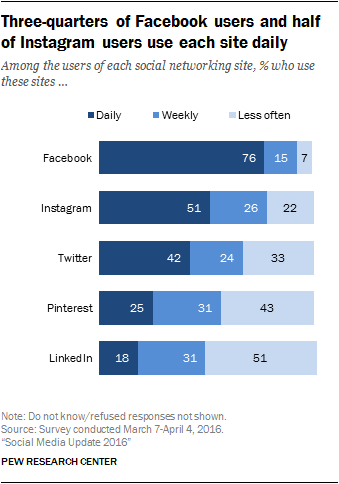
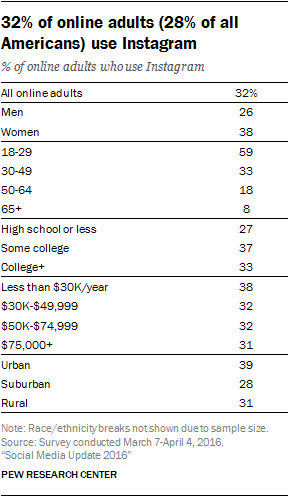
According to PewResearch Center’s 2016 Social Media Update, 32% of Internet users are using Instagram.

At least half of all Instagram users use the platform every day.

Instagram bio - bar graph to show social media data.

It’s worth noting that women are typically more likely to use Instagram than men are. 59% of all Instagram users are 18 to 29 years old.

you can sell on Instagram by catering your audience - this chart shows the demographics for instagram users

If these are your target demographics and you’re not using Instagram, you’re missing out on the opportunity of a lifetime to build brand awareness. More importantly, however, you’re missing out on lots of opportunities to sell on Instagram.

Online-only businesses, brick-and-mortar brands, and companies specializing in providing a service have all found success with Instagram sales.

If you want to avoid an Instagram marketing mistake, you need to sell like the brands that use the platform to bring in some big bucks.

First, let’s look at Artifacia as an example.

1. Notify People that Your Instagram is Shoppable, like Artifacia

Selling tools that Instagram has introduced have made Instagram’s sales potential even greater.

No matter the method you decide to use to make your posts shoppable, you need to let your followers know that your page is shoppable in the first place. You can accomplish this in several ways, but each method requires you to have a perfect Instagram bio.

This strategy can be as simple as posting a photo for your followers like Artifacia did.

CTA photo that leads to an Instagram buy, an important piece of selling on instagram

The photo not only lets followers know that their page is shoppable, but it also gives instructions for customers to visit your Instagram bio page.

How can you ensure your posts and Instagram bio drive sales on Instagram? More suggestions are below.

2. Sell on Instagram by Allowing Users to Pay via WhatsApp and BK Store

Traditional shoppable Instagram posts require you to link back to an e-commerce store on a platform like Shopify.

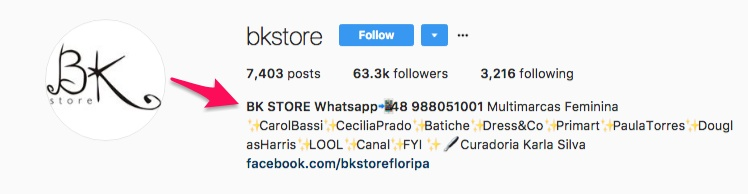
However, there’s a way around that if you use WhatsApp to collect payments from followers as BK Store does. Just add your WhatsApp number to your brand’s Instagram bio and you’re done.

paying via BK Store to help with selling on instagram

Instead of a regular e-commerce store, users can view products in your Instagram feed and text their payment and shipping details to buy products. It’s a popular way to create an online store without an e-commerce platform.

And better yet, Instagram is currently testing a new feature with Brazilian users that will allow you to post Instagram Stories right to your WhatsApp page.

Whats app plug-in to sell on Instagram

You might be able to post product images directly into WhatsApp soon once the feature rolls out to all users.

Here’s how it will work:

  • When you press the “Add to Story” button, a menu will appear with the option to share your Stories on WhatsApp.
  • After you select this option, your Instagram Stories image or video will appear on WhatsApp with an Instagram logo in the bottom corner.

3. Upload a Gallery of Product Images, like Nordstrom

It’s important to build up a gallery of your product pictures on your Instagram page. A killer gallery of images is what will help you funnel your customers.

Be sure not to use any filters, though, since they can distort your images and make your products look different than they actually are.

Studies have shown that posting pictures of real customers using your product can get you as much as 30% more engagement.

They also found that blue-dominant photos get 24% more attention than ones with a lot of red in them.

Also, make sure that your captions are detailed. Give your customers every piece of information that they would want to know in your description.

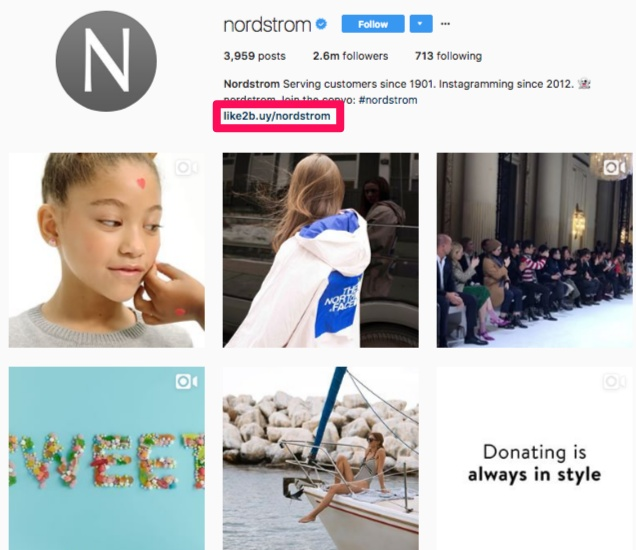
If you want to post other photos besides product images to your page but don’t want your product photos to get lost in the crowd, use a tool like Like2Buy.

A tool like Curalate could help you sell on Instagram.

Once you create a Like2Buy profile, all you have to do is add your Like2Buy link to your Instagram bio, as Nordstrom does.

Nordstorm's Instagram bio using Link2Buy to sell on Instagram

This link is what will lead people to your “storefront.”

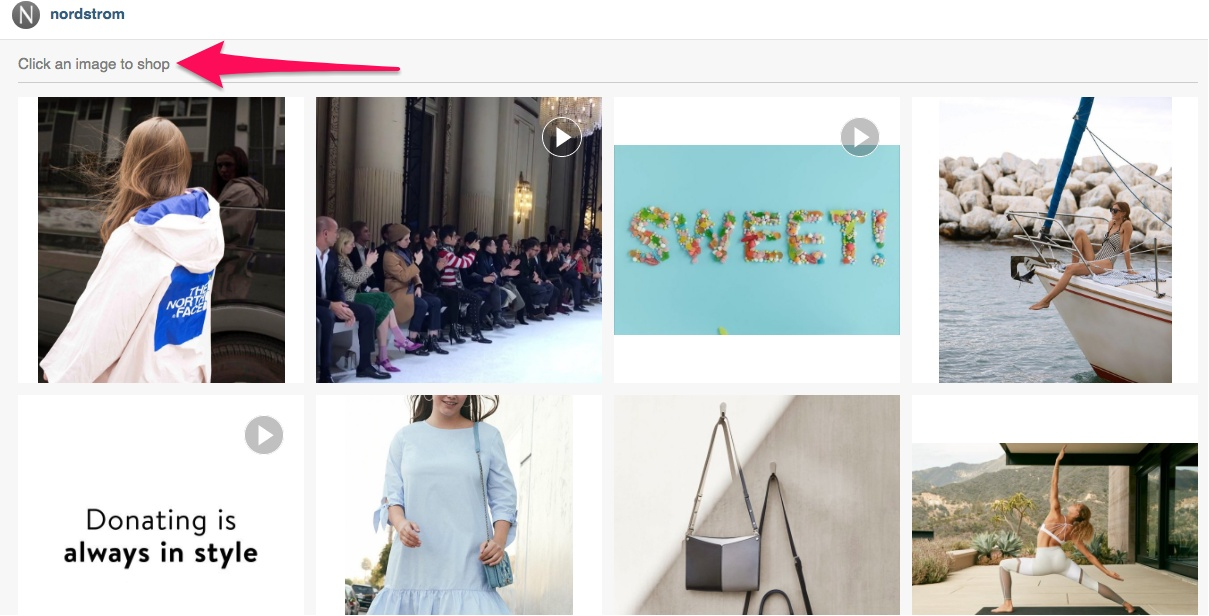
When someone clicks on it, it will send them to your gallery of product images where they can browse through the photos to shop.

All they have to do to find out how to buy a product is click on an image they’re interested in.

Using the Curlate tool in your Instagram bio to help you sell on Instagram

You can add more than one product to a single image, use user-generated content to build trust, or use fan photos.

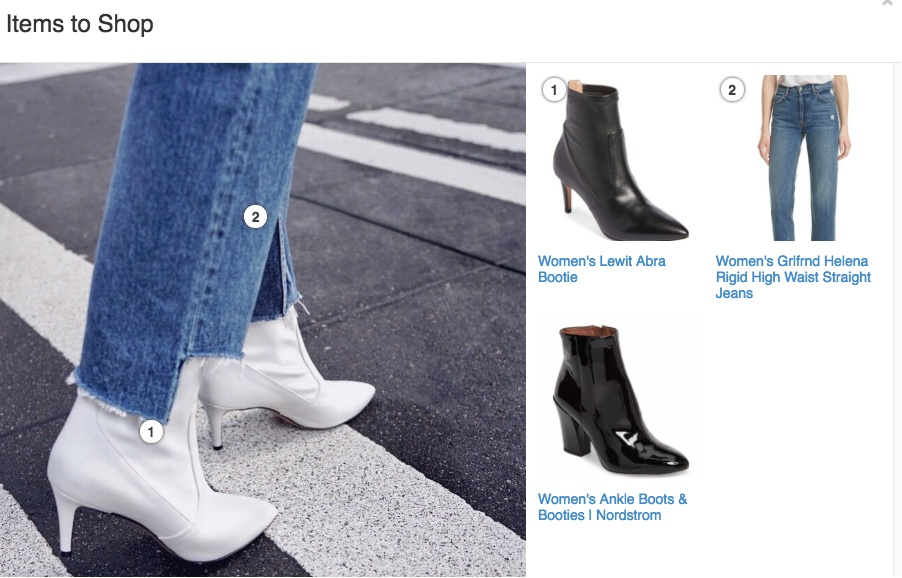
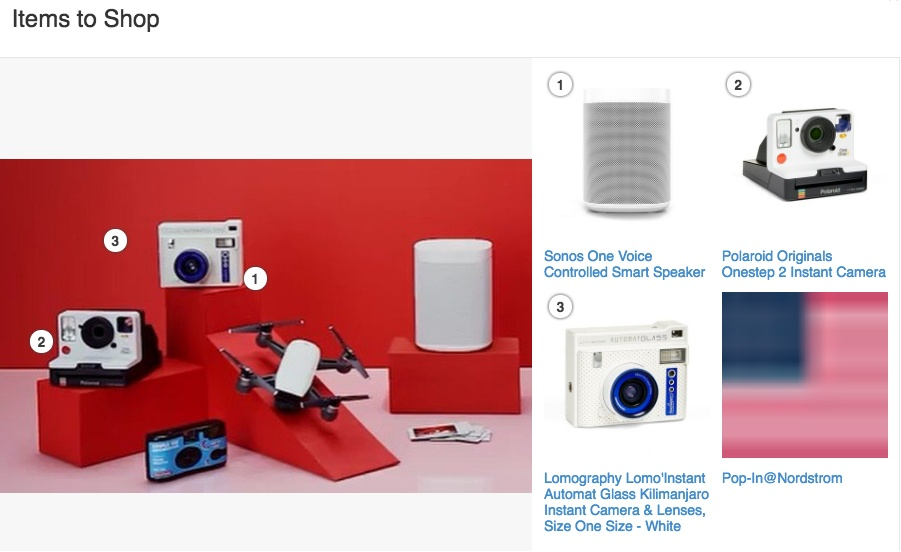
If you upload a photo with more than one product, it will list every product on the right side of the image with corresponding numbers.

Curate tool gives list of products for selling on Instagram

This way, you can add as many products as you want to one photo. This is especially helpful if you have a series or matching lines that you want to show off.

Items to shop and sell on Instagram

With Like2Buy, users will also be able to keep track of all of their likes so that they can see all of the photos and products that they have liked on Instagram under the “My Likes” tab.

That way, if they want to like a post to come back to it later and make a purchase, they don’t have to worry about scouring Instagram or Like2Buy to find it, which helps to increase sales.

You can see detailed analytics of who is viewing your posts as a seller, customize your storefront, or even add an email capture to it to gain some leads from the platform.

Nordstrom isn’t the only big brand using the platform. Forever21 and Williams Sonoma have also found success on Like2Buy.

However, Like2Buy isn’t the best tool for a small online business that wants to sell on Instagram because of how pricey it is. Some have reported that it costs as much as $1,000 per month.

However, if your brand is already well-established or you’re selling items that have a large payoff, this tool might be worth the cost.

4. Increase your Reach and Sell on Instagram using Hashtags, like Bedcolors

On Instagram, hashtags are what users type in to search through content and discover new posts that are related to the topics they’re interested in.

If you use hashtags on product images, you’ll help users discover your post and your Instagram bio get a clear understanding of what your product is before they ever click on it.

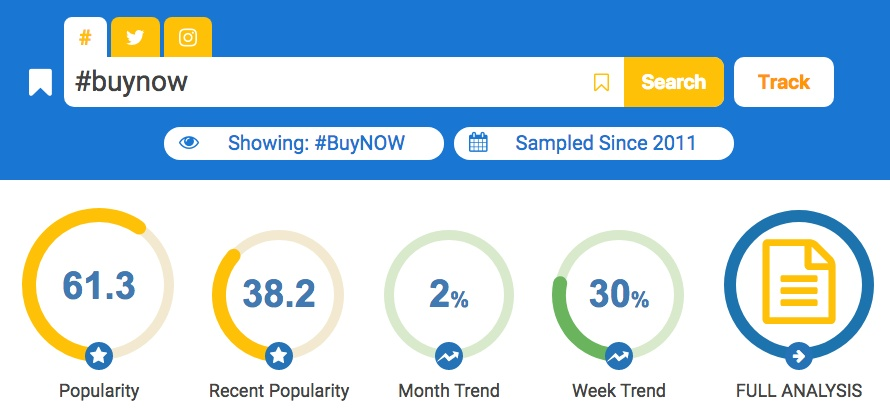
Do some keyword and hashtag research to find out which hashtags your customers are searching for with a tool like Hashtagify.

Hashtagiphy dashboard to find hashtags to use when you sell on Instagram

Try to use enough hashtags to be descriptive, but don’t overdo it. Here’s how Bedcolors uses hashtags in their posts:

Bedcolors hashtags on a post to help them sell on Instagram

The brand puts its tags at the end of its product descriptions so that they don’t get in the way of any important information.

Hashtags that Bedcolors use are at bottom of description - best place for them to be to sell on instagram

Speaking of product descriptions, you need to make sure to beef yours up.

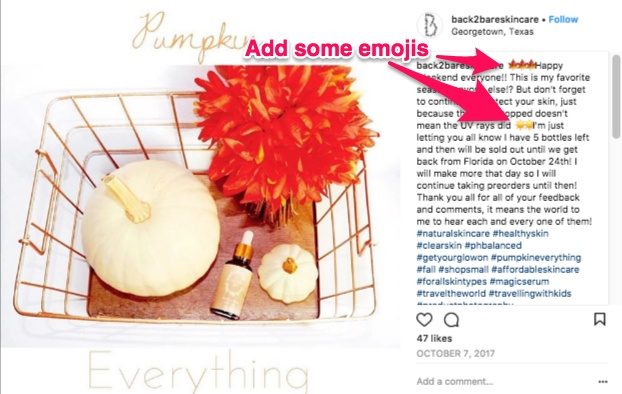
5. Beef Up Your Product Descriptions, like back2bareskincare

It’s important to get the message across about exactly what you’re selling, but you also need to keep it interesting to attract the attention of customers.

One way to do that is to incorporate emojis into your descriptions. Everyone loves emojis, and they help to break up your words.

For example, use some seasonal emojis or add a few that directly relate to your product, like back2bareskincare.

using emojis to help sell on Instagram

6. Sell on Instagram using the Comments, like Gigi’s Boutique

Soldsie is a tool that lets users purchase products directly from their Instagram feeds without ever having to exit out of the app. It also works for Facebook.

Both sellers and buyers must integrate Soldsie software with their Instagram pages before they can use the “comment selling” feature.

Start off by uploading your product images and including important product information, like what colors and sizes are available.

Then, ask your followers to buy your products by commenting the word “sold” on the post and writing their desired size, color, or other selection information.

Some online retails take it a step further by adding the hashtag “#commenttoorder” to their posts.

Customers can comment on posts to help you sell on Instagram

Once buyers have commented on your post, Soldsie will send them an email with an invoice. You can then receive their payment for the product via a credit card or PayPal.

Pricing for Soldsie depends on the plan you choose. The basic package is $49 per month, and Soldsie takes a 5.9% commission on sales.

You should also chat with your buyers regularly to build trust and long-lasting relationships with them.

7. Chat with Buyers Online, like Archie McPhee

When followers comment on your posts with questions about your products or company, it’s obvious that you should comment back and help them out.

This increases the likelihood that they will trust you enough to make a purchase, and it ensures that you’ll have happy customers.

Providing great customer service isn’t the only goal you should have when chatting with buyers in the comments, though.

Focus on having engaging conversations with your followers like Archie McPhee.

sell on instagram by chatting with your followers

The brand even includes products and product links that might relate to a customer’s contribution to the conversation, which is helpful for making even more sales.

sell on instagram by engaging followers like Archie McPhee

This technique will make users feel like there are real people behind your brand and your Instagram page that they can interact with.

They’ll start to think of your page as more of a “friend” that they trust and follow, which means that they’ll be more comfortable trusting you with orders.

Using influencers to share posts about your company and your products is another simple way to build trust with Instagram users.

8. Partner with Influencers for Indirect Sales on Instagram, like NECTAR Sleep

You can grow brand awareness and boost sales by partnering with influencers on Instagram.

By partnering with influential people on the platform, you can reach specific target audiences that are interested in your products and services but don’t know it yet.

Instagram influencer marketing has become a game-changer for social selling. And the payoff is enormous.

On average, brands generate $6.50 for every $1 that they spend on influencer marketing.

For example, NECTAR Sleep recently partnered with Daryl-Ann Denner on a post about their memory foam mattresses.

Partnerships that help you sell on instagram

In the description of her video post, she gave information about the company and the product, talked about their free trial, added a tag to their Instagram bio, and used one of their branded hashtags.

At the start, NECTAR Sleep had only 11,200 followers, while Daryl-Ann had 112,000. That means that her post introduced thousands of new people to the brand.

The post gained over 10,000 views in just one day, so it was a huge success.

You can also accept payments for the products listed on your Instagram posts by using a payment gateway.

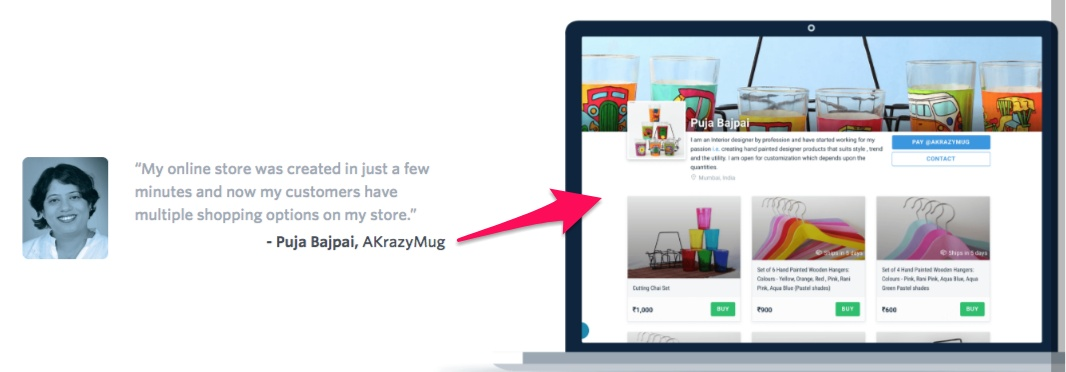
9. Accept Payments for Your Sales on Instagram with a Payment Gateway like AKrazyMug

Unfortunately, you can’t share links in your Instagram pictures back to a place where users can pay for the items.

However, there are a few ways that you can accept payments on Instagram by using payment gateways. One option is Instamojo.

To get started, sign up for an account with Instamojo and follow all of the verification steps. After you have uploaded your KYC, it will take a few minutes for them to approve your account.

From there, you need to get your own payment handle. When you sign up, your @username will become your payment handle just like your Instagram handle.

Once you’ve created a payment handle/username, the link to your Instamojo profile will be https://ift.tt/2E7Ffet.

Your profile page will be a product listing page where your payment links will show up with all of your photos.

Create product links by selecting the “Create a Payment link” button from your Instamojo dashboard.

sell on instagram by using a tool like Instamojo

Be sure to upload a profile picture and cover photo for your brand’s Instamojo page, too.

Next, share product links with your customers in direct messages.

You can reach out to all of the customers who like your Instagram post by sending them a message linking to your Instamojo page. Or, you can send links to the customers who DM you first with questions.

As soon as a user actually buys your product, you’ll receive an email confirming that they have purchased it.

From there, all you have to do is use Instapay to request a payment. Send buyers your payment handle where they can enter their payment information.

You can also request payment directly from your Instamojo dashboard. If you aren’t sure how to do this, you can read more on how to request a direct payment.

Conclusion

It might seem impossible to sell products online without having to set up and run an e-commerce shop. However, that’s not the case. A large chunk of Internet users are active on Instagram every day. Most of them follow at least one brand, so it’s a perfect place to find engaged buyers.

You can generate tons of sales from Instagram if you play your cards right, like the nine savvy entrepreneurs in this post.

If you want help implementing some of these strategies or would like help in other aspects of social media or content marketing, let’s talk. We are available to talk through your goals and how to reach them.

How do you make sales on Instagram?

The post How These 9 Savvy Entrepreneurs Sell on Instagram Without an E-commerce Shop appeared first on Neil Patel.


How These 9 Savvy Entrepreneurs Sell on Instagram Without an E-commerce Shop
Publicado Primeiro em Neil Patel
The Best Web Hosting Services (In-Depth Review)

Disclosure: This content is reader-supported, which means if you click on some of our links that we may earn a commission.

Do you want to skip the read and get right to my top picks? The best web hosting service for most people is Dreamhost or Hostinger.

Looking for a hosting solution for your website?

You’re in luck because with today’s options, it has never been easier to keep your website online.

They take care of all the technical stuff and you get to enjoy casually updating your website for conversions.

And the best part is that most of them are very affordable which helps startups get a hold of their business quickly.

That’s why I put together a list of the best hosting services of 2021 for you.

So without further ado…

The Top 8 Options For Hosting Your Website in 2021:

  1. Dreamhost Best option if you want quick and responsive website changes
  2. Hostinger – Low-Cost shared hosting options for startups
  3. Bluehost – Best for WordPress hosting
  4. Nexcess – Best ecommerce hosting
  5. HostGator – Most affordable option for startups
  6. WP Engine – Best for managed WordPress hosting
  7. InMotion – Best option for scaling BIG
  8. Siteground – Best for WooCommerce hosting

How to Choose The Best Hosting Service For Your Website:

When it comes to the best web hosting services you have to look at various important factors.

If you jump in too quick you might get into something that’s not suitable for your business.

But don’t let any of that doubt creep into your mind. 

Instead, sit back and relax while we present to you all the factors that you need to be aware of before making a decision.

You can weigh the different web hosting services and decide which is the best solution for your specific business.

Hosting factor #1 – Uptime reliability: 

If your hosting is down, no one would be able to access your website.

And obviously you want your website running 24/7.

Luckily, in 2021 this is not a huge problem since most web hosting providers offer a ‘99.99% network uptime guarantee’.

That means that your website would go down very rarely.

And even when it does, you can contact your hosting service and you will get compensation.

Most of the time that would be in the form of hosting credits.

If you want to prepare for the worst, you can check out our Website Downtime Survival Guide.

One of the best practices to making sure everything runs smoothly even when you’re taking a break is to sign up for a tracking tool like uptime robot. 

If your hosting service crosses the line, this tool will notify you that you need to find a new webserver to host.

Hosting factor #2 – Speed is key:

Website loading speed is extremely crucial when it comes to SEO optimization in 2021.

That’s simply because if your pages load slowly, people will bounce out of your website and your ranking will fall down the drain.

You need a trustworthy host provider that can guarantee optimal website loading speed.

The thing is that you can’t know the exact loading speed before you try the hosting service yourself.

But you can always optimize your website loading speed using free tools and effective loading speed practices.

And the best news is that even if your budget is tight, you can still get a good loading speed.

But don’t expect anything spectacular for say $4/month.

Generally, the higher the price, the faster your pages will load.

Anyways, we will include our personal experience regarding loading speed for each of the options down below.

Hosting factor #3 – Customer service:

Good Customer Service will come in handy when something goes wrong.

Especially if you’re new to websites, you’re bound to make mistakes that may lead to your website being down for a while.

And the more time it’s out, the more it will cost you.

So a good support team will help you get the issues solved in no time.

Even if you made a major mistake that’s impossible to come back from…

Most support teams will have a full backup of your website so you can get back to a working version.

You always want your support team to have a live chat or a telephone you can call.

Email just doesn’t make the cut if you want to resolve the issue fast, which you should want, given that your website is down.

We made sure to include only website hosting services with strong communication skills.

The Different Types of Web Hosting Services:

In 2021 there are a lot of different types of web hosting services.

The most commonly used being:

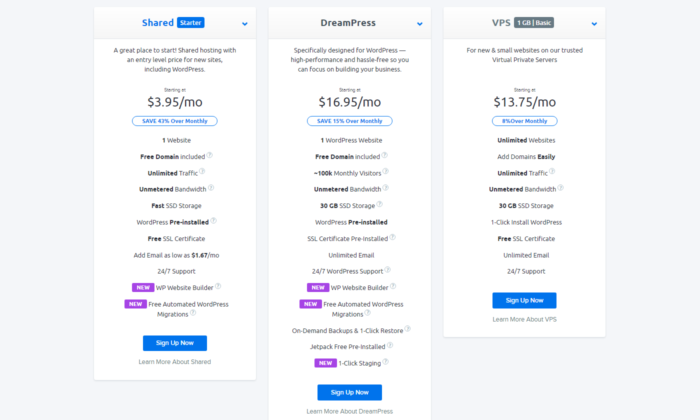
Shared Hosting

This means your website will be stored on the same server as a bunch of other websites.

It is a cheap option for startup websites.

With the right one, you can have customizable options and average loading speed.

Don’t look at Shared Hosting as a long-term solution because Shared Hosting can not withstand high levels of traffic.

It’s definitely a good solution for people that just want to get their website up and running fast.

VPS Hosting

The Virtual Private Server (VPS) is definitely a better option than Shared Hosting.

Each website is hosted in its own virtual space which speeds up your loading speed and also allows you to get more traffic on your website.

This option is best if you’re planning to scale your website fast.

Yet again, it’s not a long-term option if you want to be one of the top websites in your industry.

Simply because it still has limitations when it comes to website traffic.

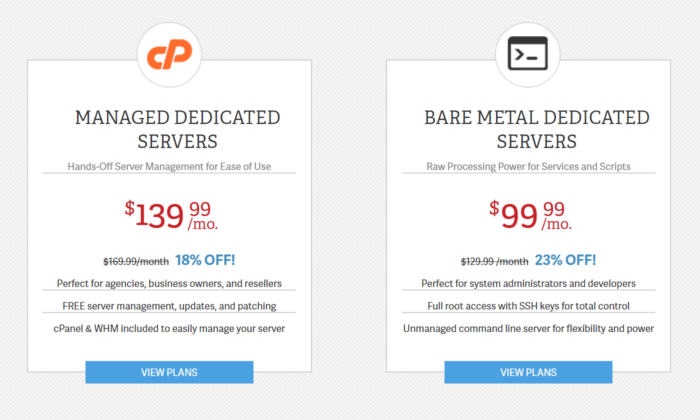
Dedicated Hosting

This is considered the most reliable and overall the best option out there.

You get a dedicated server just for your website with full control over everything.

But prepare yourself for a pricey alternative.

That option is mainly for the best of the best.

If you have plans to scale your traffic to enormously high levels, this is the only option for you.

But if you’re just starting out, we recommend one of the other 2 options.

Anyways, the web hosting services below give you the option to choose between different types of hosting services.

So just choose the one that fits your business and your budget best.

#1 – Dreamhost — Best Option if You Want quick and Responsive Website Changes

Dreamhost has been a big player for the longest time now. 

Founded in 1996 it is one of the oldest hosting services available online.

Some people might think it must be outdated by now.

But that can’t be further from the truth.

Exactly because of their ability to adapt quickly to new trends they’re still considered one of the best in the business.

They don’t look at your website as just another website.

They know that your website is your own vision for the future.

“We Make Sure Your Purpose, Is Our Purpose”

And that’s not just words. Over 1.5 million websites host with Dreamhost.

You can expect great loading speed and friendly, helpful customer support on your side.

With incredibly adaptable services you can literally change your business in a matter of hours.

They know that things change as time passes.

Maybe you want to try out something new.

Maybe you’re certain that your current business model is outdated.
With their fascinating adaptable features, they will be your best friend when making major changes in your website.
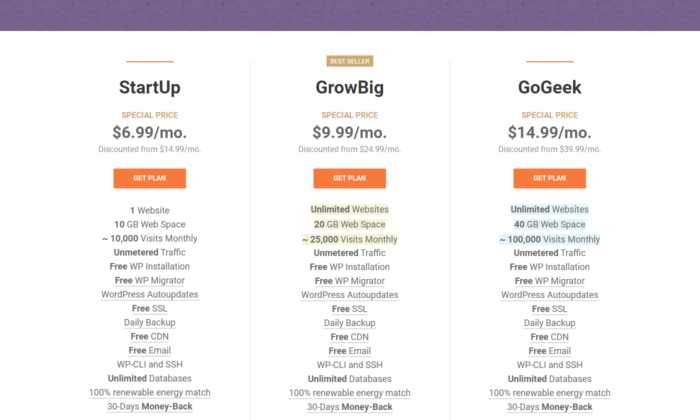
#2 – Hostinger — Low-Cost Shared Hosting Options for Startups

Hostinger is unique with it’s Shared Hosting Services.

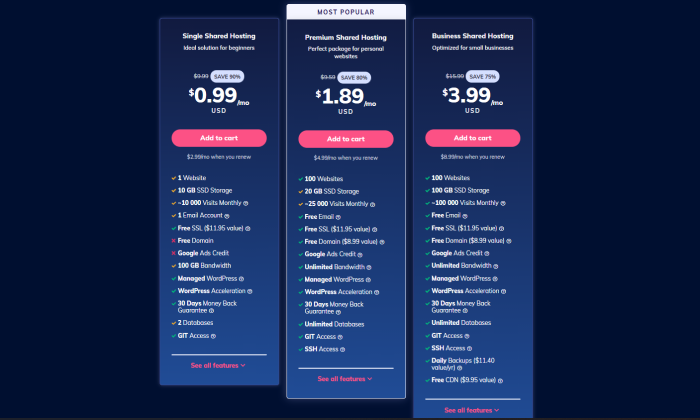
Their prices literally start from $0.99/month. WOW.

Of course, you’ll be very limited with this option but it shows how much they are ready to do in order to satisfy their customers.

We personally recommend one of the higher tier options:

The good thing with Hostinger is that for as low as $3.99/month you can get unlimited access to everything.

With 24/7/365 support, you can expect professional assistance at any point.

That’s less than four bucks a month for great loading speed and daily website backups.

That means even if you mess up badly, you always have access to previous versions of your website.

It is the best option if you’re searching specifically for a Shared Hosting Service that’s affordable and reliable.

#3 – Bluehost — Best for WordPress Hosting

If you’re looking to set up your website in less than a week, you’re probably considering WordPress.

After all, according to NetCraft, 35% of the Internet is powered by WordPress.

And it’s not a surprise. WordPress has been a leader in the industry for years now.

So if you’re looking for the best hosting option for your WordPress website, you can definitely trust Bluehost.

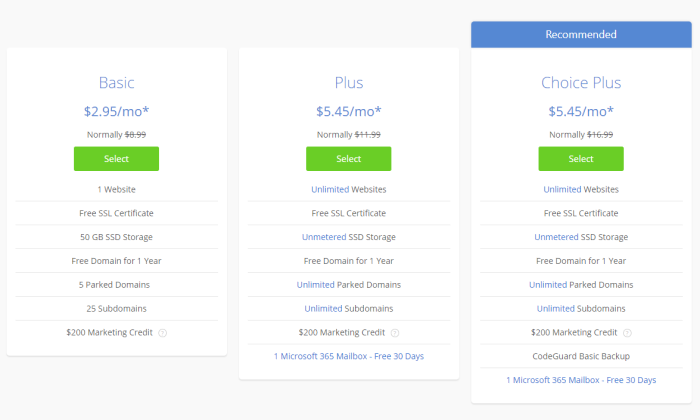
Their pricing options are competitive. Basic is $3.95/month and Choice Plus is just $5.95/month to get started.

This is really affordable considering all the unlimited features they bring to the table.

Regarding website loading speed, as long as you don’t fill your WordPress site with plugins, you should be good.

And even if you make a crucial mistake or overload your website with different plugins, you’re in good hands.

Their Customer Support is extremely responsive. They have both an active telephone line and a live chat you can rely on at all times.

#4 – Nexcess — Best Ecommerce Hosting

If you want a hands-off hosting solution for your online store, Nexcess is an incredibly smart choice. Use coupon code NEIL40 for 40% off 4 months.

They offer a wide range of hosting options with specialty solutions for Magento, WordPress, WooCommerce, BigCommerce, Drupal, and more.

Plus, you get one-click auto-scaling to handle unexpected traffic spikes, 24/7 monitoring and customer support, and premium SSL certificates to keep your site and visitors safe.

So, you get everything you need to start, manage, and scale your online store.

On top of the amazing features, Nexcess has been around for 20 years with more than 500,000+ websites under their belt.

As such, they know a thing or two about how to help make your life easier.

With that said, it’s not the cheapest option on this list. But you do get more features, better support, and improved performance with the higher price tag.

So, if you need advanced security or expect to grow quickly, Nexcess is an excellent e-commerce hosting solution.

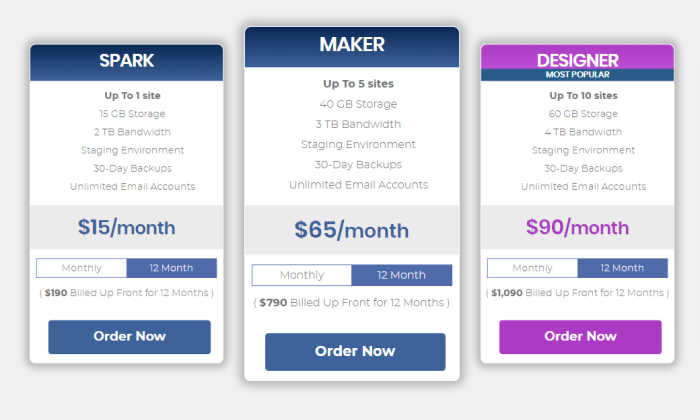
WordPress hosting plans start at $15 per month for one store, 15 GB of space, and two TB of bandwidth.

However, pricing varies based on the platform you choose. Use coupon code NEIL40 for 40% off 4 months. Sign up now.

#5 – HostGator — Most Affordable Option for Startups

HostGator is one of the most preferred options when it comes to blogging.

They are perfect if you’re looking for the most affordable way to begin posting online.

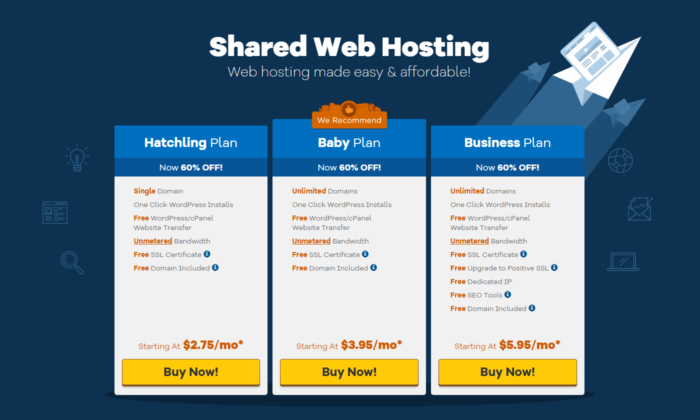
Pricing options start from the jaw-dropping $2.75/month.

Once again, you can’t expect the best features for such a low price.

But it’s a great alternative for startups that want to get their website up and running.

And just like Bluehost, they have a responsive telephone line with a live chat you can access at any moment.

You can also find a giant database with common questions beginners have, together with professional opinions and solutions to those problems.

Everything is explained and demonstrated step-by-step and if you’re still not sure that you can do it on your own.

Just shoot them a message and start chatting with their professional customer support.

#6 – WP Engine — Best for Managed WordPress Hosting

We’re getting to the more advanced options now.

With WP Engine you get a blazing fast and ultra-reliable WordPress site without any work on your part.

The company invented the idea of managed WordPress hosting—where the provider takes over all the backend technical work—and WP Engine is still the leader in the field.

WP Engine hosts WordPress exclusively. Their servers are optimized for just this type of site. And when you reach out to customer service, you will be talking to an expert who handles WordPress issues 24/7.

Of course, the top-notch uptime, speed, and customer service is not as cheap as some of the others on the list.

But if you don’t have to hire a WordPress developer to maintain your site’s security and performance (or spend time figuring that out yourself), going with WP Engine can actually be cost-effective.

You just have to contact them and work out the best plan for your specific situation.

Of course, their experts are going to help you choose the correct option without pushing you to stuff you wouldn’t need.

Every plan comes with best-in-class tools to develop your WordPress site. No other host offers such a variety and depth of features, such as one-click staging areas where you can build and test your site before it goes live.

Test that new social media WordPress plugin in the staging area to make sure it doesn’t cause problems for other plugins or themes. This is way better than discovering an issue after it breaks the site and kills traffic.

It’s a great hosting service if you’re looking to take your WordPress site to the next level without the IT headaches and responsibilities. Your teams can focus on creating great sites and let WP Engine ensure everything is running correctly.

Don’t expect cheap services, but expect great quality and support on the way to your successful business.

#7 – InMotion — Best Option for Scaling BIG

Are you positive that your website is going to dominate the online space?

If you’re 100% sure, then you should definitely take a closer look at InMotion.

Their VPS and Dedicated hosting services are far from cheap.

But with Premium prices come Premium services. We are talking fast loading speed and devoted customer support.

Obviously there’s also affordable WordPress Hosting and Shared Hosting options.

But if you’ve tried these before and now you’re looking for the next step.

InMotion is going to overdeliver on every promise.

Check out their plans and choose the one that fits your needs best.

#8 – Siteground — Best for WooCommerce Hosting

Do you want to sell your products online?

Then you’re probably in need of a good, reliable WooCommerce Hosting Service.

If that’s that case, then you should take a look at Siteground.

They have separated their pricing options depending on your scalability.

Most Hosting Services cut you here and there when it comes to cheaper options.

This is not the case here!

Siteground really wants to overdeliver, even if you choose their cheapest options.

Their Customer Service has a whopping 90% resolution at first contact.

That means that 90% of the time you’ll chat or speak with an expert in their team and resolve your issue in no time.

So if you’re looking for the best WooCommerce solution, Siteground is the hosting service for you.

Your Hosting Service Is Your Best Friend

Make sure you make a well-thought-out decision.

You’re most likely going to have a long-term relationship with the hosting service you choose.

So carefully look into every option that caught your eye today and choose the one that fits your needs best.

So, whether you choose one of my top recommendations or scout out your own, use the tips and best practices we talked about to make an educated decision… like the future of your business depends on it. 

Because it does!

Have you worked with any website hosting companies in the past? How did it go and did you get the results you hoped for?

The post The Best Web Hosting Services (In-Depth Review) appeared first on Neil Patel.


The Best Web Hosting Services (In-Depth Review)
Publicado Primeiro em Neil Patel