segunda-feira, 5 de outubro de 2020

Reputation Management Consulting

How would you feel if your conversion rate grew by 120 percent? 

Research from Uberall shows that companies that move their aggregate review rating from 3.5 to 3.7 stars experience a 120 percent growth in conversions. If your review rating increases by 0.1, you can experience a conversion rate boost of 25 percent! 

If you’re familiar with reputation management, you understand the impact it can have on your business. If you’re like most business owners, you’re unsure how to build, protect, and use your reputation effectively. 

Reputation management solves that problem. 

Reputation management consulting gives you an actionable plan showing you how to build, protect, and amplify your reputation. 

7 Ways a Reputation Management Consultant Can Help Grow Your Business

When most people think of reputation management, consulting isn’t the first thing that comes to mind. Most businesses automatically assume that they have the skills and training they need to manage their company’s reputation on their own. 

Many people think it’s just about getting reviews. 

Ask your customers to write reviews for you on Yelp or Google Reviews, and your reputation grows automatically. It’s fast, simple, and easy, and to a certain extent, it works. 

But it’s also not enough. 

This is why you need reputation management consulting. With the right support, you’ll: 

  1. Understand the different types of reputation: Consultants will help you identify whether your reputation is positive, mediocre, negative, or positive and negative. They’ll show you what the impact of each will be and how each will impact your business. 
  2. Understand where your reputation is strong or weak: Your reputation management campaigns should start with benchmarks. You’ll need to know where you’re doing well and the areas that need improvement. Your consultant should be able to prioritize the areas in your business that require your attention first. Do you need to improve product quality? Or should you focus on improving customer service first? Which review platforms will have the biggest impact on revenue? They should be able to answer these questions and provide you with a plan you can follow. 
  3. Know how to build your reputation: You build your reputation in several ways — product and service quality, customer service, awards and accolades, financial performance, results achieved for customers, etc. They’ll point out obvious but missed details; if your reviews are positive but your customer service is poor, it’ll eventually catch up with you. 
  4. Identify the tools, resources, and people you’ll need to build your reputation. Will you need third-party review management tools? Will each of these tools need login credentials? They should provide you with a list of the items you’ll need to run a reputation management campaign successfully. 
  5. How to use and amplify your reputation to grow your business: Most companies that understand the value of reputation management focus their attention on getting reviews. They’re not sure what to do with the reviews once they have them. Your consultant will show you how to use your reviews to attract more customers and lower advertising costs. They should also provide you with a plan that uses your reputation to increase your conversion rates and revenue. 
  6. Have what you need to protect your reputation: Your company can make all of the right moves and still end up with a poor reputation. Bad review blackmail, competitor fraud, bad customer behaviors, social or political missteps, and general crises are all issues that need to be addressed and prepared for. 
  7. Know how to repair your reputation: Your consultant will provide you with a crisis management plan that deals with any major or minor problems, and provides you with a recovery plan to bring your company back from any reputational disasters. Your consultant will provide you with a realistic timeframe. 

These are areas that you’ll need a consultant to help you with. 

How to Get Started With a Reputation Management Consultant

The consultant you choose can help you get started with the items you need ahead of time. But it’s better if you come into the relationship prepared and ready to work. Here’s a list of the items you’ll want to prepare ahead of time. 

  • Set goals, objectives, and KPIs for your campaigns: These will most likely change once you bring your consultant on, but you’ll want to have an idea of the goals you’re looking for ahead of time. Focus your attention on both internal and external goals. For example, an internal goal would be improved customer service ratings from customers who contact you via phone, live chat, or email. An external goal would be more four and five-star reviews on Yelp or Google reviews. 
  • Choose a point-of-contact and team that’s responsible for review management. Typically marketing, customer service, or sales receive the responsibility for review management. You’ll want to choose a single department and team, give them the decision-making authority and autonomy they need to manage your reputation. 
  • Create a governance policy: You’ll want to determine the specific people who will work with your consultant to implement the changes they recommend. You’ll also need to set legal guidelines that specify what your team should respond to, when they should respond, and how to do it. It can be as simple as deciding that you’ll respond to all reviews. This is also likely to change a bit once you have your consultant on board. 
  • Create and claim all of your review profiles: Make a list of the review sites in your industry; create an account for the mainstream, niche, industry-specific, and specialty sites. If you need to create an account specifically for your consultant, get that ready ahead of time. 
  • Share credentials and access: Your consultant may ask for access to third-party tools (i.e., Google Analytics). If you’re using third-party review management tools, they may request access for those as well. Depending on the consultant you choose, they may also need access to content management or web development tools. 
  • Set reporting requirements: You’ll want to set guidelines on your campaign reporting. How often do you want your consultant to provide you with campaign updates and reporting? Who should receive these reports? Owners and management, in addition to the team that’s responsible for reputation management? 

Your reputation management consultant will tell you what they need to get started, but it’s always best if you’re prepared ahead of time.

Measuring the ROI of Reputation Management Consulting Services

Measuring ROI is one of the biggest hurdles in consulting. Research from Consulting.us points to ROI as a problem. They found that 27 percent of the companies surveyed refused to hire consultants because it’s too hard to measure ROI. 

This doesn’t have to become a problem that keeps you from hiring a reputation management consultant. In fact, you already have the information you need to measure the ROI of reputation management. If you’ve done the upfront work of setting goals and KPIs for your campaigns, you already have what you need to measure your ROI. 

Work with your consultant to calibrate your goals upfront. 

You’ll want to get your consultant’s help with the goals, objectives, and KPIs you’ve set with your team. Your consultant should be able to tell you, at the beginning of your campaigns, whether your goals, objectives, and KPIs are realistic and in line with reality. 

If your goals aren’t realistic, your consultant should be able to explain why. 

If they are realistic, and both of you come to an agreement with the goals that you’ve set, measuring your ROI is easy. Just refer to the goals you set at the beginning of the relationship, then verify that your consultant has helped you to reach those goals. 

It’s a simple and easy way to make sure you’re getting the ROI you need to be profitable. 

4 Point Checklist For Finding the Right Reputation Management Consultant

Choosing the right reputation management consultant doesn’t have to be complicated or difficult. You can approach the vetting process the same way you would for any other consultant or professional. You outline your values, expectations, and requirements ahead of time; then you find the providers that meet your criteria. 

Here’s a shortlist of the criteria you can use. 

1. A Stellar Reputation

Your reputation management consultant should have a stellar reputation in the industry. There shouldn’t be any questions about their legitimacy or doubts about their integrity. If a consultant has lots of negative reviews, poor feedback, or concerns about their standards, they’re not a good fit for your business. 

Look for customer feedback on public sites, forums, or social media. There should be a 5 to 1 ratio of positive to negative feedback about their business. Ideally, you’re looking for a large mix of reviews, positive feedback, and buzz around their business online.  

2. A Proven Track Record

Your consultant should be able to provide you with case studies, testimonials, or references. You’ll want to hear from clients directly. You’re looking for evidence that shows you: 

  • How they work
  • The problems they solved
  • The results achieved
  • The way they served their clients

These details provide you with lots of materials you can work with. Some reputation management companies may write case studies where they conceal their client information, ignore those. Ask your consultant to provide you with one or two examples from clients who’ve decided to share their story. This makes it easier to do some basic fact-checking if something doesn’t sound right. 

3. Their Plan For Your Campaign

A great consultant will be able to give you a high-level overview of the strategies and tactics they’ll use to improve your reputation. They should lay their plans out in detail, covering important details like: 

  • The content they’ll create for you
  • How they plan to improve your reputation (with specifics)
  • Who they’ll ask to write about your business
  • How they’ll get others to talk about your business
  • How they respond to reviews and feedback
  • Their approach to SEO
  • Whether they’ll share content with you before posting it online

They should be open and completely transparent with you about your campaign. Anything less than that is a serious red flag. If your consultant is doing anything on your behalf, they must be transparent with you about their work. 

4. They Answer Your Questions 

You should be able to ask your consultant important questions about your campaign. They should provide you with clear answers to each of your questions and concerns. Here are some questions you may want to ask your consultants ahead of time. 

  • Will you see the content they post before it’s posted?
  • Do you have experience helping other clients in my industry? 
  • How would you respond to a legitimately angry customer? 
  • How do they plan on improving your reputation? 
  • How will an improved reputation accomplish your goals?

If the consultants you’re considering refuse to answer your questions or they’re evasive, it’s probably a good idea that you choose a different consultant. 

Feel free to expand on these criteria and add the details you’re looking for on an as-needed basis. 

Conclusion

Reputation management has a huge impact on your business. If you’re looking for a consultant to help you with your campaigns, you probably already know that. 

When most people think of reputation management, consulting isn’t the first thing that comes to mind. Many companies aren’t interested in hiring consultants because they don’t know how to measure ROI.  It’s common for businesses to assume that they have the skills and training they need to manage their company’s reputation on their own. 

Use this guide to find the reputation management consultants you need.  Choose your values, expectations, and requirements first; then create a list of consultants who fit that list. The consultants you find will be able to help you meet your goals. 

The post Reputation Management Consulting appeared first on Neil Patel.


Reputation Management Consulting
Publicado Primeiro em Neil Patel

How to Check Website Traffic For Any Site

check website traffic

As website traffic is the number of people who visit your site, it forms your website’s foundation. Without traffic, no one reads, clicks, signs up, or buys.

Sure, you might check your traffic daily, but do you know what to look for? Or how to check the website traffic of your competitors?

Let’s explore the whys and hows of monitoring—and improving—your traffic, as well as how to check website traffic from some of the sites you’re competing against in search results.

Why Should You Monitor Website Traffic?

You can’t improve what you don’t measure.

Whether you’re looking to generate more sales, get more email signups, or increase your advertising income, you first need to know where you’re at right now.

That means diving into your website statistics to figure out where your traffic is coming from and how it’s engaging with your site (as well as competitors).

So, how do you check website traffic for your website?

How to Analyze Your Website’s Traffic

There is only one standard tool you should take into account when analyzing your site traffic: Google Analytics.

Connected directly to your website, Google Analytics tells you exactly how many visitors your site is getting, where they’re coming from, how they’re interacting with your content.

But what data should you pay attention to?

Website Traffic Statistics to Consider

  • Unique visitors: People who visited your site at least once within the selected date range
  • Pageviews: The number of pages viewed on your website within a selected date range
  • Organic search traffic: A count of the people who visited your site via a search in Google or another search engine
  • Other traffic channels: How many visitors your site gets from other channels such as Facebook and Youtube, as well as from referral traffic (visitors clicking on a link to your website from another website)

While there are many more statistics tracked by Google Analytics, these are the main ones to look at when analyzing your site’s traffic.

Things aren’t so straightforward when you want to check your competitors’ website traffic, though.

Analyzing Competitors’ Website Traffic

When checking website traffic of sites that aren’t yours, you’ll usually want to know more than how many visitors they’re getting. Some good reasons to analyze your competitors’ traffic are:

Unfortunately, you can’t just log into their Google Analytics to get this data. So, where can you get it instead?

Top Tools for Checking Website Traffic

A wide range of tools, both paid and free, allow you to check website traffic. The ones below all have solid reputations and are worth checking out.

Ubersuggest

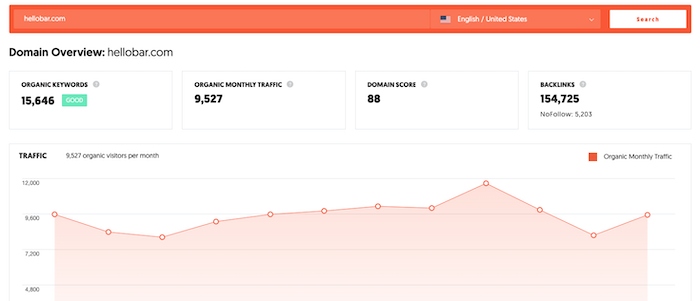
Our tool, Ubersuggest, has competitive pricing and unique combination of SEO courses, coaching, and research tools in addition to traffic estimates and keyword information.

ubersuggest example check website traffic

Curious? Sign up for a free account using your Google login to check it out.

Ahrefs

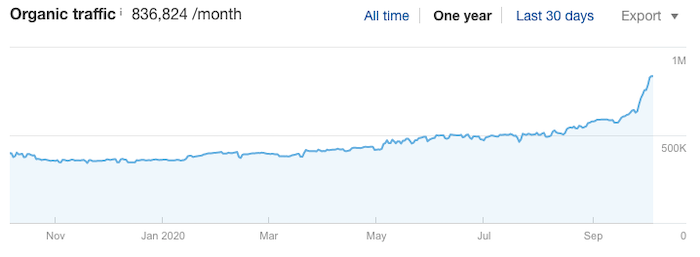
Ahrefs is one of the most popular and complete SEO audit tools out there. Its organic search overview report gives a good idea of the kind of organic traffic a site is getting and which keywords are bringing the traffic. You can use that data to go after the keywords that are bringing your competitor traffic.

Ahrefs only gives you an estimate for a site’s organic traffic. It won’t tell you anything about its traffic from sources like social media.

Ahrefs organic check website traffic example

A test done by Ahrefs showed their tool underestimated unique organic visitors for 74.14% of the websites they looked into.

Ahrefs has a seven-day trial. After that, you need to opt for one of their paid plans.

SEMrush

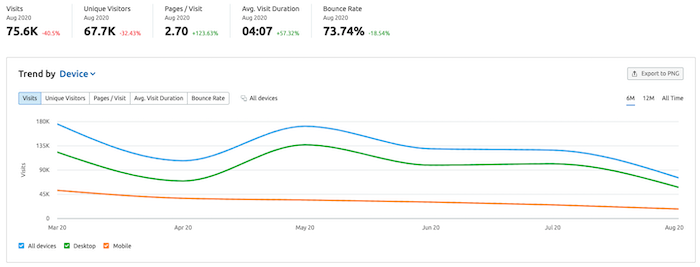
Like Ahrefs, SEMrush is a complete SEO audit tool with an extensive range of features. One of those is its traffic analytics report, which shares data such as an estimated number of unique visitors, traffic sources, top pages, and more.

SEMrush also shows you which keywords your competitors are ranking for. Based on this and the keyword’s search volume, you can estimate how much traffic each keyword brings to your competitors.

semrush check website traffic example

SEMrush has a free version that includes the total organic traffic of a site and its five top-performing keywords. If you want more details, you need a premium subscription.

SimilarWeb

SimilarWeb offers an overview of a site’s total traffic, its top traffic sources, and which countries traffic is coming from. However, it’s crucial to know SimilarWeb has a limited pool of data, and it often won’t return results for small or recently-launched websites.

In a test by ScreamingFrog, SimilarWeb came out as the most accurate website traffic checker when compared to Ahrefs and SEMrush, overestimating organic traffic by just 1%. However, for high-traffic sites, Ahrefs returned more accurate results.

SimilarWeb has a free version that gives you an estimate of a site’s monthly visits and five keywords it ranks for. If you also want to know about unique visitors and other keywords it ranks for, you have to pay for the premium version.

Serpstat

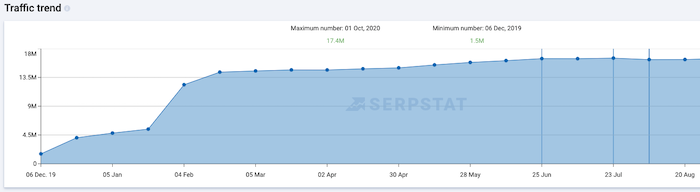
The free version of Serpstat gives you an estimate of a site’s total traffic, its top-ten keywords, and its ten best-performing pages. It also gives you an idea of a site’s traffic evolution over time. For more detailed data, you need a paid plan.

check website traffic on serpstat example

SE Ranking

SE Ranking allows you to check a website’s organic traffic and the keywords it ranks for. It has different pricing plans depending on how many features you need, how often you want your rankings to be updated, and how long you’re willing to subscribe. There’s also a 14-day free trial if you’re going to do a test run.

Quantcast

Quantcast doesn’t look like a website traffic checker initially, because it focuses on data for publishers and marketers who want to grow their audiences. However, whenever a company signs up to Quantcast, part of their data becomes publicly available.

The downside is you can only look up sites that use Quantcast, and while there are over 100 million websites that do, there’s a chance your competitors don’t.

Quantcast has a limited free version that’s mostly targeted at getting data about your website. You need a paid edition for more statistics.

Alexa

Alexa has both a free and a paid version. The free version is somewhat limited, only giving you a site’s Alexa rank based on its Alexa rank but not its actual traffic. To get an estimate of that, you need to sign up for the premium plan (or the 30-day free trial).

It’s also good to know Alexa only has data on sites visited by the millions of users in their data panel and some direct sources. It’s possible you won’t find your competitors there.

While using one of these tools is the easiest way to check website traffic for your competitors, there are other methods you can use. They take a bit more work, but they can get you more accurate results.

Checking Website Traffic Without Tools

Here are some ways to check for website traffic without using free or paid tools like what we’ve mentioned above.

Look For an “Advertise With Us” Page

If your competitors offer advertising or other collaboration opportunities, they’ll likely have an Advertise page on their websites. If they do, they might even list their traffic right there for you to see.

To quickly find out if a site has an Advertise page, enter this search phrase in Google:

site:domain advertise with us

Don’t use ” ” to indicate you want an exact match for “advertise with us” as they might be using a different name. Nevertheless, this search should make their advertising page pop up at the top of the search results— if they have one.

One thing to pay attention to when you check website traffic this way is when the Advertise page was last updated. If an Advertise page hasn’t been updated in six months or more, you can assume the data on there isn’t correct.

Look for a Media Kit

A media kit or press kit usually includes not only traffic statistics but also information about the site’s audience and where the site has been featured.

While some businesses have their media kit on their websites, they’ll often link to a pdf. Still, you should figure out if your competitor has one by searching:

site:domain media kit

Other terms you can use are “press kit,” “press pack,” and “media pack.”

As with pulling website statistics from Advertise pages, it’s important to check when a media kit was last updated, so you don’t work with outdated numbers.

Conclusion

There are several methods for checking competitors’ website traffic. You can use a tool, do some digging, or straight up ask them. While utilizing tools will often give you results in the most efficient way, it’s essential to realize that any traffic stats are estimated.

If you want to check website traffic for your site, installing and using Google Analytics is the way to go. It tells you exactly how much traffic you’re getting from which sources, making it easier for you to analyze what you need to work on next.

What’s your favorite way to check your competitor’s traffic? Go ahead and tell us in the comments.

The post How to Check Website Traffic For Any Site appeared first on Neil Patel.


How to Check Website Traffic For Any Site
Publicado Primeiro em Neil Patel
How to Choose The Right Social Media Agency

The power of social media as a marketing and advertising channel is hard to deny.

42% of all Internet users use social networks to find more information about brands. Plus, 27% of UK and US users say they discovered new brands via social media ads this year. (It shared the top spot for brand discovery with TV ads). 

With this much potential, you need to know that you’re doing it right. You might want to work with a social media agency if you:

  • have a budget but aren’t sure how to get the most from it
  • are struggling to increase performance 
  • don’t know how to measure the results of your social media efforts etc.

Once you know that you’d like to work with a social media agency, the next step is, of course, figuring out how to choose the right one. So, here are some mighty useful tips for you:

Know Your Goals and Desired Outcomes

The first thing you must establish is what you hope to achieve through social media. Your goals will inform your social media strategy and how you measure success, which can only benefit your business… 

Research shows that companies with a defined content strategy achieve 27.1% higher win rates and 18.1% higher quota attainment rates.

Having goals will also help you to allocate your budget and resources. When you know what’s most important to your business you can delegate wisely and get more bang for your buck.

Here are some fundamental social media goals you may wish to strive for:

1. Increase Brand Awareness

Your goal is to reach a bunch of new people on social media. You want to increase your online presence and to get people talking about your brand or content. So, you might work on upping your following, mentions and share count.

2. Generate Leads

You want to use social media to plant the seeds of interest and encourage potential customers to enter your sales funnel. For example, you can gather email subscribers from social media by posting your best gated content as ads.

3. Boost Sales

You aim to use social media in a way that directly impacts revenue. You might, for instance, use audience insights to advertise relevant products to the right people.

4. Increase Engagement

Your goal is to get people to interact with your social media posts. This boosts customer loyalty and makes people feel more of an affinity with your brand. Thus, you’ll work on getting more likes, comments and so on.

5. Create a Community

You may wish to boost engagement even further by building a dedicated community around your brand. For example, you might focus on creating an active Facebook group or use a branded hashtag to encourage regular conversations about your brand or products.

6. Provide Great Customer Service

It’s now common practice for people to reach out to brands for help (or to complain) on social media. Therefore, your goal might be to stay on top of those communications in order to keep customers satisfied.

Once you know what your goals are, you can share them with a social media agency and create milestones to reach together.

3 Characteristics that Make a Great Social Media Agency

Bear in mind that there are a few key elements you need to look for when choosing a social media agency:

1. They Offer a Customized Service

Some agencies use the same social media strategies for all of their clients. This simply doesn’t work. 

Each client has a unique target audience and their own business objectives. So, social media strategy can’t be a one-size-fits-all thing. You need to find an agency that offers a personalized experience catered to your needs and goals.

2. They Have a High Level of Expertise

There are thousands of digital agencies in the US alone. Many offer a broad range of similar services. It’s no wonder then that it’s difficult to choose between them when they all offer the same thing.

Thus, the differentiating factor has to be a refined level of expertise. At Neil Patel Digital, for example, we know what we do well and we know what’s going to perform. That’s why we’ve perfected our specialism: creating impactful paid social campaigns.

3. They’re Proven to Get Results

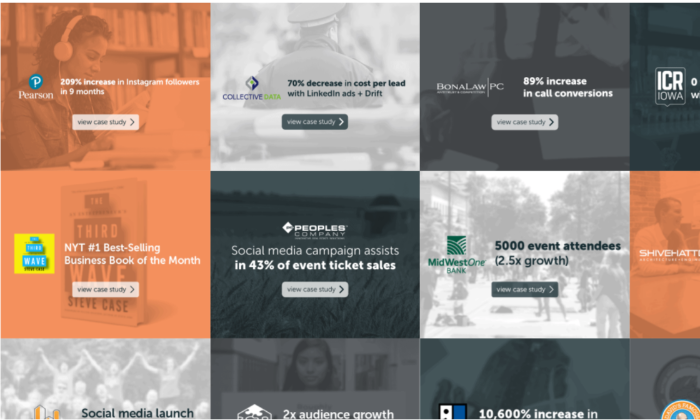
A great social media agency can prove they create high-performing campaigns. Hence, you should look for case studies, testimonials and reviews that show the agency is capable. 

All in all, you must seek out an agency that has credibility, expertise and offers a service catered to your needs.

How to Work with a Social Media Agency

Working with a social media agency is a two-way street. Here’s what you need to do to get the most out of your collaboration:

1. Be Clear and Realistic About Your Goals and Expectations

The social media agency you work with can for sure help you with goal-setting if you don’t know where to start. 

However, if you do have goals and expectations in mind you need to communicate them clearly. Because otherwise, they won’t be able to meet all of your expectations… unless they have somebody with the psychic powers of Professor X working at their agency.

The simplest way to make sure your goals are clear and realistic is to have SMART goals. They should be Specific, Measurable, Achievable, Relevant and Time-bound.

2. Share the Right Info

A social media agency will be able to achieve more on your behalf if you share relevant documentation, guides, plans and reports with them. 

For instance, you might have a documented content strategy across multiple channels, including your blog, email newsletter and so on. The social media agency will need to align what they do with your overarching strategy.

Or, perhaps, you have a strict brand style guide. Share the guide and the agency will be able to choose the right tone and design elements for any creative that they produce.

The purpose of sharing the right information is to make sure the agency gets on the same page as you as quickly as possible.

3. Communicate Well

It’s not only important that you communicate your goals and the right information at the beginning of your working relationship, but also that you keep up communications throughout campaigns or projects.

If you’re able to communicate effectively and efficiently, all of your social media ads and content will go out on time and meet your requirements. This means you have to do the necessary work on your end, too, for example, sharing new company information you want to post in advance or approving content as scheduled.

Above all, communication is key throughout the entire process. A social media agency will want to help you achieve your desired outcomes, but you have to empower them to do so.

How to Find the Right Social Media Agency for You

Research and compare social media agencies before you make a decision. There are a number of places you can find relevant information, aside from a company’s website.

Seek out credible reviews from sites, such as Clutch, G2 and FeaturedCustomers. A Google search will also pull up mentions of the agency around the web.

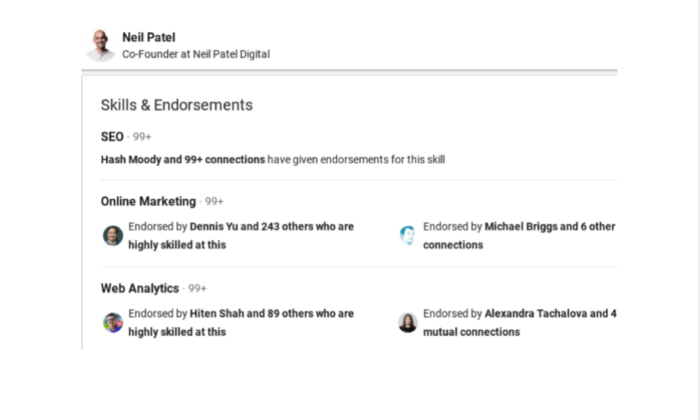
You can take a deeper dive into an agency by looking them up on LinkedIn. Check out the company’s top brass and see if they have been endorsed and recommended by clients and peers.

Researching these sources isn’t just about seeing how many stars a company has to their name, however. You will also get an idea of what size clients they work with, what kind of projects they work on and the average budget of their clients. This will help you see if, generally, you’re a good fit.

Similarly, you need to know if the agency specializes in the social media services you’re looking for. For this, you may need to do some groundwork. Consider the goals you’d like to achieve and what methods or tactics will help you achieve them.

To help you along in your research, I’ve put together a shortlist of the top social media agencies for different specialisms:

The 8 Top Social Media Agencies

#1 Neil Patel Digital — Best for Social Media Advertising

The expert team at Neil Patel Digital creates winning paid social media campaigns using thorough customer research and data-driven analysis. 

Thanks to our extensive skill sets and experience, we’ve been able to work with some mega brands, such as eBay, Google and Intuit.

We’ll help you realize your business objectives through effective audience targeting, powerful messaging and exceptional creative. 

#2 Viral Nation — Best for Influencer-Driven Marketing

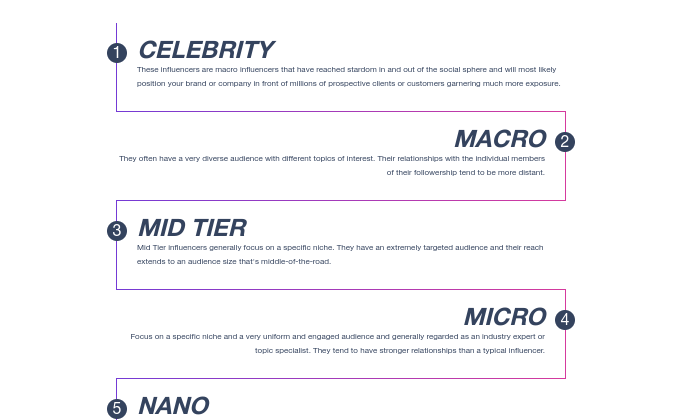
Viral Nation is best-in-class for influencer marketing campaigns. They work with a wide range of influencers, from nano-influencers to macro-influencers and celebrities.

As per their name the agency aims to create viral campaigns that produce a high return on your investment. Furthermore, Viral Nation can help you grow on both established and emerging social channels, such as TikTok and Twitch.

#3 Pan Up Productions — Best for Video

Pan Up has created unique and creative social video campaigns for a number of big-name brands, such as Netflix and Apple. For instance, they recently co-produced a pop-up wedding in NYC based on the Netflix show The Umbrella Academy.

Note that they also work with up-and-comers in a number of spaces, such as e-commerce.

#4 Joseph Studios — Best for Organic Growth

Joseph Studios focuses on non-paid social media promo for B2B and B2C clients, which includes activities, such as customer engagement and community building.

The agency has a solid reputation online and has proven its ability to drive more impressions, engagement and social media actions organically.

#5 Social Media 55 — Best for Industry-Specific Marketing

What’s interesting about Social Media 55 is that they have expertise in a number of specific niches, such as bridal, political and real estate. As such, they’re able to hone in on niche-specific tactics and strategies. 

They also offer a range of general services, such as influencer marketing and social media management for SMBs.

#6 Sculpt — Best for SaaS and B2B

Sculpt works with B2B and SaaS companies who hope to acquire leads and customers through social media. The agency has a number of case studies that showcase high-performing social media campaigns.

Also worth noting is that Sculpt doesn’t work solely with B2B brands, they also handle social for charities and nonprofits.

#7 Sociallyin — Best for Reputation Management

Sociallyin specializes in community and reputation management. As such, activities include customer support and engagement, along with analytics and brand monitoring.

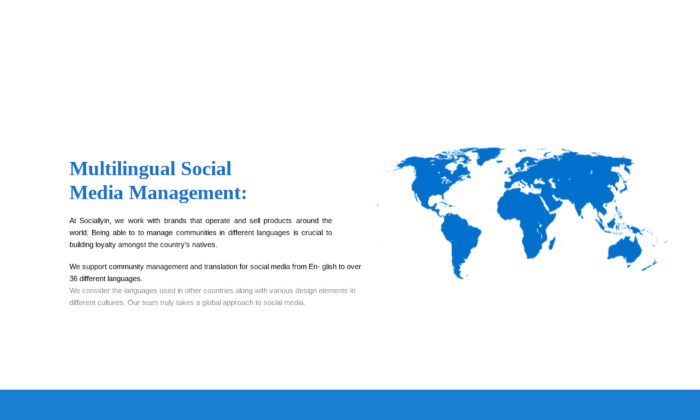
They work with brands of varying sizes and on an international level, as they also offer multilingual social media services. 

Some notable clients include Toyota and TGI Fridays.

#8 Brafton — Best for Custom Extras

What makes Brafton stand out is the unique add-ons they offer alongside their social media packages. For instance, you can add live blogging or live Tweeting for events or news coverage.

Despite being a large agency, clients have praised the quality of their work and their communication skills.

As you can see, these agencies have different specialisms and tend to work on different kinds of projects. So, it really does pay to have an understanding of what you hope to achieve from the get-go.

Conclusion

With more people using social media to research brands and purchases, it’d be crazy not to take advantage of it as a marketing or advertising channel. 

But, there may be areas where your knowledge or resources are lacking. So, it’s natural that you’d consider working with a social media agency.

The first step in choosing an agency is to know your goals and desired outcomes. The reason being, your goals will inform the strategies you want an agency to pursue for you and help you seek out experts that are the right fit for you. 

What are the business objectives you’d like to achieve through social media?

The post How to Choose The Right Social Media Agency appeared first on Neil Patel.


How to Choose The Right Social Media Agency
Publicado Primeiro em Neil Patel
How Technology Affects Communication

how technology affects communication

For better or worse, technology affects communication because it is a part of our everyday lives. It impacts the way we work, entertain ourselves, and stay in touch.

You might see the average elementary-aged child with their head buried in a smartphone and tempted to take a gloomy outlook on what technology has done to us. But is it all bad?

From a business perspective, you could argue that technology communication is beneficial.

With this in mind, here’s a breakdown of everything you need to know about how technology affects communication with customers, plus how to use these developments to your advantage.

How Has Technology Affected Communication?

Technology communication affects us continuously. As we make technological advances, new trends in communications emerge and often become the norm.

Machine learning and artificial intelligence will have a significant impact on how we communicate. Chatbots currently field over 25,000 conversations per month.

Furthermore, 75% of all companies now use automation tools. Many of the processes we automate involve communications, e.g., email marketing, messaging/chatbots, and social media engagement.

Another recent trend is the growth and widespread adoption of video conferencing technology. Approximately six in ten Americans use video chat platforms for social or work purposes. 38% of the six in ten had never previously used video conferencing.

Is Technology Good for Communication?

There are pros and cons to the ways we use technology to communicate with customers.

On the one hand, technology affects communication by making it easier, quicker, and more efficient. It allows you to track conversations and therefore provide better customer service. Tech also makes it easier to gather customer insights and improve the entire customer experience.

However, some fear technology affects communication by hindering our ability to build relationships with clients and will lead to brands becoming faceless entities.

The truth is that as long as you’re aware of such pitfalls, you’re less likely to fall victim to them. There are many more ways to use technology communication to build customer relationships than you may have realized.

How to Use Technology to Affect Communication Positively

Let’s take a look at six of the best ways you can implement technology to not only streamline communications but also make interactions more meaningful:

1. Monitor Brand Mentions on Social Media

You can use social media analytics to gather customer feedback, manage your online reputation, provide excellent customer service, and gain customer insights.

Though 56% of marketers use social data to research their target audience, it seems they aren’t using data in other useful ways as often.

Only 39% use data to build customer connections, 31% report their findings to management/colleagues, and 30% use it to analyze trends.

This gives you a chance to gain a competitive edge. Use a tool such as Hootsuite to track social analytics, monitor brand mentions, and track customer feedback.

Explain to your customers how you will use this data and their feedback to inform your brand and its social media presence. This will make followers feel more of an affinity with you as a brand that genuinely listens to its customers.

These days, many tools also include features that go beyond standard performance analytics, such as likes and shares, to allow you more in-depth insights, e.g., sentiment analysis.

There is tons of insightful data you can glean from analytics tools that can help you improve comms and, ultimately, your relationship with your audience.

2. Offer Immediate, 24/7 Communication

Some find the idea of chatbots as a means of communication impersonal, and maybe even creepy. However, it seems chatbots are here to stay. They are now able to answer up to 80% of routine questions.

If you can let a customer service bot handle frequently asked queries from your customers, saving you time and resources, it’s not just beneficial for you. It’s beneficial for your customers too.

Customers want a quick response time when they engage with brands. Customer service bots mean that customers can get the help or answers they need around the clock and in many cases, get answers immediately.

If you’re worried a chatbot could be impersonal, keep in mind that chatbots are able to hand the customer off to a real human when the conversation needs a personal touch. Services such as Tidio combine customer service bots and live chat on one platform. You might want to add a bot like this to your site or online store.

Some chatbot services, such as SnatchBot, also offer omni-channel communications.

This enables your customers to get in touch on their preferred channel, whether it’s Facebook Messenger, Skype, WhatsApp, etc.

Essentially, feature-rich chatbots are becoming a ubiquitous form of communication these days. It’s a technology trend that most will eventually adopt to streamline communications.

3. Automate Communications

Automation puts small businesses and entrepreneurs on an even playing field with large corporations. If you don’t always have the resources or time to speak to your customers directly, you may benefit from automated communications. Marketing automation boosts productivity by 20%.

Social Media Communication Automation

There are several ways to automate communications. For example, there are some social media management tools, such as HappyFox, which act as a sort of social media helpdesk. Using a tool like this allows you to automatically filter conversations and direct them to the right person.

Automation can provide useful, speedy responses to customer queries, issues, or complaints. After all, consumers say the most important attribute of customer experience is fast response times (75%).

Email Automation Communication

Email automation is also a huge time-saver. Tools such as Mailchimp or Drip can help you automate the following:

  • Sending a series of onboarding emails
  • Sending an invitation reminder
  • Chasing up an abandoned cart
  • Re-engaging subscribers who haven’t opened an email in a while
  • Delivering special offers on occasions like birthdays

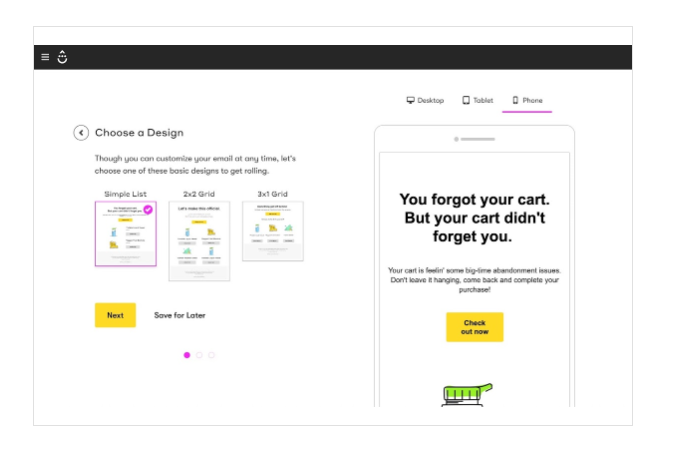
Use your chosen tool to set up behavioral triggers for specific emails. The example below shows the behavior “abandoned cart” that triggers an abandoned cart email.

how technology affects communication through email marketing

You can also create email workflows based on user actions. For example, let’s say you send a webinar invitation. Those who sign up get put into one email sequence with event reminders and so on. Those who don’t sign up enter a different sequence with more nurturing to encourage a sign-up or they receive a different, more relevant offer.

4. Keep Track of Communications

When you have lots of customers it can be difficult to keep track of your interactions, even if you have the best intentions. However, the customer or client you’re speaking to doesn’t necessarily care that you have tons of other customers.

Your customer’s needs and their experiences are always going to be most important to them. If you can’t provide a seamless customer experience, then inevitably they’re going to be dissatisfied.

This kind of thing can have an impact on your business. The majority of consumers shop more with companies that offer consistent experiences.

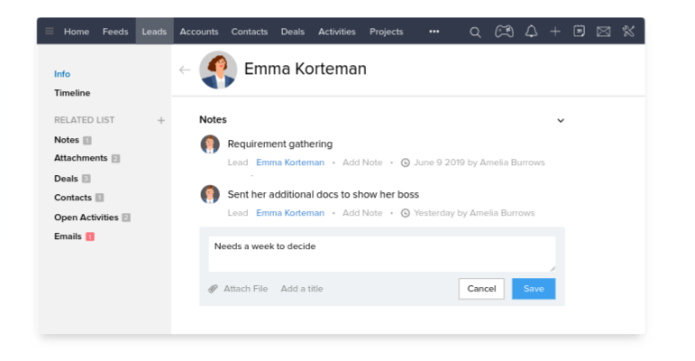
This is where technology affecting communication comes in. A CRM (customer relationship management platform) means you can keep track of all interactions with clients or customers across multiple communication channels.

You’ll save all of the vital information for each client, record notes, monitor the status of sales, etc. on a platform that may look something like this example from Zoho:

CRM example of how technology affects communication

This means even if your customers speak to a new team member, that person can have all of the client’s information right there in front of them to make sure they offer a personal and valuable conversation.

There are many popular CRMs out there, such as Zoho, HubSpot, and Salesforce. Choose one that fits your budget and the size of your company. Also, consider whether the CRM allows for integration with other software you might need and if its features are going to allow you to work collaboratively and efficiently.

5. Make Self-Service Easy

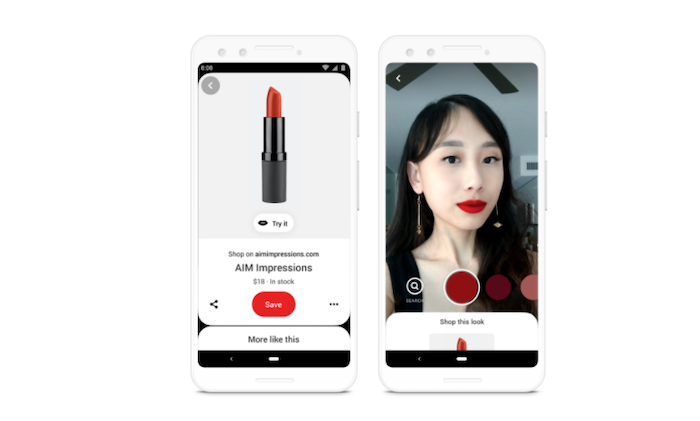
Nowadays, some technologies seem like they belong in a Sci-Fi movie. For example, you can order products by voice command on IoT devices and even try products via augmented reality.

AR example: how technology affects communication

The point is, thanks to technology communication, sometimes you won’t have to interact with customers on a personal level at all. Many consumers prefer that these days. Over 60% of US consumers opt for a digital self-service tool such as a website, app, or voice response system when they have a simple inquiry.

It’s of the utmost importance that you make it as simple as possible for customers to find the information they need for themselves. There are a few ways you can do this.

First, we’ve mentioned chatbots that answer routine queries.

Another option is to put a forum or knowledge base on your site. Figure out what kind of information both potential and existing customers need to know. You can do this by carrying out surveys or gaining insights from your sales and customer support teams.

Then serve up the information in the form of help articles, onboarding emails, walkthrough guides, video tutorials, and so on.

Even when communication isn’t a two-way thing, you need to have the tools in place for customers to self-serve.

6. Make the Most of Video Chat

The shift towards remote working, freelancing, nomadic entrepreneurship, and the like has been on the rise for some time. Technology affects communication by making it possible to work closely with clients who may even be on the other side of the planet.

It is possible to maintain communications with clients from a remote setting, using apps such as Zoom, Microsoft Teams, and Google Meet. What you may still be getting used to, however, is how to get the most from video chat.

Be sure to make use of the features your chosen app has to offer. For example, utilize screen sharing on customer service calls as you’ll be able to show, rather than tell, a customer exactly how to fix their problem (or find what they need on your website).

As well as recording your session, some video chat services can also automatically transcribe the conversation for you. This makes it easier to save and search for key information at a later date in order to keep communications consistent.

However, be wary of features that may do more harm than good. For instance, a slideshow running behind your head while you’re talking is just going to distract your clients

You need to explore the capabilities of the video platform you’re using to make client calls more efficient and useful.

Conclusion

Yes, technology affecting communication has its downsides. But doesn’t everything?

It’s totally possible to use technology to communicate effectively and efficiently with customers. In some cases, you can even use tech to strengthen customer relationships.

This is particularly true as your business grows and you need to implement some kind of tool or software to help you stay in touch with your team or your customers.

How will you integrate a tool that aids communication in your tech stack?

The post How Technology Affects Communication appeared first on Neil Patel.


How Technology Affects Communication
Publicado Primeiro em Neil Patel
domingo, 4 de outubro de 2020

Best Remote Access Software

Disclosure: This content is reader-supported, which means if you click on some of our links that we may earn a commission.

Have you ever been in your office and realized the files you need are on your home computer? Maybe you’re working remotely or meeting a client, but need to access an app from your office PC.

With remote access software, you can view or access another computer from anywhere in the world. 

This functionality is extremely versatile. You might use it to log into a client’s computer and help them overcome technical questions. Or you can share your screen with colleagues as you run a demo on your device. You can also transfer files between two computers without having to go through email or file-sharing software—even from unattended devices. 

It’s a common misconception that remote access software is only for help desks, but these tools can be used by anyone. 

Which remote access software is the best? After researching and testing dozens of options, I’ve narrowed down my list to five that I can recommend with conviction. 

The Top 5 Options For Remote Access Software

  1. Parallels Access
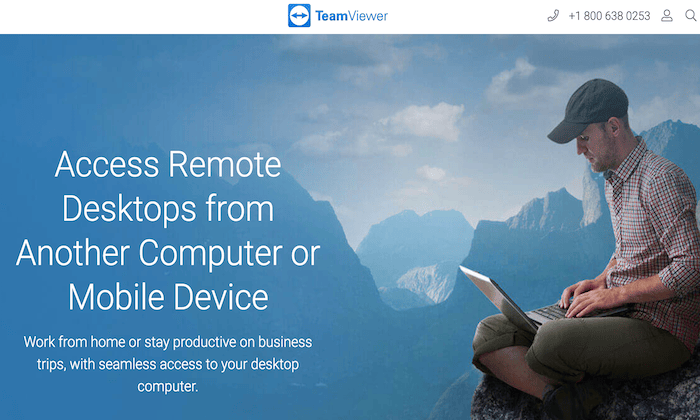
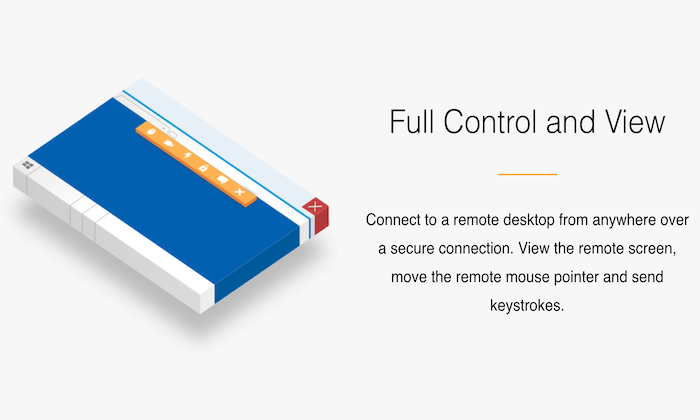
  2. TeamViewer
  3. Remote Utilities
  4. Zoho Assist
  5. LogMeIn Pro

How to Choose the Best Remote Access Software For You

Finding the right remote access software can be tough if you don’t know what to look for. But there are certain feature sets and considerations that must be evaluated as you’re comparing different options.

I’ll break these factors down into greater detail below, so you can make an informed buying decision.

Compatible Devices

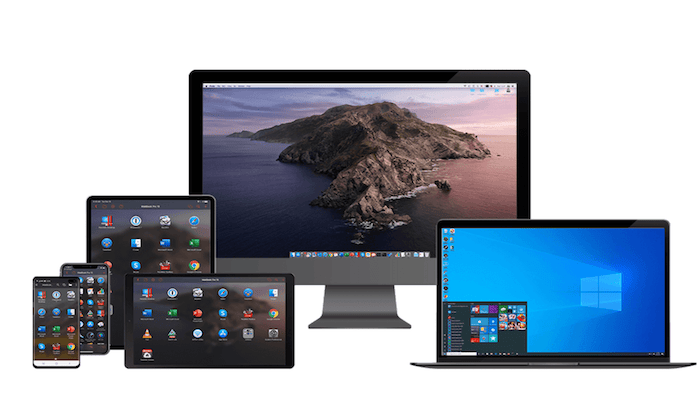
The first thing you need to do is figure what types of devices and operating systems you’ll be using. All of the best remote access tools should have cross-platform access.

Examples include Mac, Windows, Linux, Chrome OS, Android, iOS, BlackBerry, Raspberry Pi, Windows Mobile, etc.

With that said, if you’re just using the remote access software for personal use or for a small team, you might not need a tool that’s compatible with every device under the sun—just the device’s that you’re using. But if you need remote access software to assist clients or thousands of employees, you’ll want to have more versatility. 

Security

When it comes to remote access, security will always be a top concern. Is it really that easy for a third party to just access your devices? What type of sensitive information will they have access to?

Software vendors understand this concern. That’s why they add security features like 256-bit encryption, one-time access codes, two-factor authentication, etc. Always make sure that the remote access software you’re evaluating meets any industry-specific security requirements, such as HIPAA for healthcare.  

Number of Devices

Not every remote access software is built to scale. If you’re deploying it with a team of five employees, you likely won’t be using the same software as an SME that needs the software to access 500 or 5,000 devices. 

All plans will have limitations in terms of device quantities. 

You might come across certain tools with unlimited user access. But unlimited users and unlimited devices are two different things. So be prepared to purchase additional licenses if you have a larger team and need the software on lots of devices.

Functionality

The term “remote access” is pretty broad. Within that category, there are lots of potential functionalities and use cases for the software. 

Features to keep an eye out for include third-party integrations, remote printing, multiple monitor access, file sharing, live chat, screen recording, unattended access, etc. 

You don’t necessarily need all of these features. It’s just a matter of how you plan to use the software for your personal and business needs. There’s no reason to pay extra for plans with extensive feature lists that you’ll never actually use. 

Support

Generally speaking, remote access software should be fairly easy to deploy. But certain solutions are a bit more complicated, especially at scale.

If you need assistance with the setup process, the software vendor should be there to make sure things go smoothly for you. When something goes wrong or if you have questions, you don’t want to be left on an island to figure it out by yourself. 

For those of you who have a dedicated IT team, they should be able to manage everything without an issue. But not every business has those in-house resources, so support from the software provider should be a top priority. 

The Different Types of Remote Access Software

Not every remote access solution is the same. This software can be segmented into a handful of different categories. However, some software will offer a combination of these types within a single solution. 

On-Demand Access

On-demand tools require permission to gain access. Let’s say an IT agent wanted to help a remote employee with a problem on their computer, that employee would need to grant the IT team access in order for them to view and take actions on the screen.

In short, two people must be present (one on each device) for on-demand access software to work. 

Unattended Access

Unattended remote access software is the opposite of on-demand. This solution allows you to access devices even if nobody on the other computer. 

In most cases, people use unattended access software for their personal devices. For example, you could be in the office and access a presentation, file, or application on your home computer.

But a prospect or client wouldn’t give you unattended access to their personal devices. You’d have to get permission every time (on-demand access).

Cloud-Based Remote Access Software

A cloud-based remote access solution doesn’t need to be installed locally on the device. This is also known as browser-based remote access software.

For example, let’s say you’re trying to access the device of a client to help them troubleshoot a software issue. Or maybe you want a prospect to view your screen as you run a demo. These users shouldn’t be forced to install anything locally. Access to the device can be granted using a web-based link. 

Installation-Based Remote Access Software

As the name implies, an installation-based remote access solution must be installed locally on a device to work. 

All unattended access software must be installed on at least one device. Otherwise, there would be no way for you to gain access since a person won’t be there to grant permission. 

Help Desk Software

Help desk software is in a category of its own. It’s worth noting that not every help desk solution comes with remote access capabilities. Lots of times, help desk software is used for things like ticket support and customer service.

However, some help desk tools do offer remote access functions. This feature is prominent in IT help desk software, designed for in-house support. 

#1 – Parallels Access Review — Best For Remote Desktop Access

Parallels Access is a quick, simple, and reliable way to access your computer from anywhere. It’s one of the best ways to retrieve all of your files and applications, no matter where you are in the world.

With just a few clicks, you can connect to your desktop from any mobile device or web browser.

Parallels Access is feature-rich and extremely versatile. Let’s take a closer look at why this software ranks so high on my list:

  • Access your computer from any web browser with no additional hardware required
  • Use full-screen applications
  • Gain full access over PC applications, as if they were installed locally
  • The software is fully optimized for screen resolution and optimal readability
  • Access files on remote computers or files stored in the cloud
  • Manage files by sorting, copying, renaming, deleting, etc.
  • Ability to share files with friends and co-workers
  • Copy/paste text and edit files remotely

If you’re going to install Parallels Access on your computers, then I strongly recommend getting the mobile app for your smartphone or tablet. Then your computer can essentially be in your pocket at all times.

Don’t have the smartphone with you? No problem. Just log-in securely to your Parallels Access account from any browser to gain the same access.

Plans for single users and up to five computers start at $19.99 per year. Business plans for unlimited users start at $49 per year. 

#2 – TeamViewer Review — The Best For macOS and iOS

More than 2 billion devices are connected to TeamViewer, making it one of the most popular remote access solutions in the world. This software has quickly become a top choice for remote work.

TeamViewer has a wide range of solutions. In addition to remote access, they have tools for remote support, mobile device support, remote assistance for IoT, remote monitoring and patch management, global video conferencing, and more. 

Years ago, PCs were the device of choice for business use. So when it came to supporting Macs and iOS devices, most software on the market wasn’t compatible. This was a problem for assisting clients and employees using Apple products.

But TeamViewer became a pioneer in the remote access space for Macs, iPads, and iPhones. 

  • Cross-platform access to iOS, macOS, Windows, Linux, and Android
  • Enterprise-grade security and a VPN alternative
  • Remote printing capabilities
  • Easy to install and set up unattended access
  • Admins can use it to access remote servers
  • Mobile app available for iOS and Android devices
  • In-session collaborations for co-workers and tech support
  • Custom modules with company logos and branding
  • Centralized management console and device reporting

Today, lots of other remote access tools support Apple devices. But not all of them do it as well as TeamViewer. Individuals can download it for free. Businesses can request a 14-day commercial trial before buying a license.

#3 – Remote Utilities Review — Best Remote Access For IT Teams

Remote Utilities is a bit unique compared to some of the other tools on our list. This software is built specifically for IT help desks. 

The tool gives your team total control over your IT infrastructure. 

Here’s an overview of the software’s noteworthy highlights:

  • Download on Windows, Mac, Linux, iOS, and Android
  • File transfer mode
  • Two-factor authentication (2FA)
  • Unattended access to remote servers and workstations
  • Remote access using LAN or VPN
  • Deploy the program in an active directory network
  • Proxy server support
  • You can use a single PC on your LAN as a gateway to peers on the same network
  • Easy to scale as large as you need it to be
  • No mandatory, automatic, or unexpected upgrades
  • Custom configurations, even for the most demanding IT requirements

Again, Remote Utilities isn’t designed for the average Joe or small business owners. This solution is for IT teams and users with more advanced needs. It’s a little bit more complex than some of the other tools on our list, but it gets the job done for technically inclined users. 

Pricing starts at $99 with up to 20 endpoints per tech. 

#4 – Zoho Assist Review — Best For Customer Support

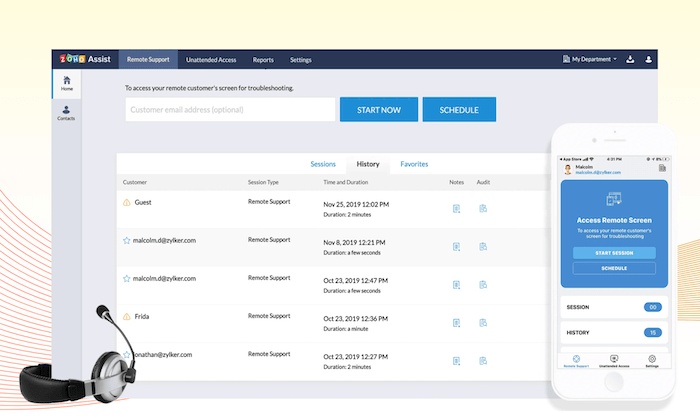
Zoho Assist is a web-based remote support solution for businesses. It’s the best way to provide your customers with support through on-demand remote access. 

The software also has the capability to manage unattended access sessions for in-house devices on PCs, laptops, servers, and mobile devices. 

Zoho Assist is trusted by businesses across a wide range of industries. Whether your company is large or small, this software can accommodate your needs.

Let’s take a closer look at the features, benefits, and noteworthy highlights of Zoho Assist:

  • On-demand remote support for troubleshooting with no prior installation
  • Integrated voice and video chat for enhanced customer support
  • Unattended remote access inside and outside your LAN
  • Mass deployment options available (supports Windows and Mac)
  • Secure file transfers with SSL 256-bit AES encryption
  • Multiple monitor support and automatically detect active monitors
  • Reboot and reconnect remote desktops from anywhere with a single click

The software is great for customer support, IT help desks, and outsourced MSP support.

Plans start at $8 per month for a single technician. The unattended access solution must be purchased separately from the remote support software. This also starts at $8 per month and includes 25 unattended computers. You can try Zoho Assist for free with a 15-day trial; no credit card required. 

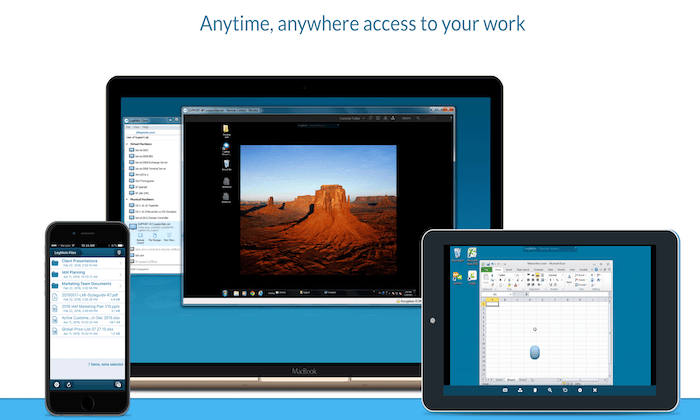
#5 – LogMeIn Pro Review — Best For Anytime File and Application Access

If you’re looking for a simple way to access files and apps on your computer from anywhere, LogMeIn Pro is the clear winner. The software is easy to use, secure, and extremely reliable. 

It’s a popular choice for SMBs across all industries. 

Let’s take a closer look at the software’s features to see why it comes so highly recommended:

  • Simple step-by-step setup instructions for easy deployment
  • Access your remote desktop as if you were in front of the screen
  • Unlimited users and instant collaboration
  • Free access to LastPass to store and manage all passwords
  • Multiple monitor display view on a 1:1 local screen
  • Remote printing functionality
  • 1 TB of file storage to access and share from anywhere
  • Quick access to frequently visited websites, cloud apps, and desktop apps
  • Remote access on the go with the LogMeIn Pro mobile app

Plans for individual users start at $30 per month. This gives you access to two computers. To access up to ten computers, you’ll need a small business license, starting at $129 per month. 

Summary

Which remote access software is the best? It depends on what you’ll be using it for.

Between Parallels Access, TeamViewer, Remote Utilities, Zoho Assist, and LogMeIn Pro, I know that one of these tools can accommodate your needs.

Just use the methodology I described earlier in the guide to help you choose the right option for your business. There’s something for everyone on my list.

The post Best Remote Access Software appeared first on Neil Patel.


Best Remote Access Software
Publicado Primeiro em Neil Patel
How to Choose The Right Analytics Agency

In our modern digitally enhanced world, data and information underpin all of our activities. 

But are you making your data work for you, or is it something that you are yet to take full advantage of?

For many business owners and marketers, analyzing and deploying data can be an intimidating prospect. 

For that reason, analytics agencies have emerged, whose aim is to help businesses leverage their data for better decision making and improved outcomes. 

If you are thinking about hiring an analytics agency, here is everything you need to know. 

Know Your Goals and Desired Outcomes

Like when working with any agency partner, you first need to consider your current situation and goals. 

The reason for this is that not every analytics agency is built in the same way.

Some agencies work with certain industries or companies at different stages of maturity.

Other agencies specialize in certain areas of analytics such as marketing vs operations.

There are also differences in how they execute. For instance, one agency may rely heavily on technology to power their insights. Whereas another may rely more on their years of experience and human intuition. 

When thinking about your goals, consider these aspects:

  • Your existing data – Think about the data assets that you are currently building. This can include things like marketing channels (search, PPC, content), operations or product data. 
  • The role of data in your business – Next, you will need to think about the role that data plays in your business. For instance, do you need to use data to predict and manage your inventory? Or perhaps you may need to leverage data to scale an existing marketing channel. 
  • Your budget – Naturally, there is a varying service fee depending on which agency you work with. Depending on what you want to achieve, you need to think about how much budget you can allocate to an analytics service. 
  • Business priorities – Ultimately, you will need to think about what is a priority for your business at the moment. This is where you should spend most of your time thinking and see how data and analytics syncs up with your main priority. Maybe you need to optimize your processes to reduce costs. Or perhaps you need to discover new market segments by leveraging customer data. 

Before rushing into hiring an analytics agency, take the time to conduct a full audit of where you are today and where you want to be, while being conscious of how leveraging data can help you get there. 

6 Characteristics That Make a Great Analytics Agency 

Choosing the right analytics agency can be tricky if you don’t know much about analytics yourself. 

In addition to a partner that can provide all the technical fundamentals of analytics, you will need someone who guides you and helps you make sense of what’s going on with your data.

And in the ideal case, a partner that can help take over the execution of your new data-informed strategy, particularly when it comes to the marketing aspect. 

When evaluating an analytics agency, make sure that you vet for these characteristics.

Thought Leadership 

Thought leadership describes the esteem and authority a company is held in in a particular industry. 

This position is typically achieved by that company producing content that educates, solves industry problems and demonstrates superior expertise. 

Take a look at the type of content that a given analytics agency is producing. 

Are they even creating content at all? 

Is the content insightful and communicated in a clear and concise manner (this also affects how they will communicate with you)?

An analytics agency that is producing good thought leadership content also signifies whether that company is on top of the latest trends, which is needed in fast-evolving fields. 

Powerful Technology 

Your analytics agency partner will need to have the appropriate technologies built that can help you aggregate and make sense of your data. 

Their technology will need to be able to integrate with your data sources such as Google Analytics or Shopify, depending on the platforms that you use. 

They should also have a platform that allows you to view and make sense of this data in a way that provides an intuitive user experience – such as the ability to visualize data with graphs or easily download reports. 

In an ideal case, your analytics agency will have more advanced technology such as machine learning algorithms which can crunch and manipulate data for deeper analysis.

A Well-rounded Team

Analytics sits at the intersection between the world of numbers and the world of words.

There’s no point in collecting data if you can’t turn that data into actionable insights and strategy. 

For that reason, the analytics agency that you work with will need to have a diverse set of team members who are both analytical but also creative. 

This could include team members such as data scientists, psychologists, and digital marketers. 

Bonus points for analytic agencies that have strong founders, as the insight and disposition of the founder is often imprinted onto the companies culture – affecting how they think and execute. 

A Solid Client List

Sometimes, you can gauge the value of a company simply by looking at who they’ve worked with in the past.

If the analytics agency you are considering has an impressive track record of working with big names such Google or Intuit, then chances are that they know their stuff. 

One caveat though: even if the agency has worked with impressive brand names, it doesn’t mean that they will necessarily be the right fit for you.

For a start, you may not even be able to afford their fees. And even if you could, they may be more optimized to working with bigger clients or clients with different needs.

So consider also the relevance of their client list in relation to your particular situation.

Clear Communication

If you are working with an analytics agency, you want a partner that can explain to you the story behind your data. 

The first way they need to do this is through their technology, which should allow you to visualize your data through graphs, charts, and other meaningful ways.

The second way they should do this is through how they communicate actionable insights through storytelling, and ideally strategy creation. 

Remember that although data is objective, it doesn’t guarantee that the interpretation of that data will be objective too. 

For that reason, your partner should always have a strong, clearly communicated, and logical case for their analysis. This way, you can know that you are making informed decisions.

Syncing With Your Team

Working with an analytics agency requires synchronization between both your technology and your teams. 

Your development team will need to be able to easily integrate and set up with your partners.

Your marketing team will need to feel confident and informed enough to adapt their strategies based on the insights your partners are providing.

To work successfully with an analytics agency, both your teams need to be on the same wavelength. Strategy, expectations, and skill sets need to be well aligned to get the best results.

How to Work With an Analytics Agency 

Each analytics agency that you work with will have a slightly different process. In general however, there is an overriding structure that will be the same from company to company.

In order to reach a successful outcome when working with an analytics agency, you should typically go through these steps. 

1) Share your goals – Your agency partner should have a complete understanding of your goals including services, timeline and results. You will need to be as transparent as possible at the start of your relationship to ensure that you both have the appropriate expectations going forward. For instance, if you will actually need help with the marketing execution but you’ve partnered with a tech focused agency, there will likely be an issue later on.

2) Manage expectations – It’s important to also manage clear expectations about what’s possible early on. Some agencies offer a variety of additional services such as helping with strategy or machine generated analytics. Others may just offer a simple dashboard. It’s also important to understand the role of analytics in general and what it’s uses and limitations are. 

3) Map out your assets – Your data assets represent the existing ways that you are collecting and storing data across your business. You will need to map out all your existing assets such as marketing channels (Google Analytics, etc), operations (inventory management, etc) and technology. These will then be used by your analytics agency for integration and analysis.

4) Integration – With your assets in place, you will then need to integrate them with your analytics partner. In the best case, your partner will have their own platform and will work with your development team to connect your data assets. If you are working with a smaller agency however, they may choose to access your data directly, in which case you would need to provide them the login credentials to the software you use.

5) Reporting –  Once everything has been connected, your analytics agency will begin conducting an audit of your existing data assets. If they have a platform, you will be able to access and view all of your data in one place. The best agencies will allow you to view and manipulate your data in a user friendly way through graphs, charts and reports. They may also have machine learning technology that makes sense of your data without any human input.

6) Analysis – With technology, the human eye or a combination of both, your analytics agency will help you make sense of your data by telling you the story behind the numbers. They should then help you produce actionable insights which will inform your strategy going forward. 

7) Strategy – With your existing data fully analyzed, you will then need to update your strategy, depending on the insights produced. For instance, you may choose to double down on a particular sales channel, or realise that you need to remove a bottleneck in your operations. 

8) Execution – Some analytics agencies offer services beyond analytics, such as marketing execution. Your data may signify that you lack the necessary human capital to generate results with your existing or new strategy. Here, your agency partner may be able to help by taking over the reigns of wherever you are coming up short.  

9) Monitoring – On an ongoing basis, your agency partner will work with you to ensure that your data, strategy and execution are all synced up. You should be having analysis and strategy meetings with them at least once a month, but also be able to access your data and any computer generated insights on demand.

How to Find The Right Analytics Agency For You

Finding the right analytics agency requires that you look out for and vet certain things. We have spoken about some characteristics to look out for here and what to expect when working with an analytics partner.

Here is a quick summary of the things to look for when finding the best analytics agency (LINK HERE):

Characteristics:

  1. Full stack marketers – When analyzing your marketing data, it helps a lot if your analytics agency are marketers themselves. That way, they can help turn your data into strategies that actually get results.
  2. Strong technology – An analytics platform is the bare minimum your agency partner should have. If they have machine learning and data crunching algorithms, even better. 
  3. An all star team – Your analytics agency needs to have a diverse set of team members that understand both numbers and marketing psychology. A strong founding team is also something to look out for.  
  4. A strong client roster – Agencies that have worked with big brands is always a good sign. But when inquiring, try to find out if they have worked with brands similar to yours in terms of size and industry. 
  5. A great communication style – Making sense of data is one thing, but explaining it in a clear and concise manner is something else. An analytics agency that can storytell in a meaningful way will help you put your data to use. 
  6. They take a holistic approach – There are numerous sources of data that you are probably collecting. The more sources of data they can integrate and analyze the better. 

What to expect:

  1. Onboarding and integration – The first thing your agency partner should do is onboard you to their platform and talk you through the process. This will include things like syncing up your technology and managing expectations in terms of outcomes.
  2. Auditing of assets – Next, they will need to do an audit of your existing data assets and come up with actionable insights which will turn into strategy and then execution.
  3. Setting up marketing channels – If your analytics agency offers services beyond analytics, they will work with you to execute your marketing strategy, including channels such as SEO, PPC and social media.
  4. Data management – On a continuous basis, you will be able to access and view your data through your agency partner. You will be able to download reports and visualize your data. 
  5. Actionable insights and results – The best analytics agencies really stand out when it comes to translating your data into insights, strategy and execution. You should work with your agency to ensure that your data is informing decision making and driving results.

The Top 3 Analytic Agencies

There are hundreds of good analytic companies out there that serve all types of needs.

It is unlikely however that you have the time to go through and vet them all, so we’ve filtered down the top 3 analytic agencies, based on the various criteria we’ve discussed in this article.

The top 3 agencies listed here have different strengths and weaknesses, so you will have to decide which is the best fit for you. 

1) NP Digital — Best For Marketing Execution

If you think that you will need helping putting the insights from your data into practice, then you should work with NP Digital. The agency was founded by Neil Patel, one of the most influential digital marketers in the world. And in addition to the analytics services they provide, they can also help you set up and execute a results driven marketing strategy. They have worked with big brand names including companies such as Google and Intuit. 

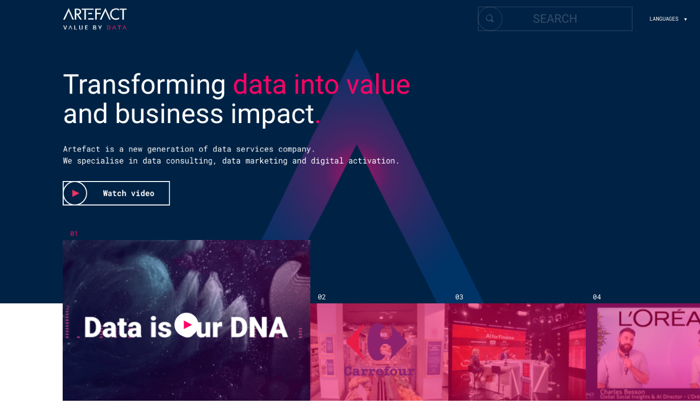
2) Artefact — Best For Technology 

Perhaps you are in an industry where you have a ton of data to analyze, or data plays a critical role in your ability to compete in the market. In this case, you should consider Artefact, an agency that has a robust technology stack which leverages artificial intelligence to really get the most out of your data. They have a strong and diverse team, ranging from social scientists to statisticians, and have worked with companies such as Greenpeace and Carrefour. 

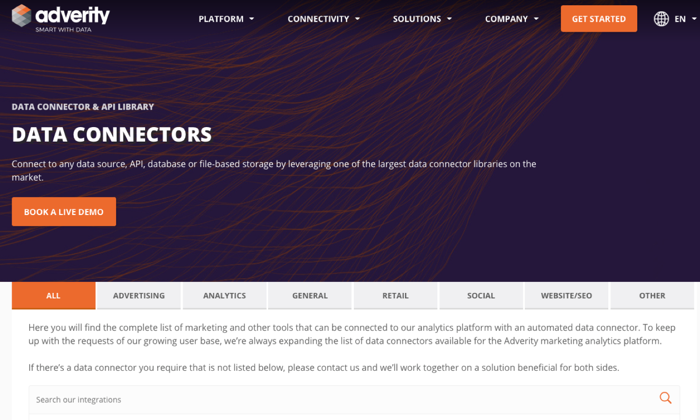
3) Adverity — Best For Smaller Businesses

For smaller businesses who may not be able to afford high end agency fees, Adverity may be a better match. Although Adverity is more of a technology platform than an agency partner, you will be able to amplify your analytics strategy at a fraction of the cost. The platform allows you to integrate data sources from operations to marketing. The drawback of course is that you don’t have the human level insight and execution that consultative agencies provide. Adverity currently has a 4.5/5 star rating with over 100 reviews on the G2 website. 

Conclusion

At this point, you should have a good idea of how to choose an analytics agency. 

Keep in mind that everything written is from our perspective, and there may be other things you should consider when evaluating an agency. 

Before you finally pull the trigger and sign any contract, make sure that the analytics agency you want to work with has worked with companies similar to yours and that they can demonstrate some results. 

The post How to Choose The Right Analytics Agency appeared first on Neil Patel.


How to Choose The Right Analytics Agency
Publicado Primeiro em Neil Patel